सैंटोस एफसी फैन टोकन (सैंटोस) क्या है? सैंटोस के बारे में वह सब कुछ जो आपको जानना आवश्यक है

सैंटोस एफसी फैन टोकन क्या है? सैंटोस टोकन क्या है? सैंटोस टोकनोमिक्स के बारे में यहीं और जानें!
Coin98 एक्सचेंज 2.0 क्या है? 4 मुख्य विशेषताओं के साथ Coin98 एक्सचेंज का उपयोग करने के तरीके पर एक AZ गाइड: एक्सचेंज, मार्केट्स, पोर्टफोलियो और टर्मिनल।
Coin98 Exchange 2.0, Coin98 Labs का अगला-जेन उत्पाद है, जो उपयोगकर्ता के अनुभवों को अनुकूलित करने और DeFi को बड़े पैमाने पर अपनाने के मिशन को पूरा करने के हमारे निरंतर प्रयासों में है।
इस लेख में, मैं आपके साथ Coin98 एक्सचेंज 2.0 का अवलोकन और साथ ही इस अत्याधुनिक मल्टीचैन लिक्विडिटी एग्रीगेटर प्लेटफॉर्म का अनुभव करने के तरीके के बारे में एक AZ गाइड साझा करूंगा!
Coin98 एक्सचेंज 2.0 क्या है?
Coin98 Exchange 2.0 एक विकेन्द्रीकृत एक्सचेंज (DEX), एक मल्टी-चेन लिक्विडिटी एग्रीगेटर है। पिछले संस्करणों से उन्नत सुविधाओं को बनाए रखने के अलावा, Coin98 Exchange 2.0 तरलता को समेकित करने के लिए एक सुपर लिंक तंत्र जोड़ता है, जिससे केवल एक लेनदेन में उपयोगकर्ताओं के लिए सबसे छोटा रास्ता और सर्वोत्तम मूल्य मिल जाता है।
Coin98 Exchange 2.0 का जन्म कई ब्लॉकचेन पर तरलता विखंडन की समस्या को हल करने के लिए किया गया था, जिससे उपयोगकर्ताओं को ब्लॉकचेन तकनीक के गहन ज्ञान की आवश्यकता के बिना पूरी तरह से और निर्बाध रूप से DeFi का अनुभव करने में मदद मिली।
बाजार में अग्रणी CEX के विकेन्द्रीकृत, गैर-कस्टोडियल संस्करण के रूप में जाना जाता है, Coin98 Exchange 2.0 धीरे-धीरे पारंपरिक अर्थव्यवस्था में आवश्यक सेवाओं को DeFi में ला रहा है जैसे:
Coin98 एक्सचेंज 2.0 . की विशेषता
बाजार के सर्वोत्तम तरलता स्रोतों को एकीकृत करें।
Coin98 Exchange 2.0 एक ऐसा उत्पाद है जो अपने दायरे को व्यापक और गहरा करने का इरादा रखता है। वर्तमान में, उत्पाद में शीर्ष 9 ब्लॉकचेन जैसे एथेरियम, बीएनबी चेन, सोलाना, पॉलीगॉन, हिमस्खलन सी-चेन, केसीसी, फैंटम, बोबा नेटवर्क और हेको चेन पर एकीकृत तरलता स्रोत हैं, जो उपयोगकर्ताओं को Coin98 उत्पाद में कई श्रृंखलाओं पर व्यापार करने में सहायता करते हैं।
उपयोग में सरल और आसान।
Coin98 Exchange 2.0 को अब एक सहज, उपयोगकर्ता के अनुकूल इंटरफेस के साथ नवीनीकृत किया गया है जो उपयोगकर्ताओं के लिए उत्पाद की लेनदेन प्रक्रिया का उपयोग करना और बेहतर ढंग से समझना आसान बनाता है। गैस मुक्त, फिसलन, मूल्य प्रभाव, एएमएम, और अन्य जानकारी सभी स्पष्ट रूप से दिखाई जाती हैं।
गैस शुल्क अनुकूलन
नए संस्करण में, Coin98 Exchange 2.0 स्वचालित रूप से टोकन स्वैप की कीमतों, गैस शुल्क और लेनदेन की गति को अनुकूलित करता है। इसके अलावा, अपनी आवश्यकताओं के आधार पर, आप गैस बार को समायोजित करके गैस शुल्क को मैन्युअल रूप से समायोजित कर सकते हैं।
उन्नत तंत्र
तुलना तंत्र उपयोगकर्ताओं के लिए सर्वोत्तम मूल्य के साथ सिक्का/टोकन ट्रेड करना संभव बनाता है और तरलता स्रोतों के बीच सबसे छोटा फिसलन है। कोई भी लेन-देन करते समय, स्मार्ट रूटिंग तंत्र उपयोगकर्ताओं को एक लेनदेन में सर्वोत्तम लाभ प्राप्त करने में मदद करने के लिए पथ बनाने के लिए गणना करेगा।
अनूठी वेबसाइट
Coin98'ư उत्पादों की अन्य विशेषताओं की तरह, Coin98 Exchange 2.0 में भी Coin98 एक्सटेंशन उपयोगकर्ताओं को इस ब्रांड के नए विकेन्द्रीकृत एक्सचेंज का स्वतंत्र रूप से अनुभव करने के लिए एक वेबसाइट है। वर्तमान में, उत्पाद विकास के चरण में है। उपयोगकर्ता इसे Coin98 सुपर ऐप के मूल स्वैप पर आज़मा सकते हैं।
ग्राहक सेवा
Coin98 Exchange 2.0 में 12 अलग-अलग भाषाओं में एक ग्राहक सेवा टीम है, जो कई प्लेटफार्मों पर 24/7 ऑनलाइन है, जिसमें टेलीग्राम पर 12 भाषाओं के लिए 12 समुदाय शामिल हैं।
Coin98 Exchange 2.0 का अनुभव करने से पहले आपको क्या तैयार करने की आवश्यकता है?
Coin98 Exchange 2.0 का दिल मल्टीचैन इंजन है, जो उपयोगकर्ताओं को कई अलग-अलग ब्लॉकचेन से आसानी से और आसानी से जोड़ता है। उपयोगकर्ता व्यापार के लिए ईटीएच या बीएससी वॉलेट जैसे सिंगल-चेन वॉलेट का भी उपयोग कर सकते हैं, हालांकि, Coin98 एक्सचेंज बेहतर उपयोगकर्ता अनुभव के लिए मल्टी-चेन वॉलेट का उपयोग करने की सलाह देता है।
इसके अलावा, उपयोगकर्ता Coin98 वॉलेट और Coin98 एक्सचेंज के बीच मल्टीचैन इंजन की पूर्ण संगतता के माध्यम से अद्वितीय "ऑलवेज कनेक्टेड" अनुभव का आनंद ले सकते हैं।
Coin98 सुपर ऐप डाउनलोड और इंस्टॉल करें
Coin98 Exchange 2.0 अब iOS और Android दोनों उपयोगकर्ताओं के लिए Coin98 सुपर ऐप पर उपलब्ध है:
Coin98 सुपर ऐप का उपयोग करने के तरीके के बारे में विस्तृत निर्देश पढ़ें या Coin98 सुपर ऐप को स्थापित करने के लिए ट्यूटोरियल वीडियो देखें
Coin98 एक्सटेंशन वॉलेट डाउनलोड और इंस्टॉल करें
Coin98 एक्सटेंशन वॉलेट को स्थापित करने के लिए आप chrome.coin98.com पर पहुंच सकते हैं ।
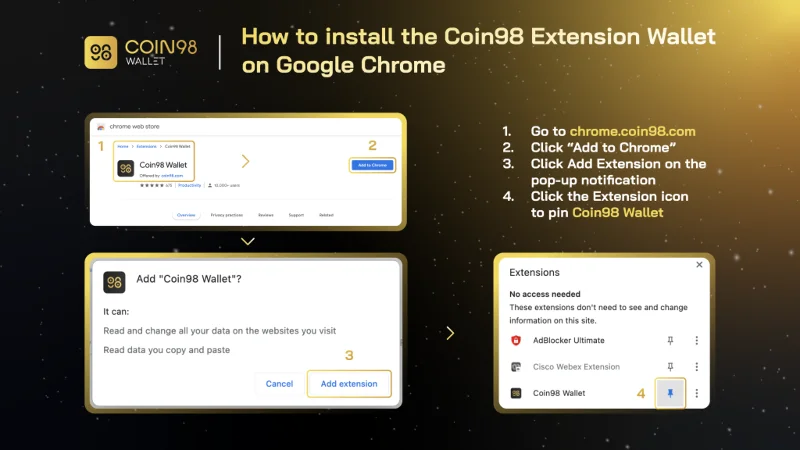
Coin98 एक्सटेंशन वॉलेट कैसे स्थापित करें
Coin98 एक्सटेंशन वॉलेट को स्थापित करने और उपयोग करने के निर्देशों के लिए, आप इस गाइड का संदर्भ ले सकते हैं।
एक मल्टी-चेन वॉलेट बनाएं
Coin98 एक्सटेंशन वॉलेट को डाउनलोड या अपडेट करने के बाद, आप मल्टी-चेन वॉलेट बनाने के लिए नीचे दिए गए निर्देशों का पालन कर सकते हैं या अन्य वॉलेट एप्लिकेशन से Coin98 वॉलेट में वॉलेट आयात कर सकते हैं।
यदि आप वर्तमान में एक Coin98 वॉलेट उपयोगकर्ता हैं, तो कृपया नवीनतम संस्करण में उपलब्ध अन्य नए चेन वॉलेट को अपडेट करने के लिए अपने मल्टीचैन वॉलेट को फिर से आयात करें!
लेन-देन शुल्क के लिए ब्लॉकचेन का मूल सिक्का तैयार करें
Coin98 Exchange 2.0 का उपयोग करने में सक्षम होने के लिए, आपको प्रत्येक ब्लॉकचेन के लिए गैस शुल्क तैयार करना होगा जिसका आप उपयोग करना चाहते हैं।
आप CEX पर Binance, Kucoin,… पर देशी सिक्के खरीद सकते हैं और उत्पाद का अनुभव करने के लिए संबंधित वॉलेट में वापस ले सकते हैं। बोबा जैसे परत 2 ब्लॉकचैन के लिए, कृपया ईटीएच को संबंधित नेटवर्क में उपयोग करने के लिए परिवर्तित करें।
अब सब कुछ तैयार है, चलिए ट्रेडिंग शुरू करते हैं।
नोट: आपको प्रत्येक सिक्के को सही ब्लॉकचेन पर संबंधित वॉलेट में स्थानांतरित करना होगा।
Coin98 एक्सचेंज 2.0 की विशेषताएं
Coin98 एक्सचेंज 2.0 में 4 मुख्य विशेषताएं हैं, जिनमें शामिल हैं:
Coin98 Exchange 2.0: एक ट्रस्ट, बिना अनुमति और निर्बाध तरीके से टोकन की अदला-बदली के लिए तरलता के महत्वपूर्ण स्रोत प्रदान करता है।
Coin98 मार्केट्स: उपयोगकर्ताओं को कार्रवाई योग्य अंतर्दृष्टि के साथ सशक्त बनाते हुए, महत्वपूर्ण क्रिप्टोक्यूरेंसी बाजार डेटा को नेत्रहीन रूप से वितरित करता है।
Coin98 पोर्टफोलियो: 11+ ब्लॉकचेन पर मूल्य परिवर्तन और उनकी संपत्ति की वृद्धि की निगरानी के लिए उपयोगकर्ताओं का समर्थन करता है।
Coin98 टर्मिनल में शामिल हैं:
Coin98 एक्सचेंज 2.0 के साथ व्यापार कैसे करें
कॉइन98 एक्सचेंज 2.0 कैसे काम करता है?
Coin98 Exchange 2.0 की कार्य प्रक्रिया इस प्रकार है:
चरण 1: यदि उपयोगकर्ता पहले की तरह प्रत्येक एएमएम तक पहुंचने के बजाय टोकन ए को टोकन बी में स्वैप करना चाहते हैं, तो अब व्यापार के लिए संबंधित ब्लॉकचैन चुनें।
चरण 2: इस चरण पर, Coin98 Exchange 2.0 आगे बढ़ेगा:
चरण 3: Coin98 Exchange 2.0 उपयोगकर्ताओं के लिए सर्वोत्तम लेनदेन विकल्प प्रदान करता है। उदाहरण के लिए, नीचे दी गई छवि में: C98 टोकन का 91% पैनकेक स्वैप के माध्यम से कारोबार किया जाएगा, जबकि शेष 9% को बिस्वाप के साथ स्वैप किया जाएगा।
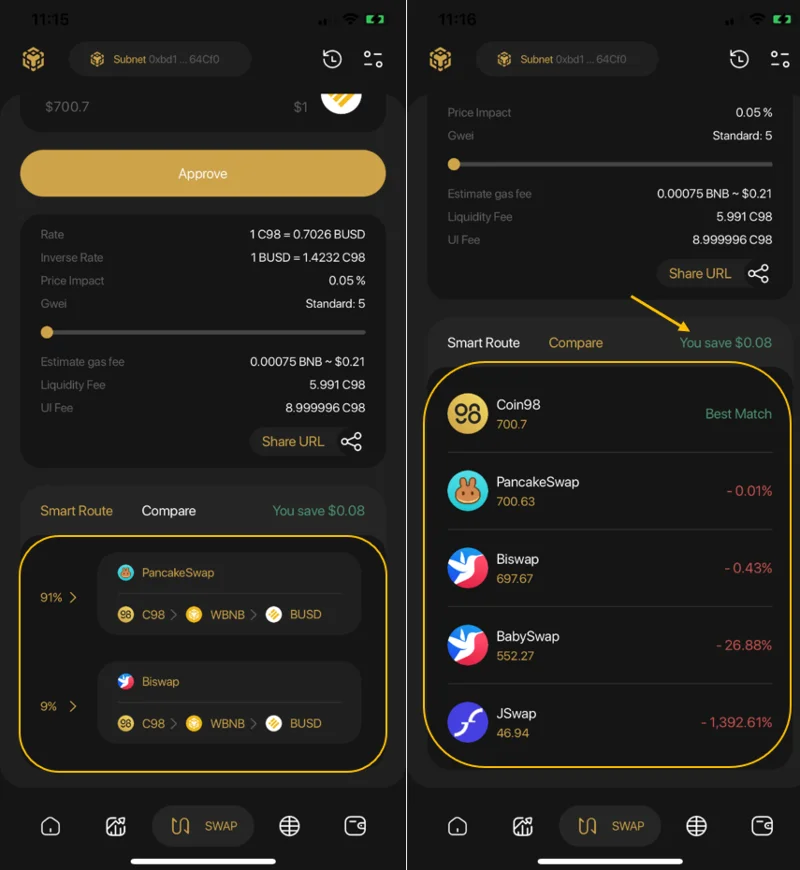
Coin98 Super App पर Coin98 Exchange 2.0 के साथ व्यापार कैसे करें
चरण 1: Coin98 सुपर ऐप के मुख्य इंटरफ़ेस पर, स्वैप पर क्लिक करें।
चरण 2: ब्लॉकचेन का चयन करें। इस लेख में, मैं एक उदाहरण के रूप में बीएनबी चेन को चुनूंगा।
चरण 3: स्क्रीन के ऊपरी दाएं कोने में सेटिंग आइकन पर क्लिक करें और 2 इंटरफ़ेस विकल्पों में से चुनें: मूल UI और प्रो UI।
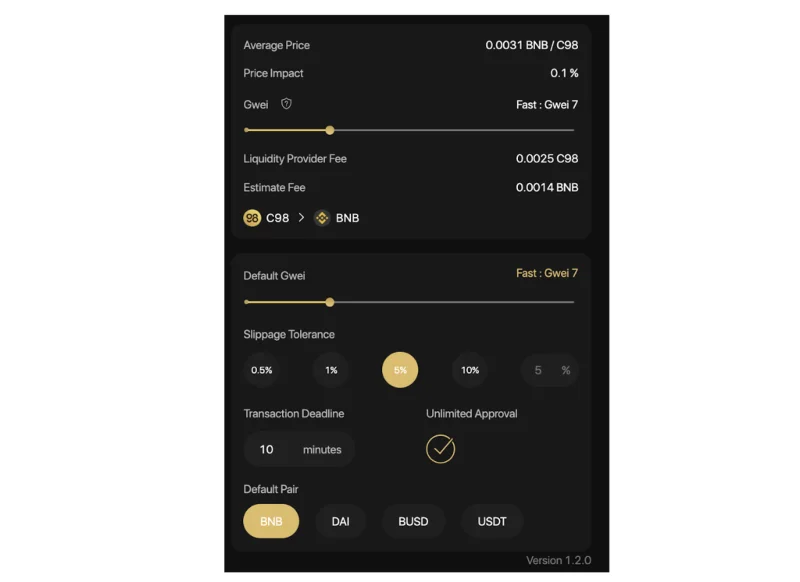
उपयोगकर्ता इस खंड में गैस शुल्क और फिसलन को भी समायोजित कर सकते हैं।
The arrow in the middle of the trading interface is used to switch between the buying and selling positions. Users need to check the tokens’ positions carefully before making any transactions.
Users must fill in the following information to complete the transaction:
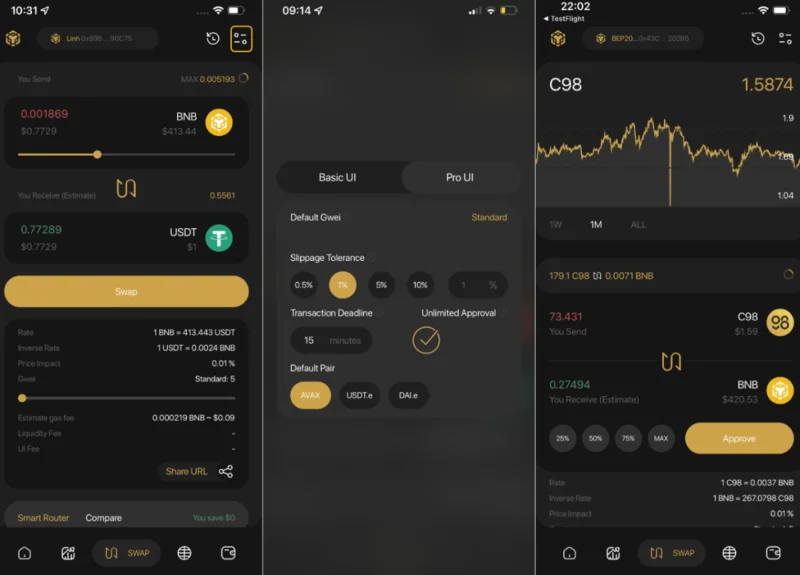
Step 4: Slide the bar to adjust the trading amount. Carefully read the information below before deciding to trade:
Step 5: Click Approve (for the first time) → Swap to finish.
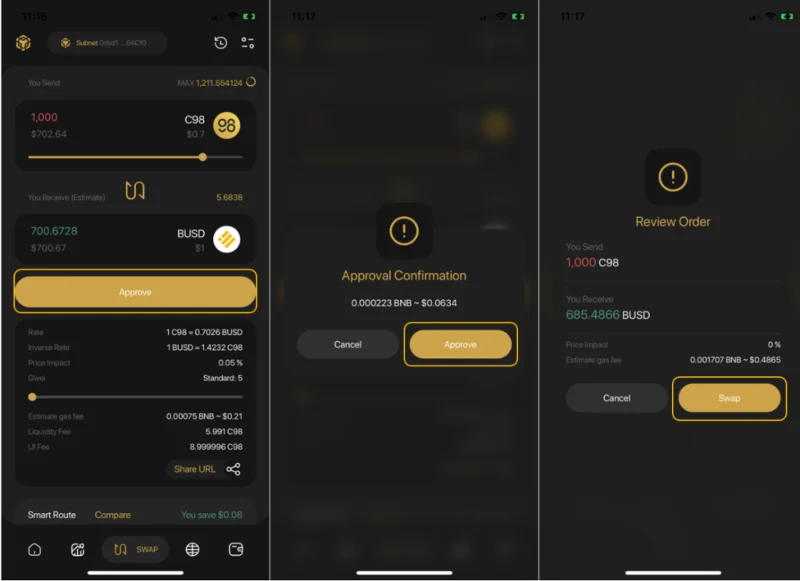
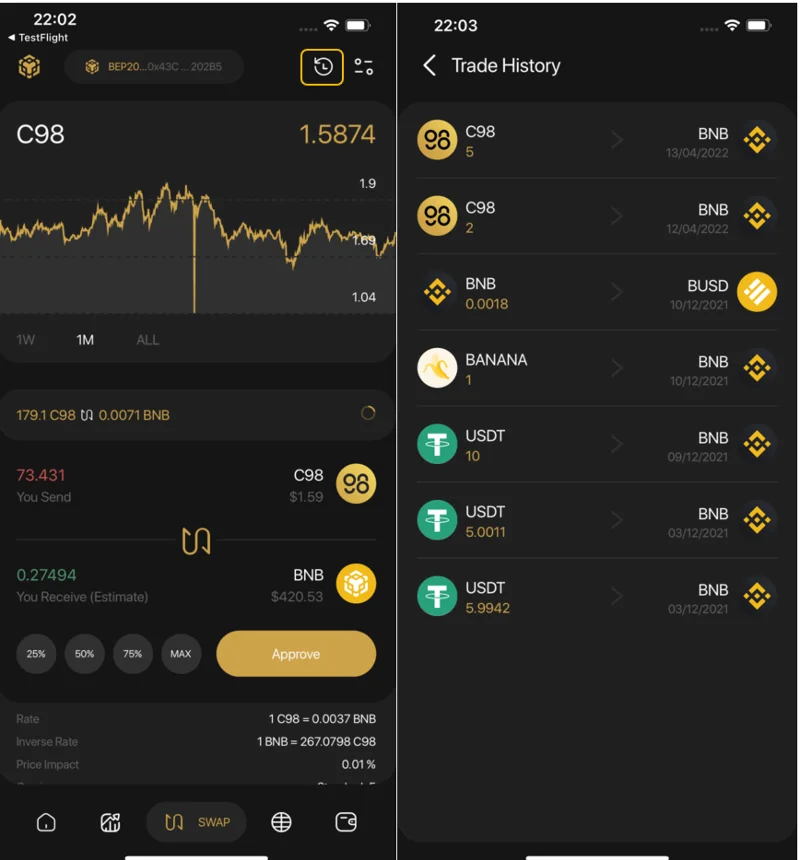
After swapping successfully, users can access the Trade History from the swapping interface to view their transactions or go back to the home screen to check the traded tokens if needed.
Note:
How to trade on Coin98 Exchange
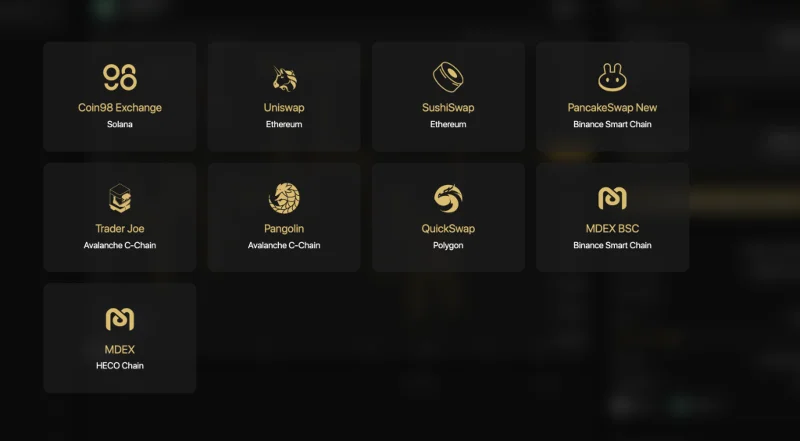
Coin98 Exchange is always striving to integrate as many leading AMMs in the market as possible, including Uniswap & SushiSwap (Ethereum), PancakeSwap (V2) & MDEX (Binance Smart Chain), MDEX (HECO Chain), Pangolin & Trader Joe (Avalanche C-chain), QuickSwap (Polygon), Coin98 Exchange (Solana) and more… allowing users to have a seamless transaction experience, across different blockchains with a single multi-chain wallet and without changing the network.
First, you can access Coin98 Exchange here: exchange.coin98.com
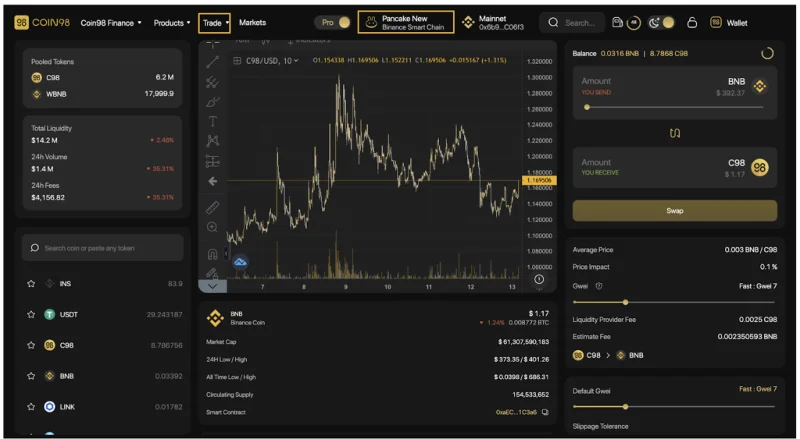
Overview of the Coin98 Exchange interface
Coin98 offers users 2 types of interface:
The Pro-UI with in-depth trading information and features for active traders and more advanced users
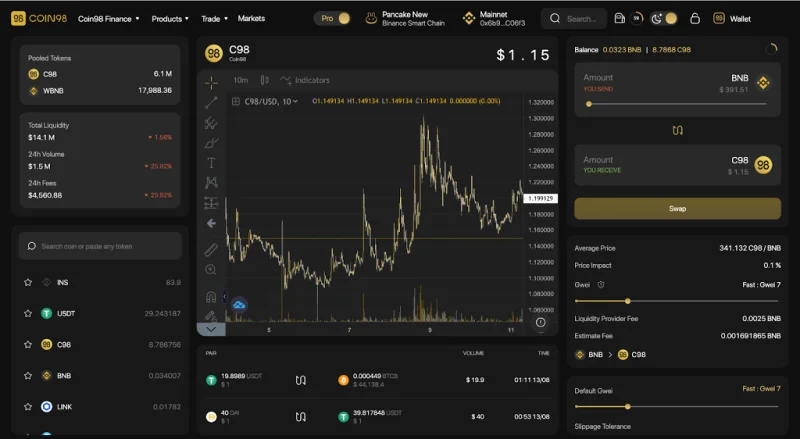
The Basic - UI with a streamlined interface that focuses on simplicity, speed, and ease-of-use, making Coin98 Exchange a perfect choice for crypto novices, first-time users, and users who just need the basics.
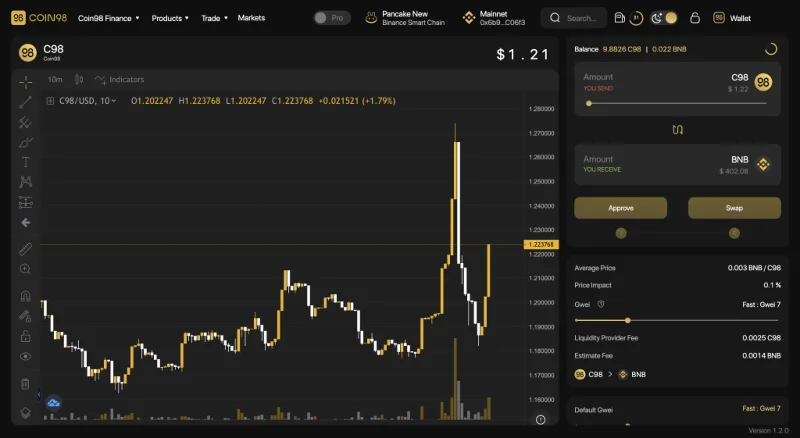
The main interface of Coin98 Exchange has the following sections:
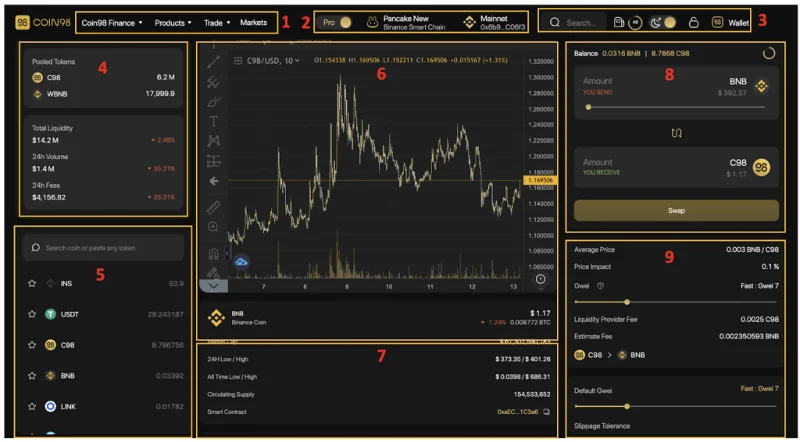
[1] Navigation to other Coin98's sites, products and AMMs of Coin98 Exchange.
[2] From left to right:
[3] Some built-in utilities:
[4] Information about the 2 chosen tokens in the pool:
[5] The Token selection area.
[6] The price chart of the token that you intend to swap including:
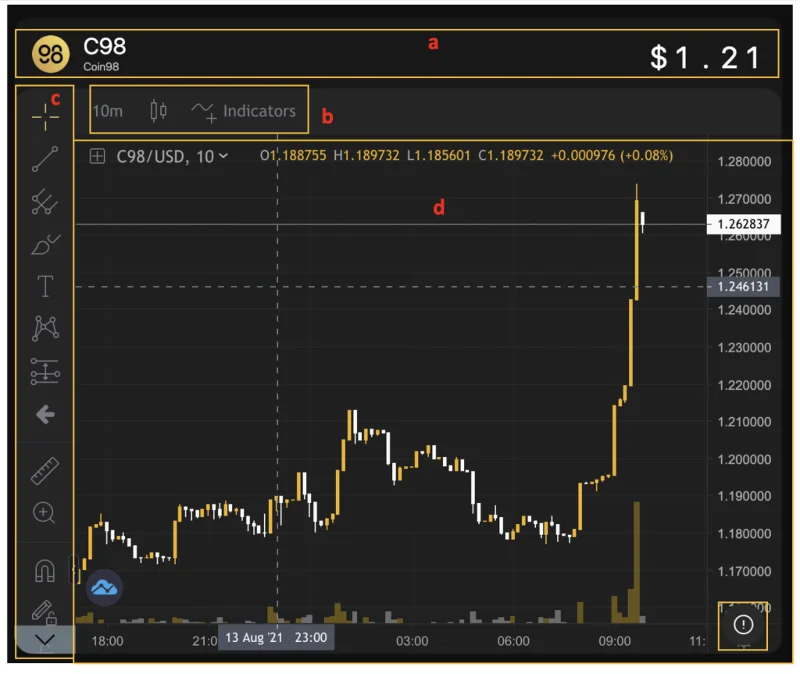
Users can click the (!) icon at the lower-left corner of the price chart to view more information about the token.
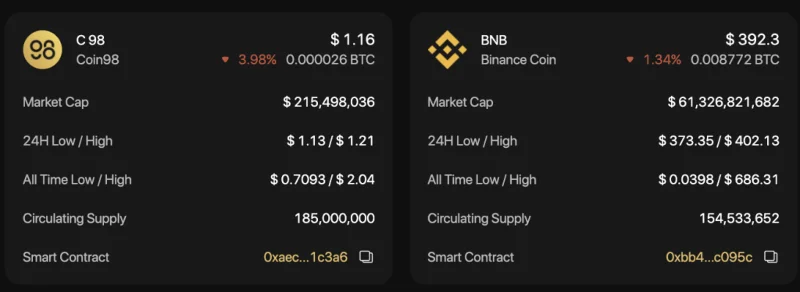
[7] History of transactions.
[8] The transaction area.
[9] The transaction information as well as the main settings:
Advanced Settings:
A simple guide on how to trade on Coin98 Exchange
Step 1: Select the AMM you want to trade with by clicking on one of the two highlighted sections on the screen.
In this case, I will take PancakeSwap (V2) as an example.
Step 2: Select the token you want to trade from the token search bar.
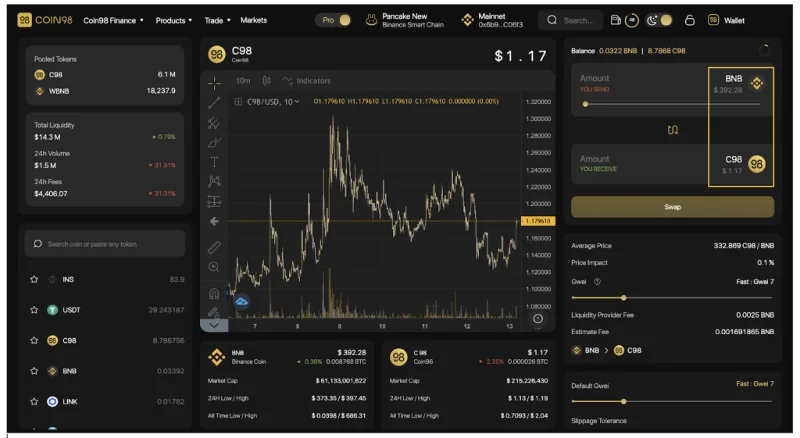
For new tokens that have not been listed on Coin98 Exchange, you can paste their Contract addresses and trade as usual.
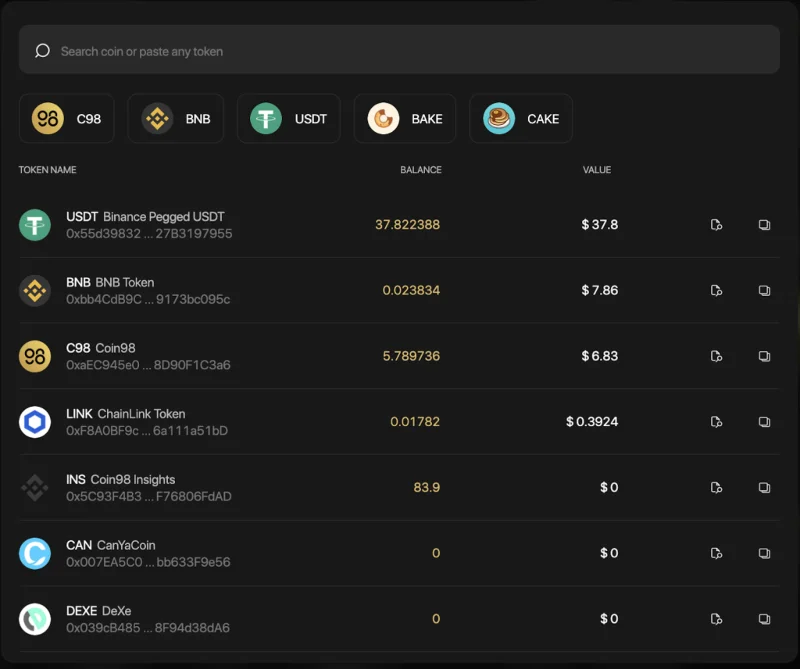
I will take the USDT-C98 trading pair as an example.
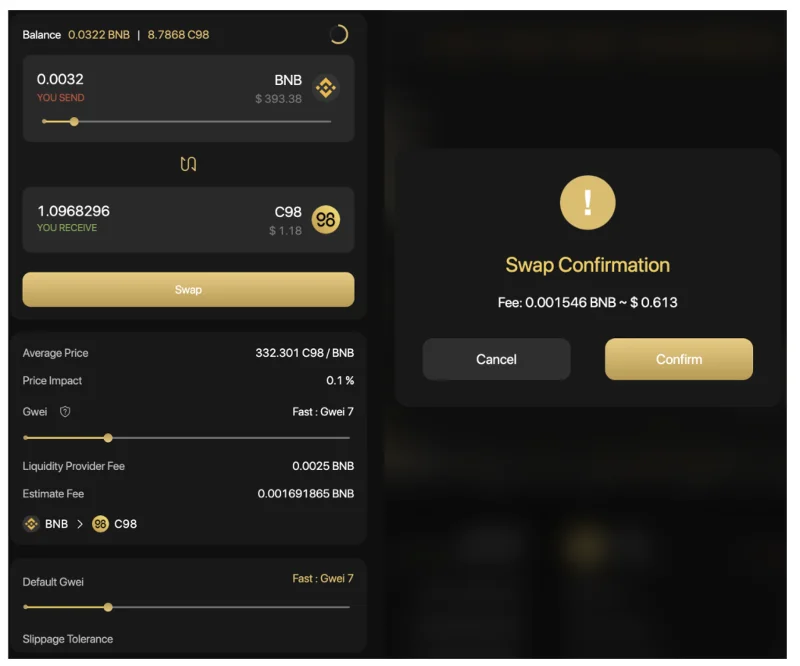
Step 3: At the transaction area, you can:
Step 4: Click Confirm to confirm that you agree with the fee and are ready to make this transaction.
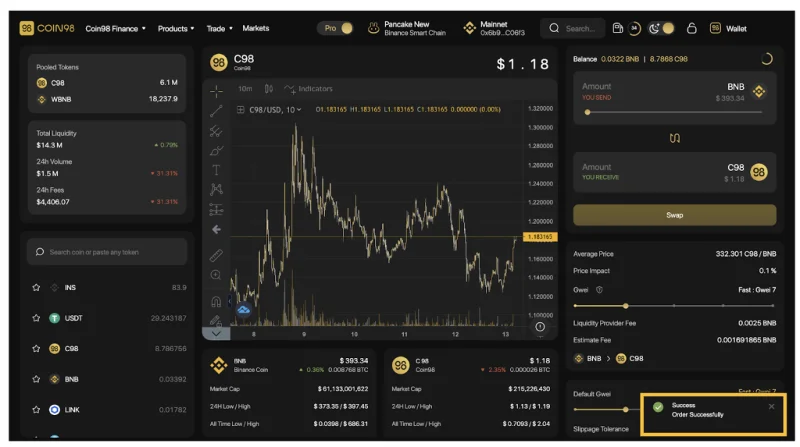
When the transaction is completed, you will receive a notification at the bottom right corner of the screen.
Note:
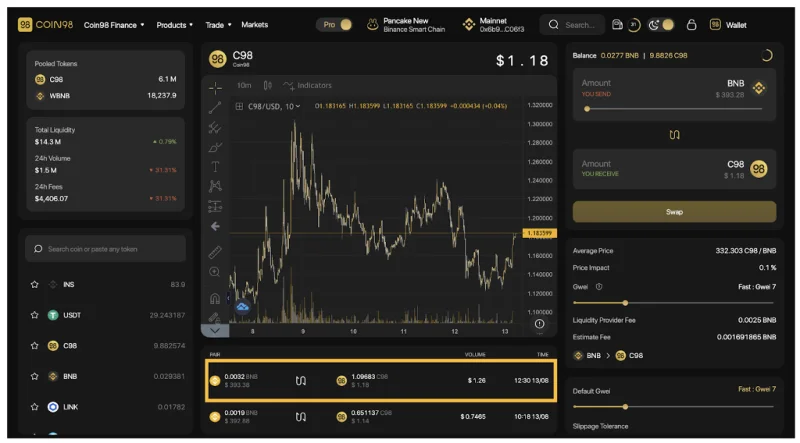
In the future, Coin98 Exchange will integrate more top-tier AMMs and cross-chain bridges to elevate users' trading experience to a new level.
During the Swap process, if you want to learn more about a certain coin/token, you can use the Coin98 Markets feature right in your browser.
How to use Coin98 Markets
Coin98 Markets is a tool that aggregates real-time, detailed, and useful market data that assists users in monitoring the market changes and fluctuations, from which appropriate investment decisions can be made.
Coin98 Markets is now tracking over 9,600 coins/tokens and over 660 exchanges. Via Coin98 Markets, users can gain understanding and objective perspectives of a coin/token to make appropriate investment and trading decisions.
Overview of the Coin98 Markets interface
Similar to the trading interface on Coin98 Exchange, before going into the detailed instructions, I will introduce to you the metrics as well as the main interface of Coin98 Markets.
From the Coin98 Exchange interface, you can click Markets on the navigation bar at the top of the page, or access Coin98 Markets via: markets.coin98.com.
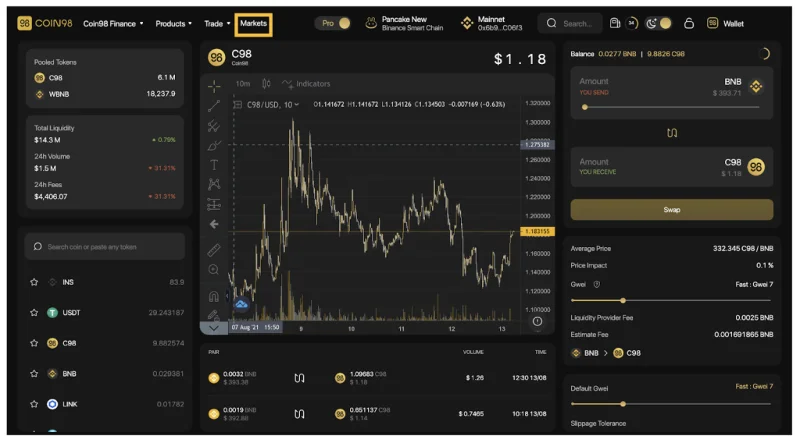
The main interface of Coin98 Markets has the following sections:
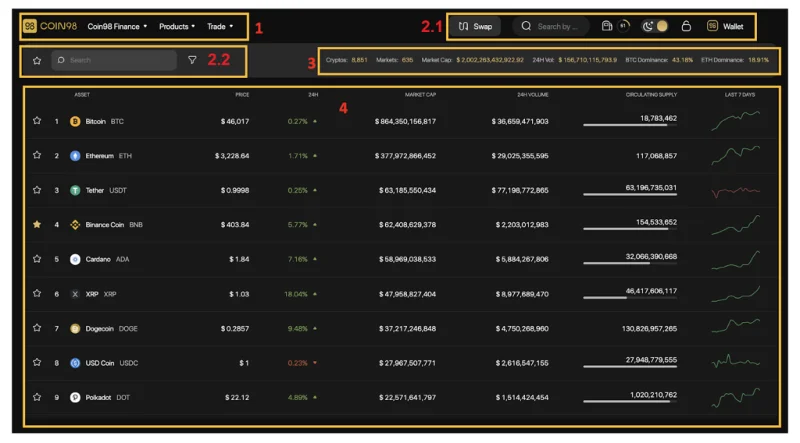
[1] Navigation to other Coin98's sites, products and AMMs of Coin98 Exchange.
[2] Some built-in utilities:

[3] Market Fundamental metrics:

[4] Basic information about Coins/Tokens:
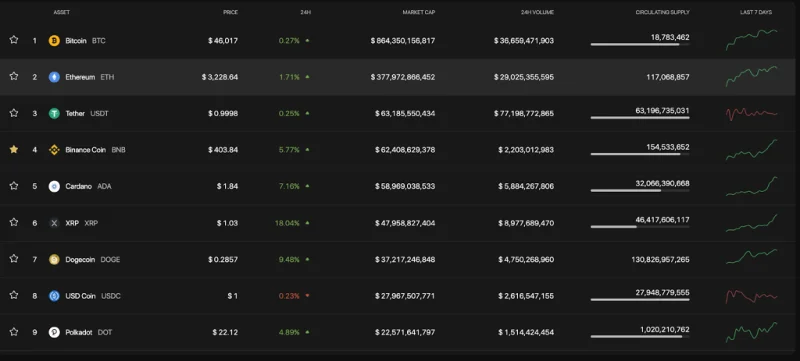
How to view token/coin information on Coin98 Markets
Step 1: Search token/coin you want to view on Coin98 Markets.
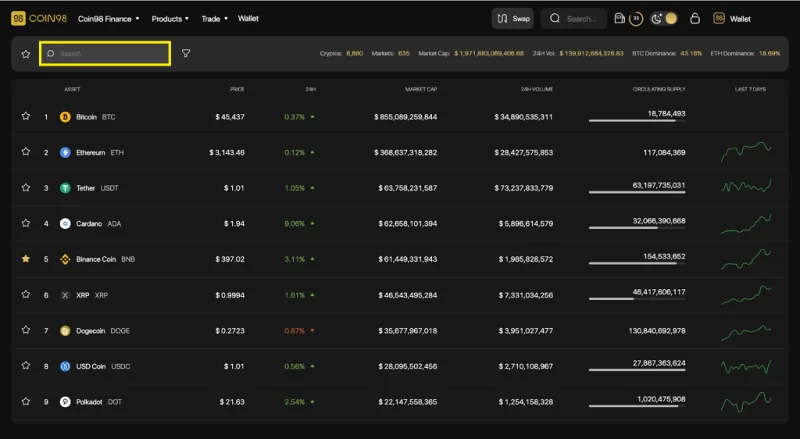
Step 2: Click on the token/coin you want to learn about.
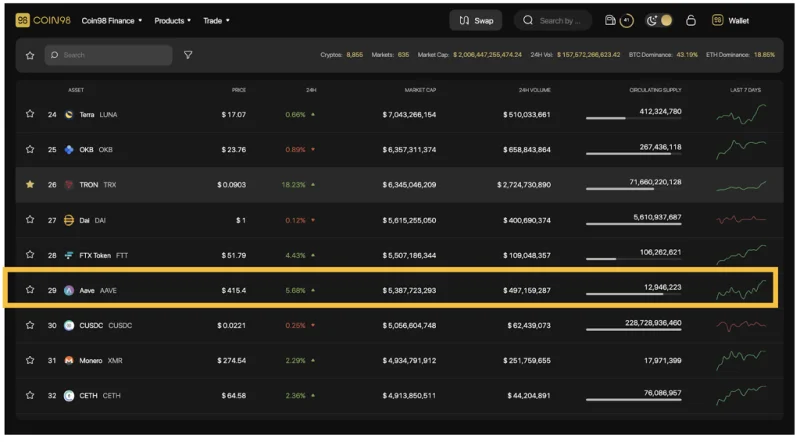
Step 3: The system will display the full information about the coin/token you have selected with some details as follows:
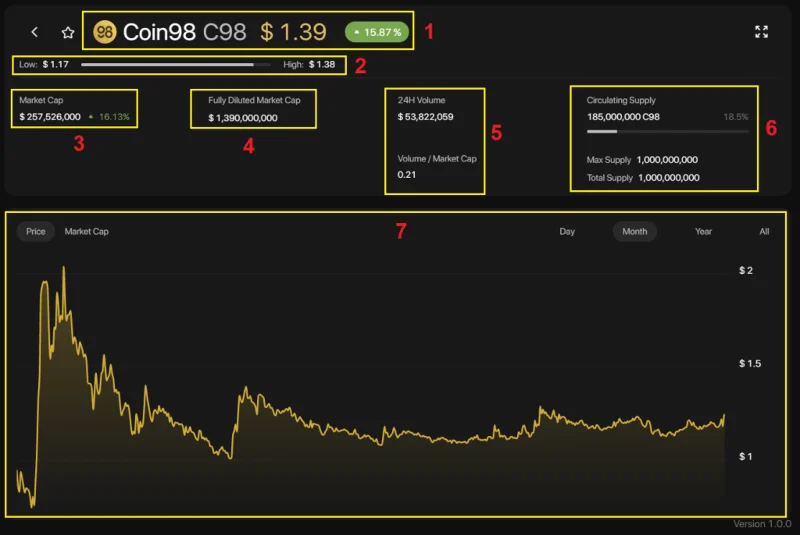
[1] Name and ticker of the token/coin, current price and % of price change within 24 hours
[2] Low - High bar: The highest and lowest price within 24 hours of the chosen coin/token.
[3] Market Cap and % change of Market Cap within 24 hours
[4] Fully Diluted Market Cap: Total market capitalization when all tokens are unlocked.
[5] With 2 information about Volume:
[6] Supply metrics:
[7] The price chart and the capitalization value of the chosen token/coin by day (Day), month (Month), Year (Year), and the entire time (All) view.
In addition, users can also use the Expand View mode by clicking on the arrow icon on the top right of the screen.
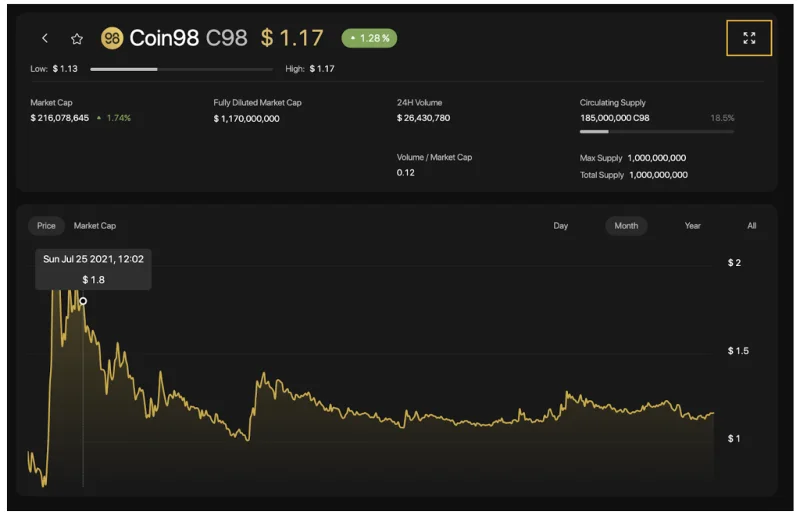
In this interface, you can see other information such as:
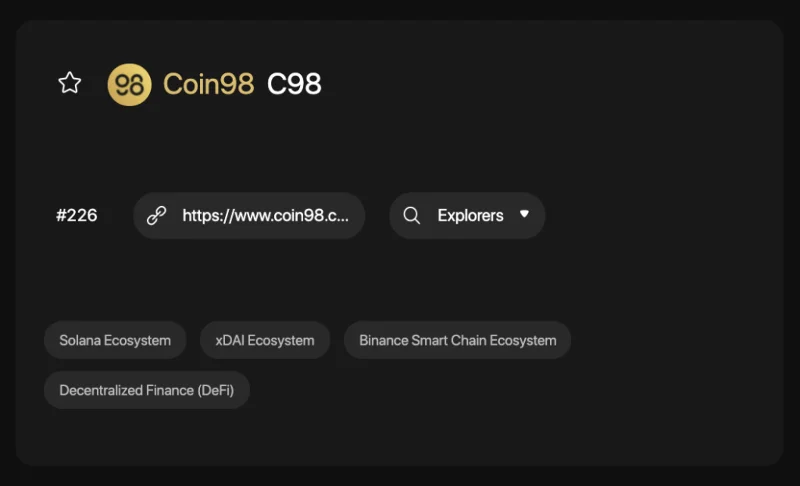
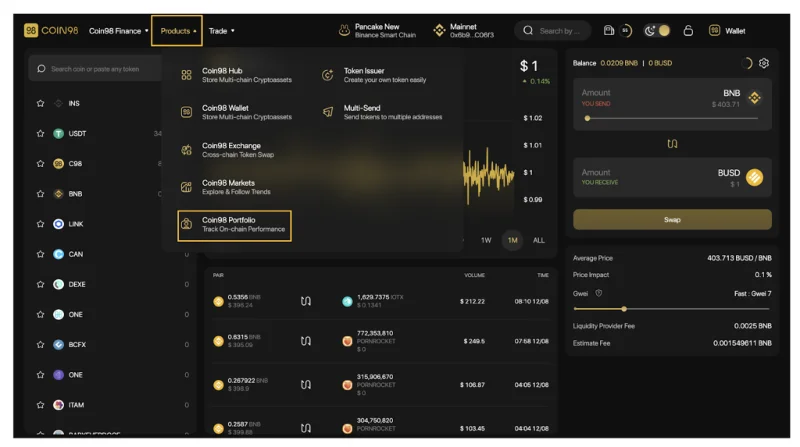
After researching the tokens/coins and trading them successfully you can directly manage your asset portfolio right on Coin98 Portfolio.
How to use Coin98 Portfolio
Coin98 Portfolio - a one-stop tracker for all your coins, has supported tracking portfolio for the following top-tier blockchain addresses: Solana, Ethereum, BSC, HECO, Avalanche C-Chain, Tron, TomoChain, Near, Polkadot, Kusama, and Celo, ... easily and conveniently. You only need to insert the wallet addresses to track without the need for Passphrases and Private Keys
To use Coin98 Portfolio, from the Coin98 Exchange/ Coin98 Markets interface, you can click on the Products navigation bar at the top of the page, select Coin98 Portfolio or visit this link: portfolio.coin98. com
The main interface of Coin98 Portfolio has the following sections.
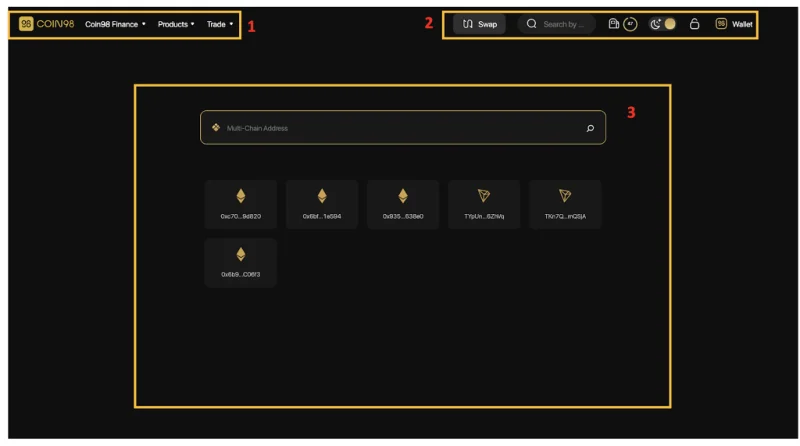
[1] Navigation to other Coin98's sites, products and AMMs of Coin98 Exchange.

[2]: Some built-in utilities:
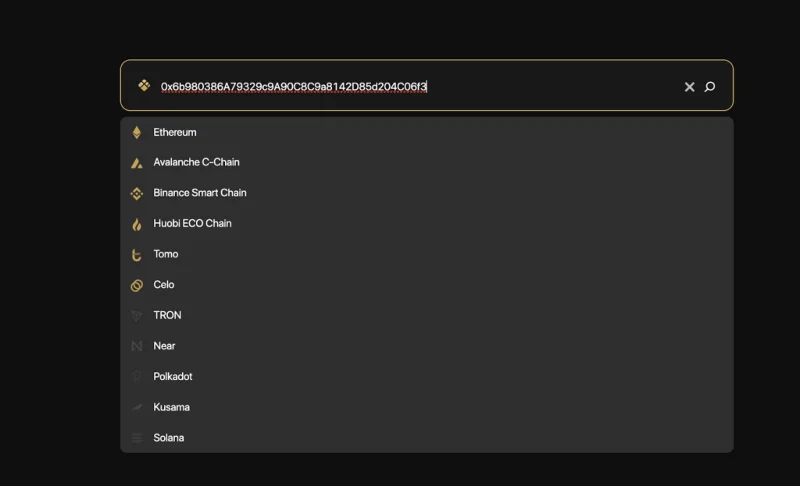
[3] The Search box: This is the main feature of Coin98 Portfolio. You only need to insert the wallet addresses you want to track, no need for Passphrases and Private Keys. Coin98 Portfolio also supports saving recent addresses to make it easier for users to manage their assets.
Here are two simple steps you need to follow to use Coin98 Portfolio:
After you have inserted all of your wallets, here is what your portfolio looks like.
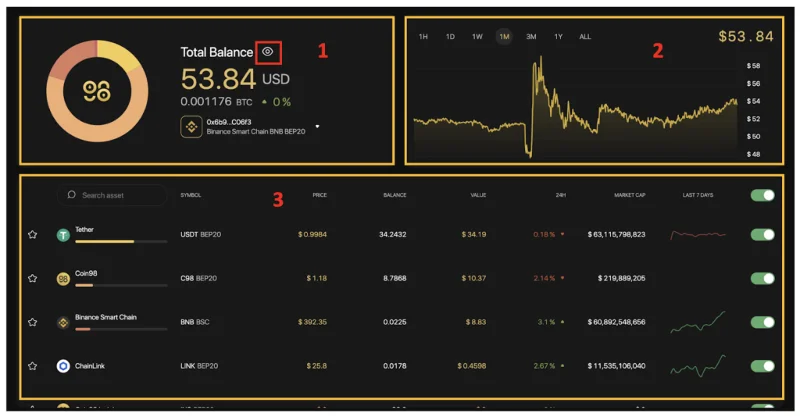
The main information includes:
[1] The total balance:
[2] The Balance chart: You can choose any time frame, from 1 hour - 1 year or the whole time.
[3] The Assets portfolio: Full information about each token you are holding such as price, total value, value changed in 24 hours, volume,.... To hide/show any token you can use the on/off icon on the right.
Moreover, you can click on a token to see its basic information popped up on the right side of the screen.
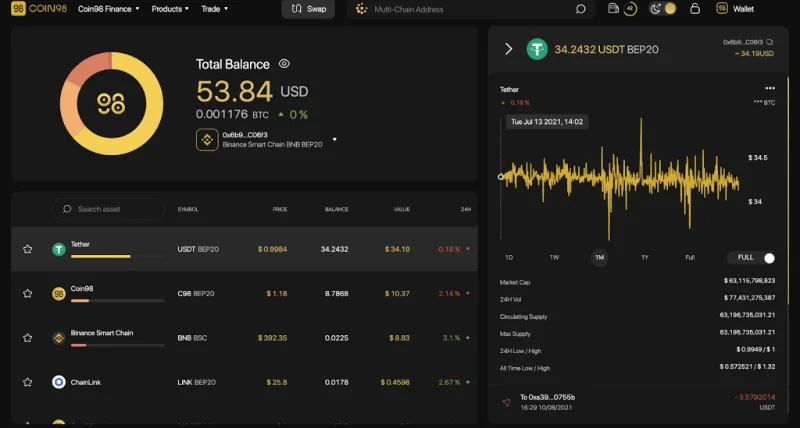
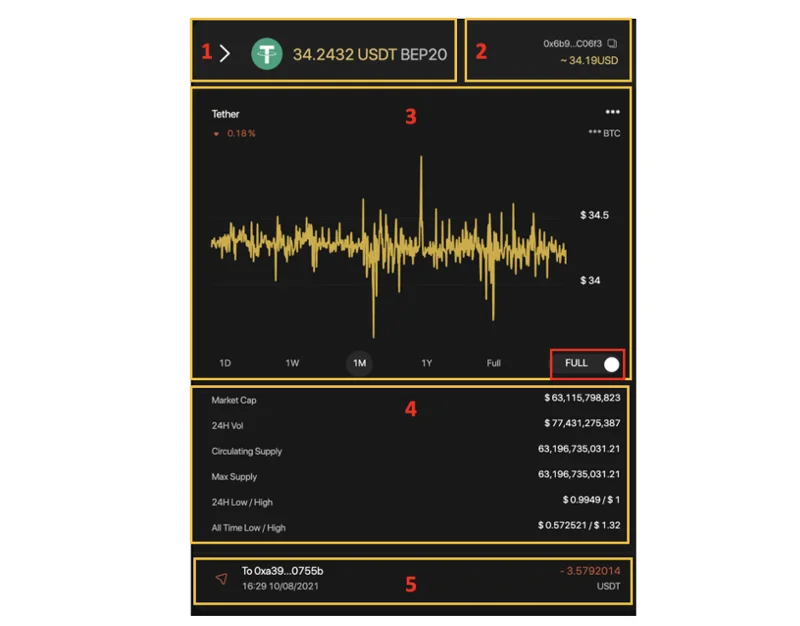
The main information includes:
[1] The token sticker, the standard and the token amount.
[2] Token wallet address, value in USD.
[3] The graph showing the total value of a token or the price of a token unit over time. To change the chart you can use the toggle button in the right corner of the chart. You can choose multiple time frames, from 1 hour - 1 year or the whole time.
[4] Token Information overview.
[5] Token transaction history on the wallet address you are choosing. You can click on each transaction to check the information on Explorer tools such as BscScan, EtherScan, ....
Besides the three main features mentioned above, Coin98 Exchange also offers an additional set of utility tools called Coin98 Terminal.
How to use Coin98 Terminals
Coin98 Terminal (Utilities) is a set of utility tools to enable users to easily become a part of the DeFi world in a convenient way, including Token Issuer, Multi-send, and Multisig (coming soon).
Token Issuer
Token Issuer is a feature that allows users to issue their own tokens easily and conveniently. Currently, Token Issuer is supporting on 3 main chains: Ethereum, HECO, and Binance Smart Chain. In the near future users can also experience this tool Tron (TRC10) and Solana.
To issue a new token on Token Issuer, follow those steps:
On the Products navigation bar at the top of the page, select Coin98 Issuer or visit the link: terminals.coin98.com/issuer
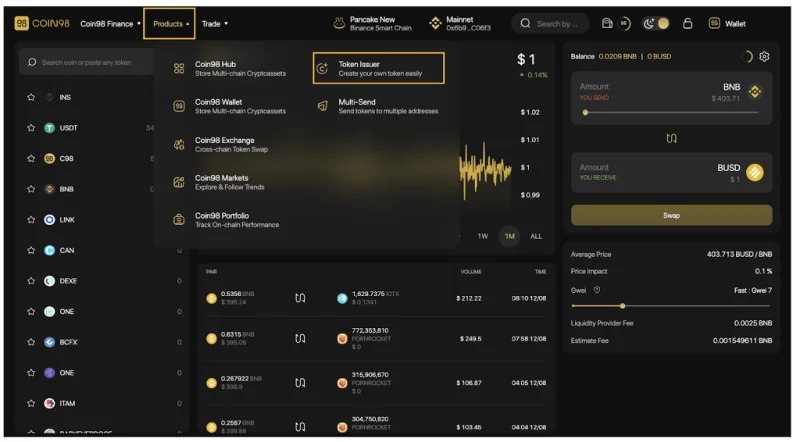
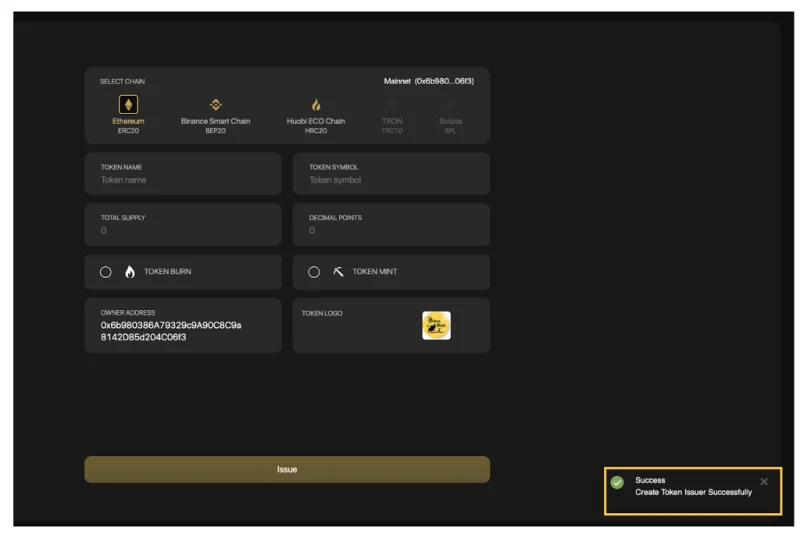
Step 1: Select the network that you wish to issue tokens, in this example I chose the HECO Chain (HRC20). The system would find your respective chain wallet.
Step 2: Fill in the following information:
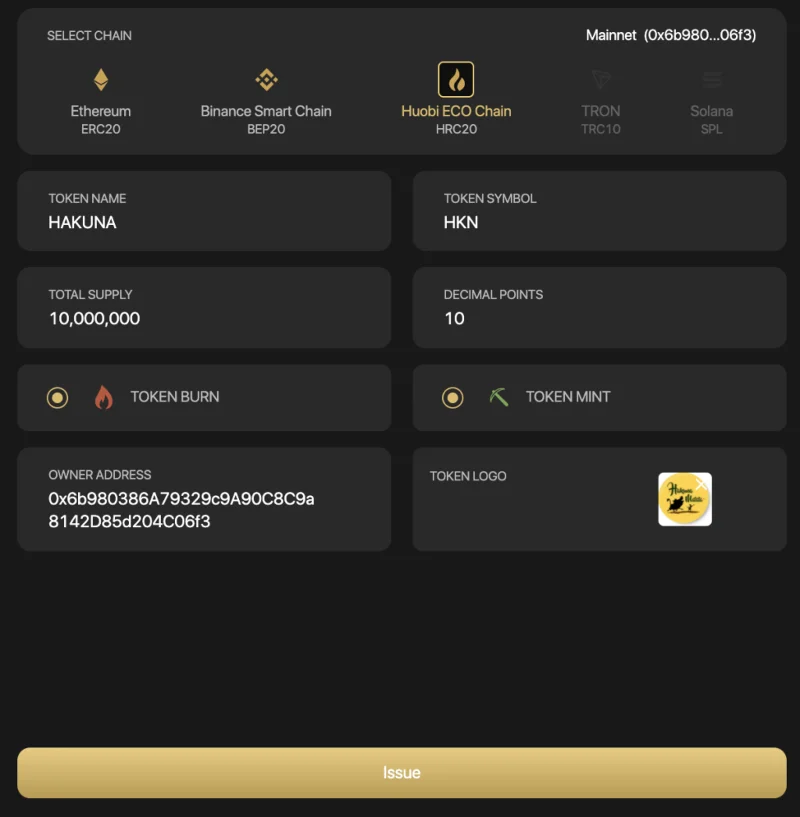
You can consider two options after issuing the token:
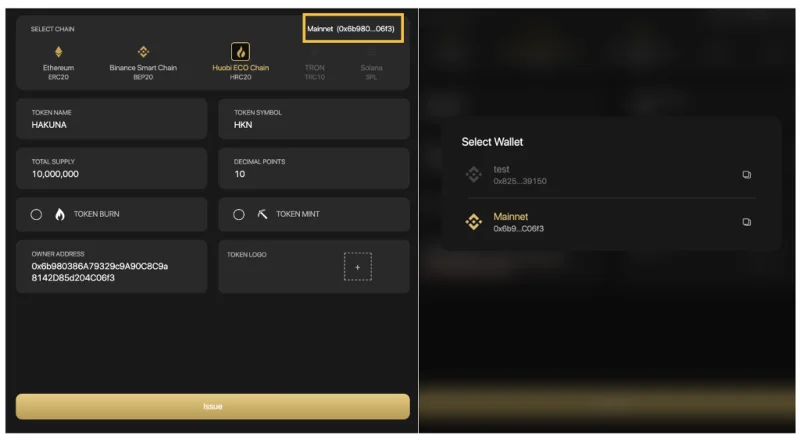
अपने कनेक्टेड वॉलेट का पता बदलने के लिए, आप निम्न चरणों का पालन कर सकते हैं:
चरण 3: समस्या पर क्लिक करें ।
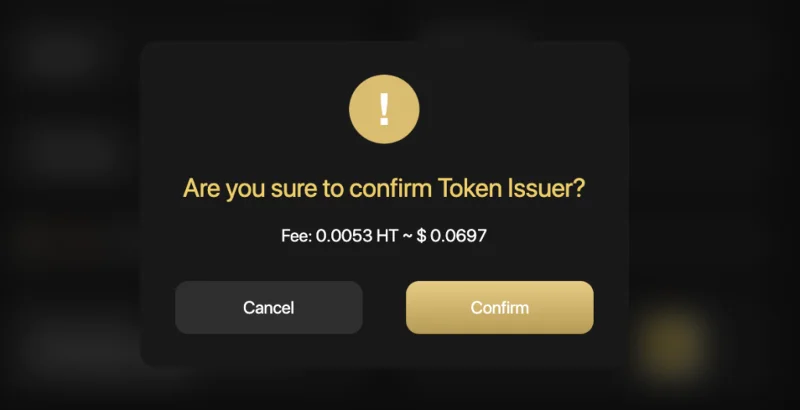
चरण 4: सिस्टम उपयोगकर्ताओं को टोकन जारी करने के लिए नेटवर्क शुल्क का भुगतान करने के लिए कहेगा।
उपयोगकर्ताओं को इस चरण के लिए पर्याप्त शुल्क तैयार करने की आवश्यकता है। यदि आप सहमत हैं, तो पॉप-अप पुष्टिकरण पर पुष्टि करें पर क्लिक करें।
आपकी टोकन जानकारी देखने के लिए आपको EtherScan/BscScan/Hecoscan पर पुनर्निर्देशित करने के लिए निचले दाएं कोने में एक पॉप-अप घोषणा होगी।
बहु-प्रेषक
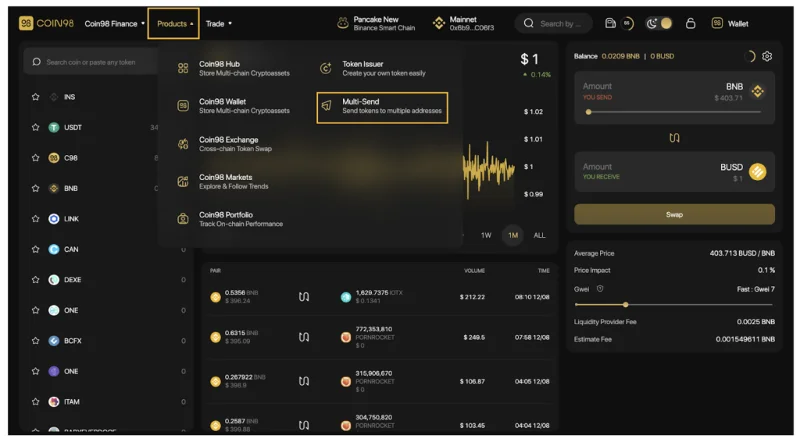
मल्टी-प्रेषक एक सुविधा है जो उपयोगकर्ताओं को निम्नलिखित ब्लॉकचेन पर एक ही समय में कई पते पर सिक्के / टोकन भेजने की अनुमति देती है: बिनेंस स्मार्ट चेन, सोलाना, एथेरियम, पॉलीगॉन, एचईसीओ चेन, क्लेटन, गेटचैन, सेलो, ओकेएक्सचैन, टॉमोचैन, एक्सडीएआई , हिमस्खलन (सी-चेन), फैंटम।
Coin98 Multisend तक पहुँचने के लिए, पृष्ठ के शीर्ष पर उत्पाद नेविगेशन बार पर क्लिक करें, Coin98 Multisend चुनें या लिंक पर जाएँ: Terminals.coin98.com/multisend
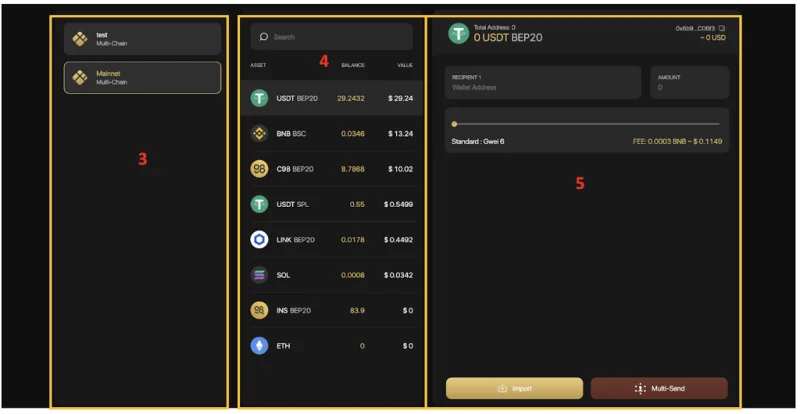
Coin98 Multisend के मुख्य इंटरफ़ेस में निम्नलिखित भाग हैं:
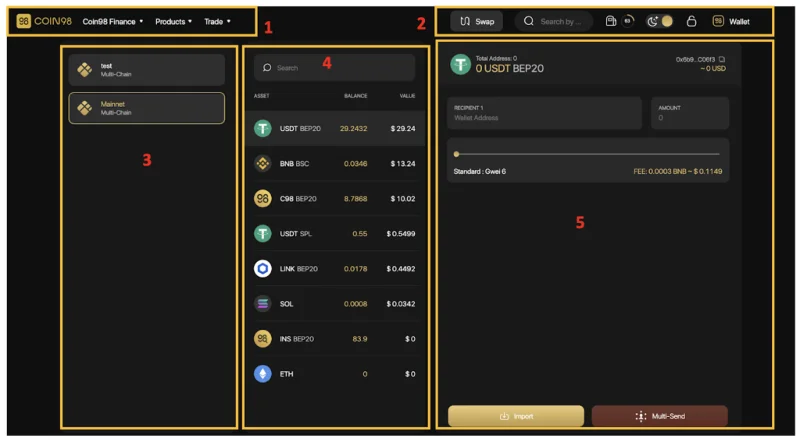
बहु-भेजें सुविधा का अनुभव करने के लिए, आप इन चरणों का पालन कर सकते हैं:
[1] Coin98 की अन्य साइटों, उत्पादों और Coin98 एक्सचेंज के AMM पर नेविगेशन।
[2] कुछ अंतर्निहित उपयोगिताएँ:

[3] बटुआ चयन क्षेत्र।
[4] टोकन चयन क्षेत्र।
[5] टोकन भेजने का मुख्य क्षेत्र।
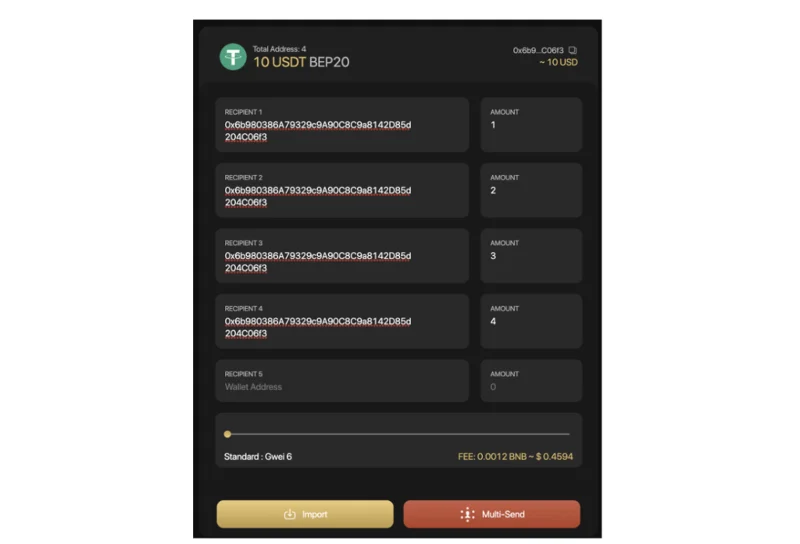
उस क्षेत्र में जहां आप टोकन भेज सकते हैं, उन चरणों का पालन करें:
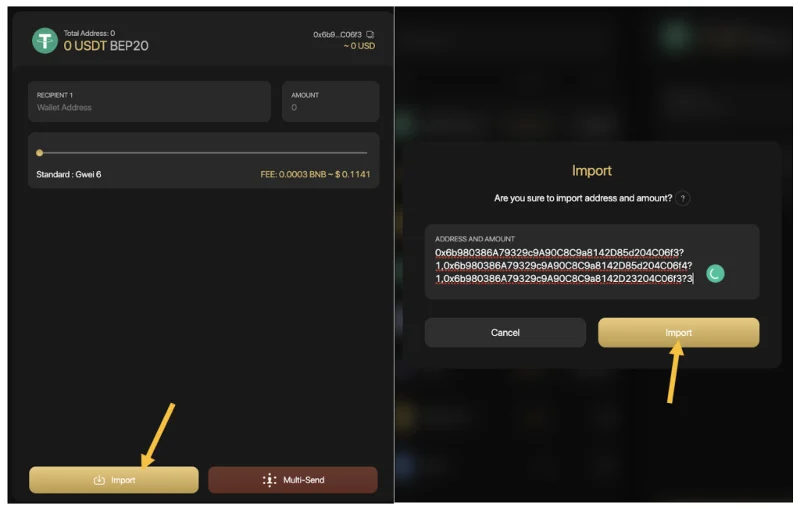
चरण 1: प्राप्तकर्ता के वॉलेट पते दर्ज करें। इसे करने के 2 तरीके हैं:
उदाहरण: 0xbe80ceed72e1798c631fcd92f611367abd7f836f?0.5, 0x52c12e10f181f801324ed3c3cd6d17f58a93e6b8?1, 0x5a7b52cf2f59d072aa38dee1107612ad656e048e?
चरण 2: वांछित gwei तक पहुंचने के लिए गैस बार को स्लाइड करें → पूरा करने के लिए भेजें पर क्लिक करें ।
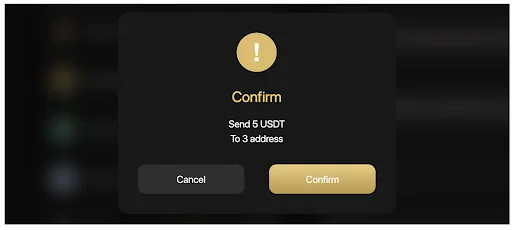
यदि आप भेजने की जानकारी से सहमत हैं, तो पुष्टि करें पर क्लिक करें।
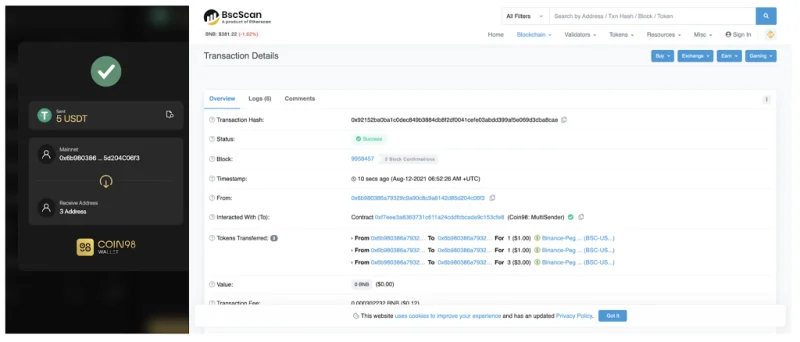
सफलतापूर्वक भेजने के बाद, आप अपने लेनदेन को देखने के लिए Coin98 एक्सटेंशन वॉलेट या Coin98 पोर्टफोलियो पर टोकन इतिहास तक पहुंच सकते हैं। लेन-देन की अधिक जानकारी देखने के लिए, आप एक्सप्लोरर ब्राउज़र (ईथरस्कैन, BscScan, ...)
नोट :
वॉलेट स्वीकृति
वॉलेट स्वीकृति एक ऐसी सुविधा है जो आपको उन सभी अनुबंधों का निरीक्षण करने की अनुमति देती है जिन्हें आपने अपनी ओर से पैसा खर्च करने के लिए अनुमोदित किया है और जिनकी अब आपको आवश्यकता नहीं है, उनके लिए उनकी पहुंच को निरस्त कर सकते हैं।
आपको वॉलेट स्वीकृति टूल का उपयोग क्यों करना चाहिए?
व्यापार, फार्म, हिस्सेदारी, या किसी भी डीएपी के साथ बातचीत करने के लिए, उपयोगकर्ताओं को स्मार्ट अनुबंधों को आपकी संपत्ति तक पहुंचने की अनुमति देने की आवश्यकता होती है। भत्ते के लिए 2 दृष्टिकोण हैं: एक विशिष्ट मात्रा में टोकन और असीमित अनुमोदन की अनुमति दें ।
असीमित अनुमोदन उन्हें एक तेज़ और घर्षण रहित अनुभव प्रदान करता है; हालांकि, यह संभावित रूप से संपत्ति के नुकसान के जोखिम को प्रभावित कर सकता है यदि उपयोगकर्ता अविश्वसनीय प्लेटफॉर्म या स्कैमिंग पूल के साथ इंटरैक्ट करते हैं।
यह अनुशंसा की जाती है कि आप अपने फंड को सुरक्षित रखने के लिए किसी प्लेटफॉर्म तक असीमित पहुंच न दें।
टोकन भत्तों को कैसे रद्द करें
चरण 1 : Coin98 टर्मिनल तक पहुंचें
चरण 2: टोकन को रद्द करना शुरू करने के लिए मुख्य स्क्रीन पर वॉलेट स्वीकृति का चयन करें ।
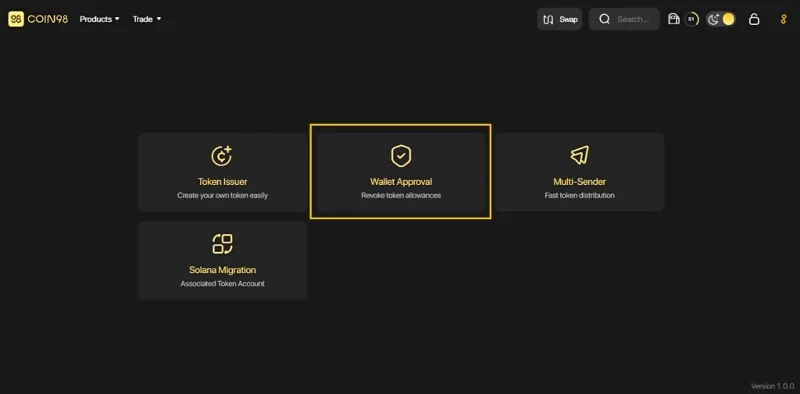
चरण 3 : उस वॉलेट पर क्लिक करें जिसे आप अक्सर DeFi सेवाओं के साथ इंटरैक्ट करते हैं।
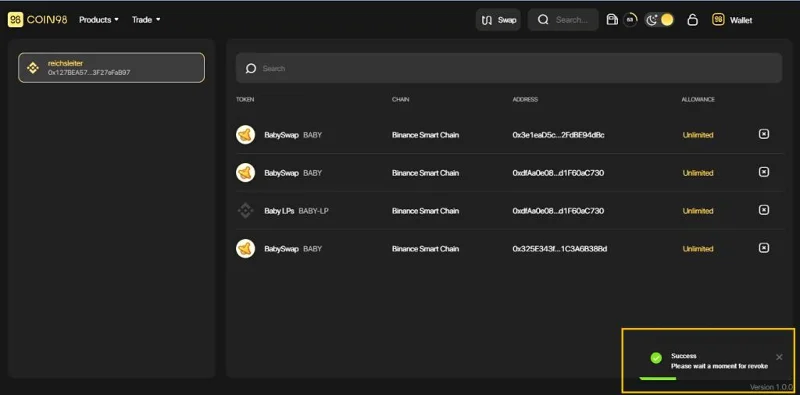
चरण 4 : इस इंटरफ़ेस में, आप [x] आइकन पर क्लिक करके किसी भी वांछित अनुबंध की अनुमति को रद्द कर सकते हैं ।
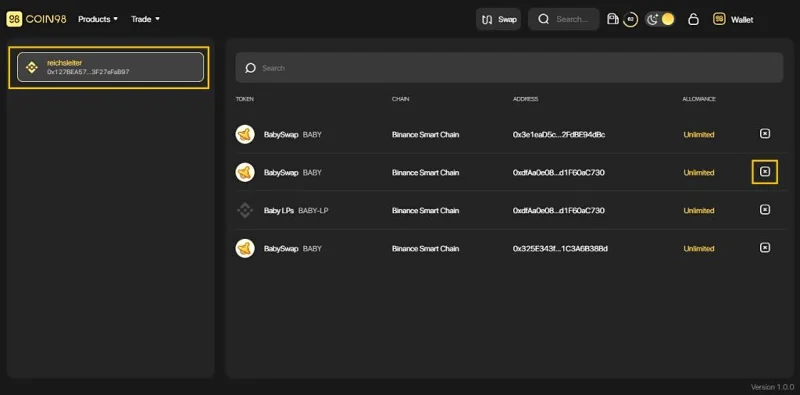
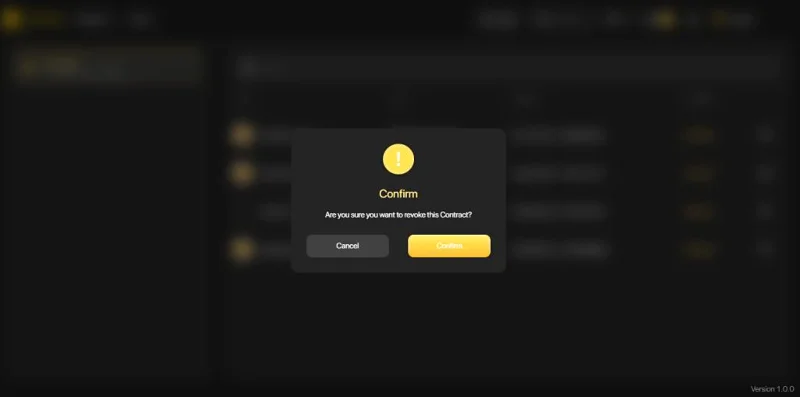
चरण 5 : पूरा होने के लिए पुष्टि करें पर क्लिक करें और सेकंड के लिए प्रतीक्षा करें। सब कुछ कर दिया!
एक बार पूरा हो जाने पर, सिस्टम स्क्रीन के निचले दाएं कोने में एक संदेश प्रदर्शित करेगा।
नोट :
सोलाना प्रवास
अन्य ब्लॉकचेन के विपरीत, एसओएल पते और एसपीएल पते पूरी तरह से अलग हैं, जिससे उपयोगकर्ताओं के लिए इसका उपयोग करना कठिन हो जाता है। यदि उपयोगकर्ता एसपीएल टोकन एसओएल पते पर भेजते हैं, तो नेटवर्क मौजूदा वॉलेट में नेविगेट करने के बजाय स्वचालित रूप से एक और एसपीएल पता शुरू करेगा। यही मुख्य कारण है कि संपत्ति को कई एकल एसपीएल पतों में विभाजित किया जाता है।
सोलाना वॉलेट माइग्रेशन एक ऐसा समाधान है जो उपयोगकर्ताओं को अपने संबद्ध एसपीएल टोकन को एक एकल एसओएल वॉलेट पते पर माइग्रेट करने में मदद करता है और सोलाना डीएपी के साथ बातचीत करते समय उपयोगकर्ताओं की संपत्ति के विखंडन को रोकता है।
खंडित SPL टोकन को SPL वॉलेट में कैसे माइग्रेट करें
चरण 1: Coin98 टर्मिनल तक पहुंचें ।
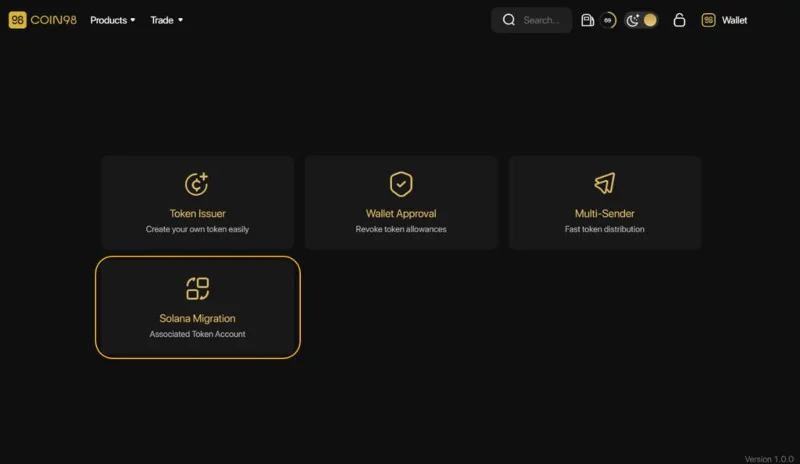
चरण 2: होम स्क्रीन पर, माइग्रेशन प्रक्रिया शुरू करने के लिए सोलाना माइग्रेशन चुनें।
चरण 3 : इस स्क्रीन पर, आप देख सकते हैं:
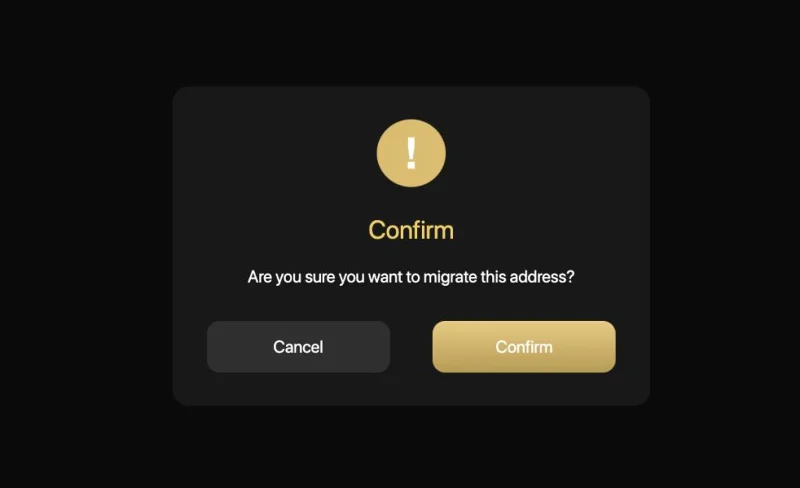
प्रक्रिया शुरू करने के लिए माइग्रेट बटन पर क्लिक करें
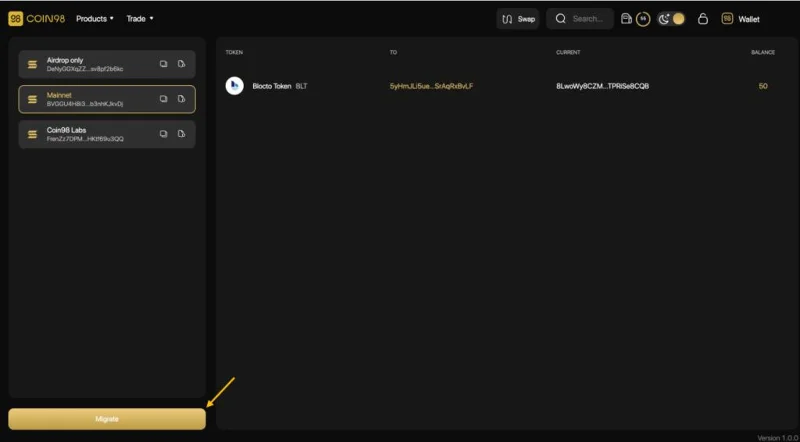
फिर पुष्टि करें चुनें और प्रक्रिया को पूरा करने के लिए कुछ सेकंड प्रतीक्षा करें।
टिप्पणियाँ:
Coin98 एक्सचेंज पर आने वाली विशेषताएं
मेरे द्वारा ऊपर दी गई उत्कृष्ट विशेषताओं के अलावा, भविष्य में, Coin98 एक्सचेंज ब्रह्मांड निम्नलिखित सुविधाओं को भी लॉन्च करेगा:
अगले लेखों में इन सुविधाओं का उपयोग करने के तरीके के बारे में गाइड के लिए बने रहें।
अंतिम विचार
इस लेख के माध्यम से, मुझे आशा है कि आपने Coin98 एक्सचेंज पर व्यापार करने के लिए बुनियादी कदमों का अवलोकन प्राप्त कर लिया है। मेरा मानना है कि इस ऑल-इन-वन प्लेटफॉर्म पर एकीकृत विशेषताएं उपयोगकर्ताओं को न्यूनतम संभव लागत पर अनुकूलित गति प्रदान करेंगी।
यदि आपके कोई प्रश्न हैं या Coin98 एक्सचेंज का उपयोग करने में परेशानी होती है, तो कृपया नीचे टिप्पणी करने के लिए स्वतंत्र महसूस करें और व्यवस्थापकों के साथ अपनी समस्या पर चर्चा करने के लिए Coin98 समुदाय में शामिल हों!
सैंटोस एफसी फैन टोकन क्या है? सैंटोस टोकन क्या है? सैंटोस टोकनोमिक्स के बारे में यहीं और जानें!
TomoChain (TOMO) क्या है? यह लेख आपको TomoChain (TOMO) क्रिप्टोक्यूरेंसी के बारे में सभी सबसे उपयोगी जानकारी प्रदान करता है।
हिमस्खलन क्या है? AVAX सिक्का क्या है? हिमस्खलन अन्य ब्लॉकचेन से अलग क्या है? AVAX टोकनोमिक्स के बारे में और जानें !!!
शीबा स्वैप क्या है? सभी शिबा स्वैप हाइलाइट्स और एसएचआईबी टोकन टोकनोमिक्स विवरण के बारे में यहां अधिक जानकारी प्राप्त करें!
तेजोस क्या है? XTZ टोकन क्या है? Tezos को अन्य ब्लॉकचेन से क्या अलग बनाता है? XTZ टोकनोमिक्स के बारे में यहीं और जानें!
यूनिट प्रोटोकॉल (DUCK) क्या है? लेख आपको यूनिट प्रोटोकॉल (DUCK) क्रिप्टोकरेंसी के बारे में सभी सबसे उपयोगी जानकारी प्रदान करता है।
क्वांटस्टैम्प (क्यूएसपी) क्या है? यह लेख आपके लिए आभासी मुद्रा क्वांटस्टैम्प (क्यूएसपी) के बारे में सभी आवश्यक और उपयोगी जानकारी प्रदान करता है।
फ्लेमिंगो (FLM) क्या है? यह लेख आपको फ्लेमिंगो (FLM) क्रिप्टोकरेंसी के बारे में महत्वपूर्ण और उपयोगी जानकारी प्रदान करता है।
विकुटा फ्लोर क्या है? विकुटा एक वियतनामी एक्सचेंज है जो कम कीमत पर विभिन्न प्रकार के altcoins खरीदने और बेचने का समर्थन करता है। विकुटा फ्लोर मैनुअल यहाँ देखें!
ब्लॉकक्लाउड (बीएलओसी) क्या है? लेख आपको ब्लॉकक्लाउड परियोजना और बीएलओसी टोकन के बारे में सबसे विस्तृत जानकारी देता है।