What is PooCoin?
PooCoin is a platform and tool that allows users to look up and track all price charts, wallet holders, capitalization ... of all coins / tokens on BNB Chain, Polygon and Kucoin platforms . This includes coins/tokens that are “junk”, low-cap or just released. PooCoin was introduced and launched in March 2021.
Highlights of PooCoin
Data information is updated continuously, quickly
When using PooCoin, all new coins/tokens that have just been released and listed on DEX decentralized exchanges will be updated by this platform and displayed immediately. What other similar platforms and tools like TradingView, TabTrader… can't do. These major platforms will usually update more slowly when their chart data is taken from major centralized exchanges like Binance, Coinbase, OKX… PooCoin's charts are fully integrated with TradingView's features. users can easily do technical analysis of the coins/tokens they want.
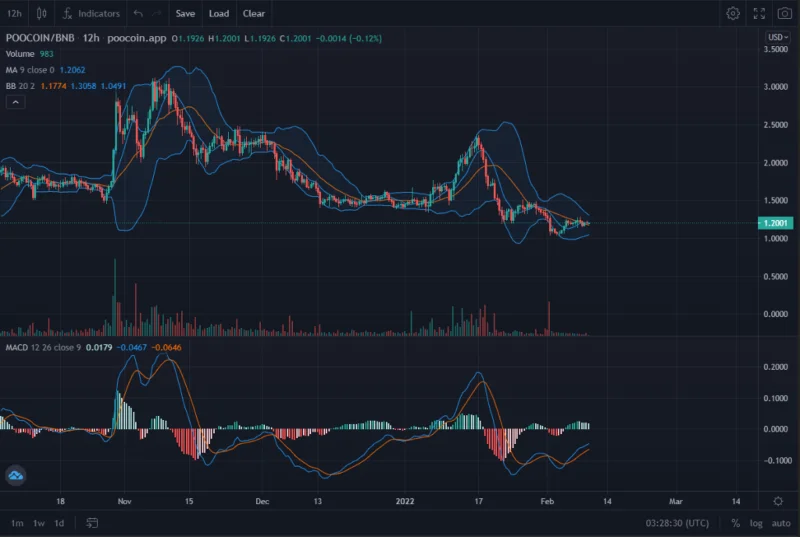
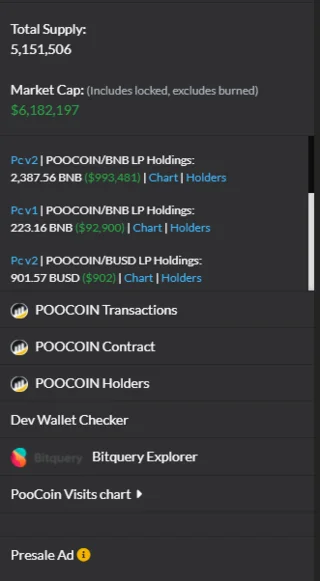
PooCoin obtains data directly through the coin/token contract on the BlockExplorer of the supporting platforms. This makes users using PooCoin can also see information such as total supply, capitalization, wallet holder, dev wallet, etc.
![What is PooCoin? Instructions to buy POOCOIN on PancakeSwap]()
Support users to trade and manage portfolios in crypto wallets
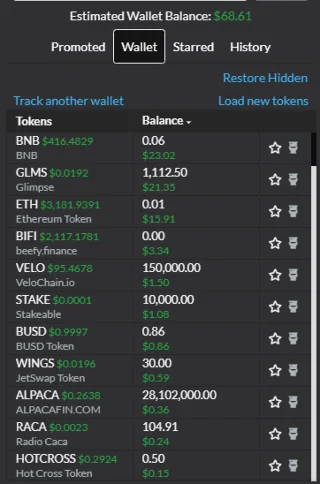
When connecting a cryptocurrency storage wallet with PooCoin, users can also easily monitor the list of coins/tokens in the wallet from which to estimate the volume of their existing assets.
![What is PooCoin? Instructions to buy POOCOIN on PancakeSwap]()
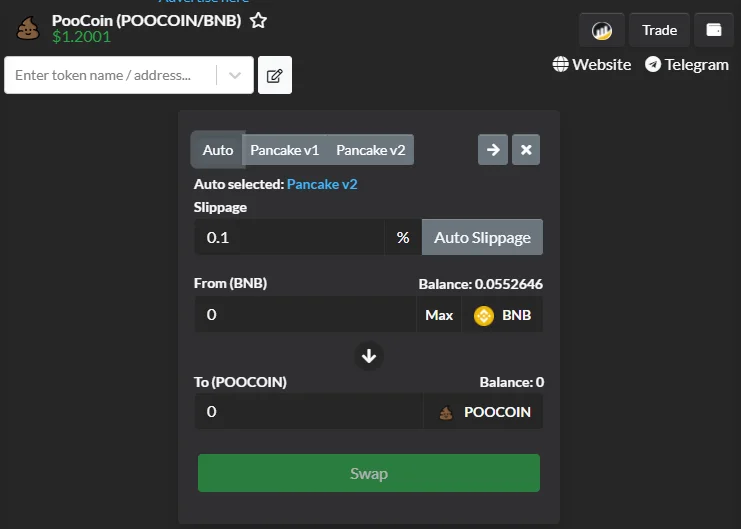
PooCoin also supports users to instantly trade the coin/token that they are following the chart.
![What is PooCoin? Instructions to buy POOCOIN on PancakeSwap]()
Overview of the POOCOIN . token
POOCOIN is the official token of PooCoin built on the BNB Chain platform. POOCOIN can be used to:
- Governance of the PooCoin Ecosystem
- Users who store POOCOIN will be able to open many new features on the PooCoin platform such as tracking wallets, turning off ads, etc.
- Join PooCoin's Launchpad
- Stake PooCoin to get free tokens (future)
General information about token POOCOIN
- Name: PooCoin
- Ticker: POOCOIN
- Blockchain: BNB Chain
- Token Standard: BEP-20
- Token Type: Utility, Governance
- Smart contract: 0xb27ada…c097cc
- Max Supply: 10,000,000 PooCoin
- Total Supply: 5,151,505. PooCoin
Exchanges and wallets that store POOCOIN tokens
Investors can buy, sell or trade POOCOIN on decentralized exchanges that support the prestigious BNB Chain platform today such as PancakeSwap, BakerySwap…
POOCOIN tokens can be stored on wallets that support coin/token according to the BEP-20 standard. Some wallets that you use to store POOCOIN such as Trust Wallet, MetaMask…
Instructions on how to buy PooCoin on PancakeSwap
If you do not have a MetaMask wallet, you can refer to how to create a MetaMask wallet .
Connect MetaMask Wallet to BNB Chain (BSC)
The default network of the MetaMask wallet will be Ethereum. You must be connected to the BNB Chain network before logging in to PancakeSwap.
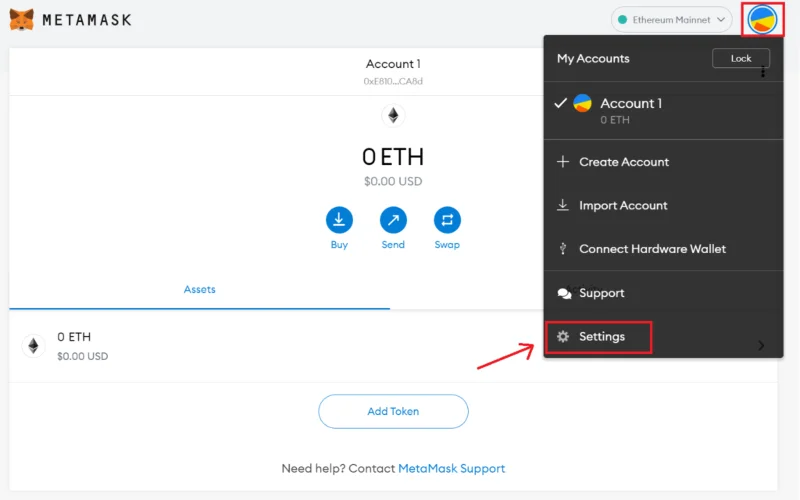
Step 1 : Log in to your MetaMask wallet then select “Settings” in the upper right corner.
![What is PooCoin? Instructions to buy POOCOIN on PancakeSwap]()
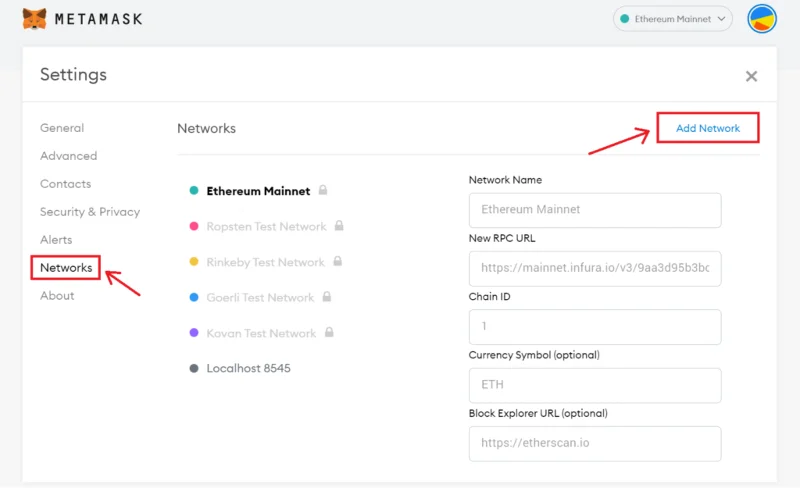
Step 2 : In the Settings section, select “Networks” and then click the “Add Networks” button.
![What is PooCoin? Instructions to buy POOCOIN on PancakeSwap]()
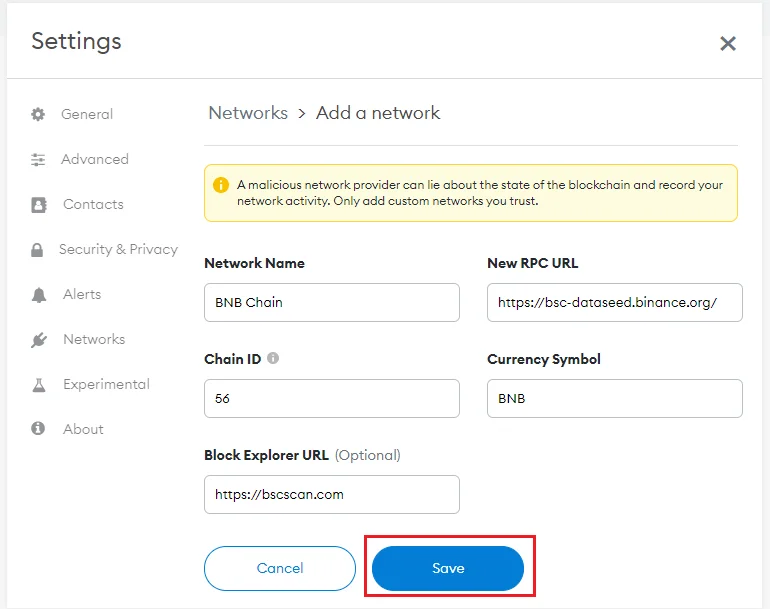
Step 3 : To connect to the BNB Chain network, fill in the following information and then click “Save” to complete.
- Network Name: BNB Chain
- New RPC URL: https://bsc-dataseed.binance.org/
- ChainID: 56
- Symbol: BNB
- Block Explorer URL: https://bscscan.com
![What is PooCoin? Instructions to buy POOCOIN on PancakeSwap]()
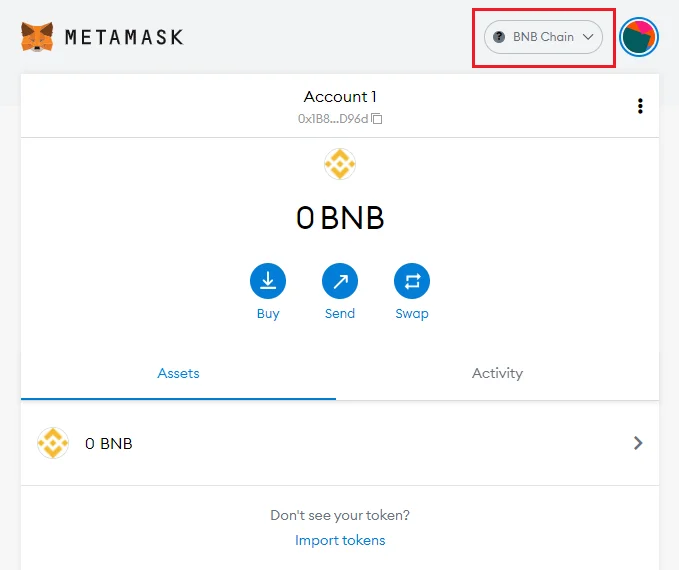
After pressing the “Save” button, the MetaMask wallet will automatically switch to the network you just entered, BNB Chain.
![What is PooCoin? Instructions to buy POOCOIN on PancakeSwap]()
Swap POOCOIN on PancakeSwap
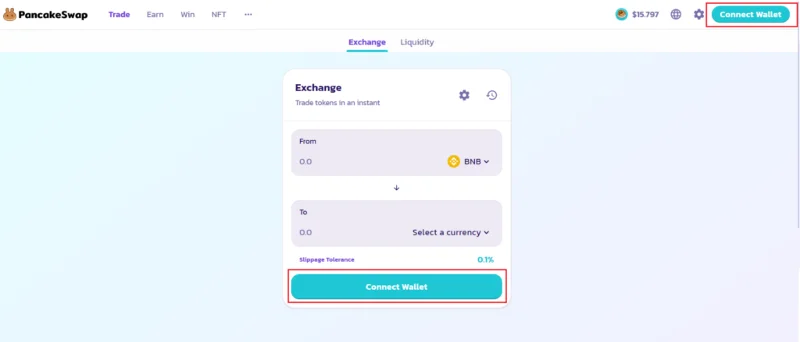
Step 1 : You access https://pancakeswap.finance/swap , then select “Connect Wallet” to log in to PancakeSwap.
![What is PooCoin? Instructions to buy POOCOIN on PancakeSwap]()
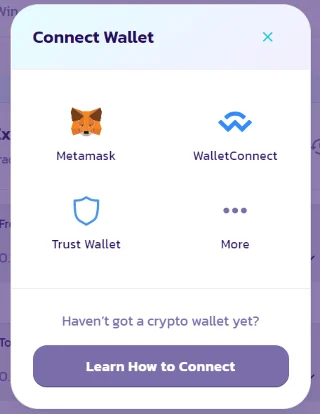
Step 2 : You choose MetaMask wallet to log in to PancakeSwap.
PancakeSwap currently supports many crypto wallets such as MetaMask, Trust Wallet, Binance Chain Wallet…
![What is PooCoin? Instructions to buy POOCOIN on PancakeSwap]()
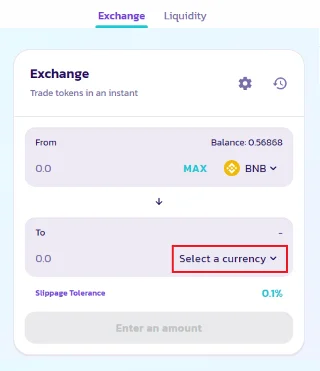
Step 3 : You click on “Select a currency” then select the coin/token you want to swap.
![What is PooCoin? Instructions to buy POOCOIN on PancakeSwap]()
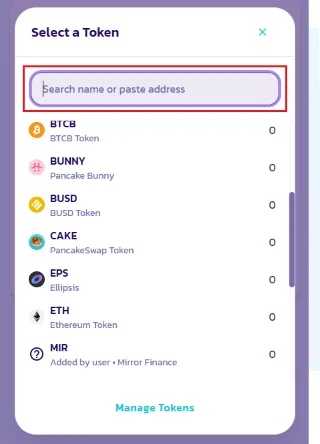
You can paste the contract address of the coin/token you want to swap into the “Search name or paste address” box to manually add it to PancakeSwap if it is not yet supported by the exchange.
![What is PooCoin? Instructions to buy POOCOIN on PancakeSwap]()
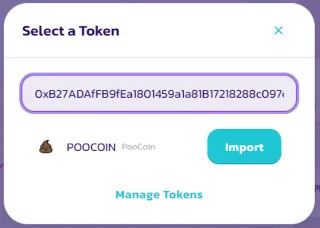
With POCCOIN, you paste the contract address as 0xb27adaffb9fea1801459a1a81b17218288c097cc and then press the “Import” button.
![What is PooCoin? Instructions to buy POOCOIN on PancakeSwap]()
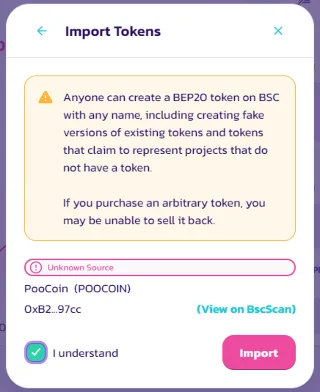
After pressing “Import”, you will receive a warning from PancakeSwap. If the contract address you just entered is correct, click on the “I understand” box then click “Import” to complete.
![What is PooCoin? Instructions to buy POOCOIN on PancakeSwap]()
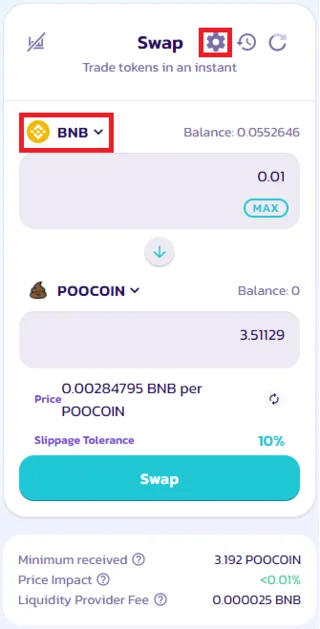
Step 4 : With the POOCOIN/BNB trading pair, enter the amount of BNB you want to swap and then press the "Swap" button to change BNB to POOCOIN.
![What is PooCoin? Instructions to buy POOCOIN on PancakeSwap]()
Note : If you do not want to swap from BNB, you can choose to change to another coin/token that you have in your wallet by clicking on the BNB icon. Same as you select/add POOCOIN.
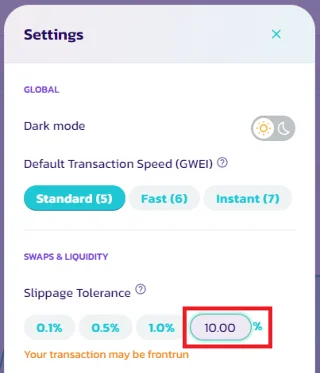
Since the liquidity pool of the POOCOIN token is small, you also need to increase the slippage level in the settings to avoid slippage.
![What is PooCoin? Instructions to buy POOCOIN on PancakeSwap]()
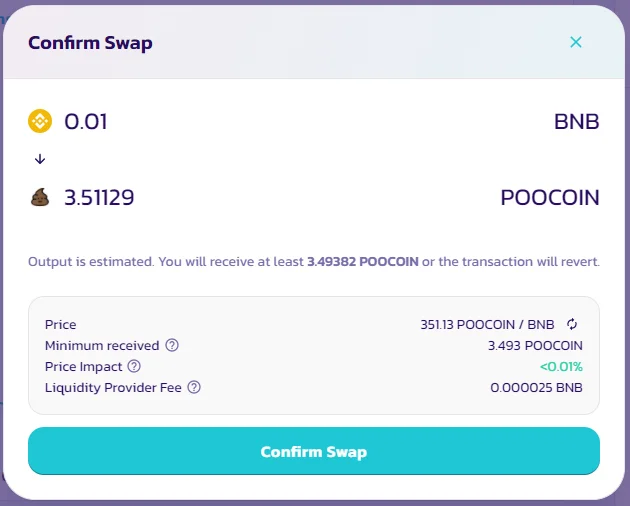
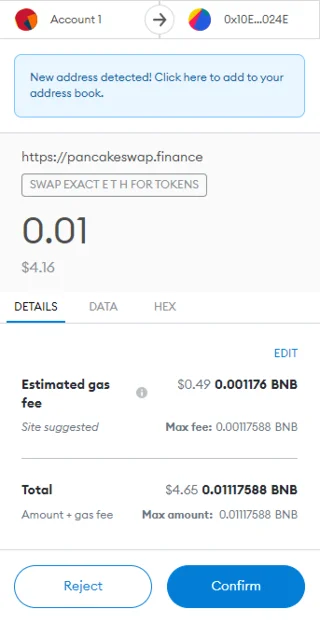
Step 5 : You check the transaction details and select “Confirm Swap”.
![What is PooCoin? Instructions to buy POOCOIN on PancakeSwap]()
Step 6 : You select “Confirm” to confirm your transaction.
![What is PooCoin? Instructions to buy POOCOIN on PancakeSwap]()
Once the transaction is done, you can click “View on BscScan” to view your transaction details. With swap from POOCOIN to BNB, you also follow the same steps as when swapping from BNB to POOCOIN.
How to use PooCoin Charts
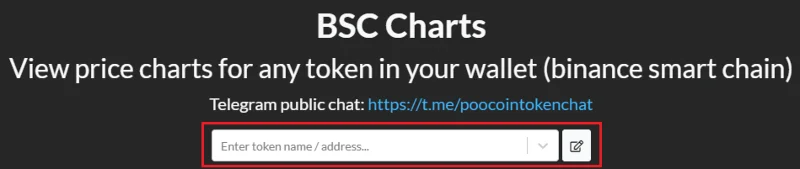
Step 1 : To view the price chart on PooCoin, you need to access the Charts section on the toolbar at https://poocoin.app/ . By default, you will be able to look up the coins/tokens on the BNB Chain platform on the first use.
![What is PooCoin? Instructions to buy POOCOIN on PancakeSwap]()
Step 2 : Search for the coin/token you want to track.
![What is PooCoin? Instructions to buy POOCOIN on PancakeSwap]()
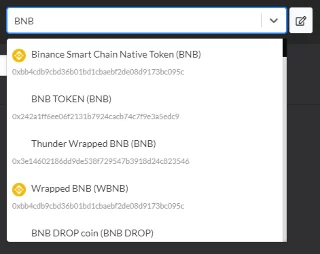
You can enter the name or contract address of that coin/token to look up information. However, searching by contract will help you find the exact coin you need. Since PooCoin gets its data from BlockExplorer, there will be a lot of coins with similar names created for the purpose of fraud. You can get a project's contract at some reputable information sites such as CoinMarketCap, CoinGecko or directly from the project's media pages.
![What is PooCoin? Instructions to buy POOCOIN on PancakeSwap]()
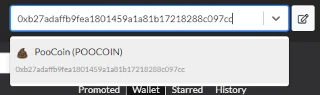
After entering the contract address in the search bar, click the corresponding search result to go to the chart page.
![What is PooCoin? Instructions to buy POOCOIN on PancakeSwap]()
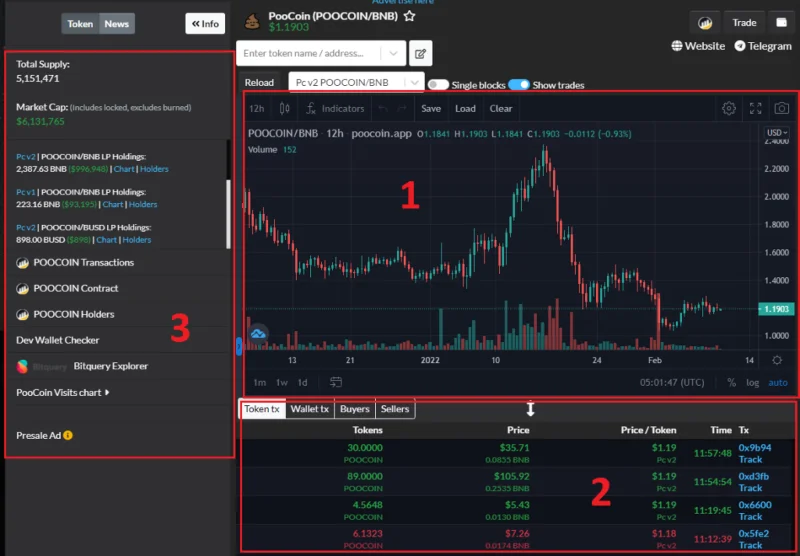
At the chart page, you can monitor and check some important information such as:
- Price chart
- Just made transactions with that coin/token on decentralized exchanges
- Information about market capitalization, total supply, wallet holder... of coin/token
![What is PooCoin? Instructions to buy POOCOIN on PancakeSwap]()
How to check newly released tokens
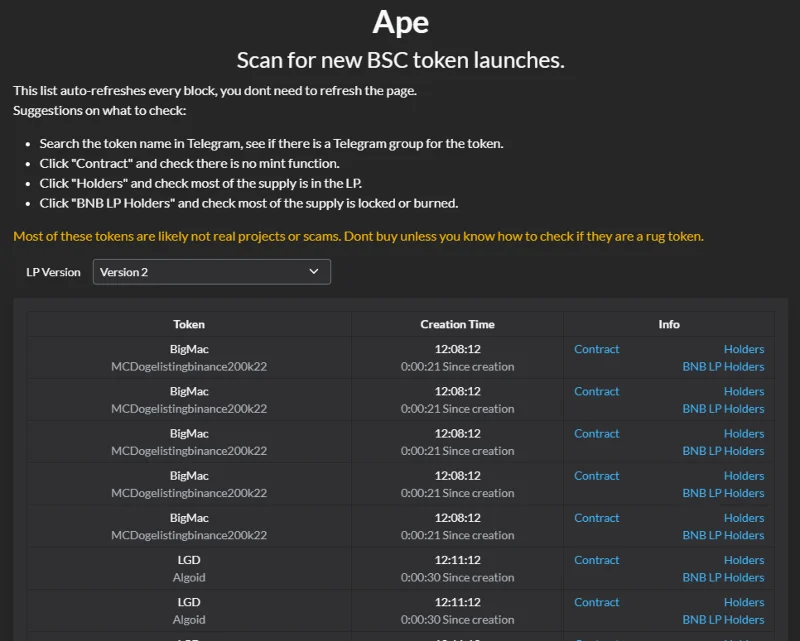
You visit https://poocoin.app/ape to keep track of the list of newly released coins/tokens on the platforms that PooCoin supports.
Data about newly released coins/tokens will be displayed and updated continuously in real time. The basic information that PooCoin provides includes:
- Token : Name and ticker of the coin/token
- Creation Time : Time coin/token was released
- Info : Includes information about the contract, number of holders and BNB LP Holder
![What is PooCoin? Instructions to buy POOCOIN on PancakeSwap]()
Hunting and buying coins/tokens when they are just released can help you increase your profits very quickly and quickly if the token really has potential. On the contrary, you can also lose your money when buying fraudulent coins / tokens, impersonating when a day there are thousands of new coins released continuously.
summary
Above is information about PooCoin and POOCOIN token. Currently, PooCoin is the most used platform when participating in trading coins / tokens on the BNB Chain platform. In addition to tracking the price chart, PooCoin also provides other useful features to users such as direct trading of the coin/token that the user is following right away without having to switch to decentralized exchanges, If you are a venture capitalist who regularly invests in “junk” coins, then PooCoin is a place to go. you join and experience.