Airdrop scams have not become safe simply because wallets and block explorers have better warnings. Current 2026 documentation makes the limits of those protections unusually clear. Etherscan’s March 2026 contract-code guidance distinguishes an “Exact Match” verification from a safety judgment: verified source code can show that published code matches deployed bytecode, but it does not certify that the contract is trustworthy. MetaMask’s current security-alert documentation likewise says transaction simulation can improve warnings without guaranteeing that every threat will be detected. Ledger’s Clear Signing documentation, updated September 1, 2026, emphasizes reading the actual transaction intent rather than approving opaque data.
That leads to a durable rule for airdrop claims: do not decide whether a claim is legitimate from a logo, token name, blue check, search result, or “verified” label alone. Verify the exact website, network, contract address, and permission you are being asked to authorize. The checklist below is designed for that job.
First, understand what a wallet drainer actually needs from you
A wallet drainer is malicious software, a website, or a smart-contract flow designed to make a user authorize asset theft. Simply seeing a suspicious token or NFT in a wallet does not normally give the sender control of your funds. The dangerous step is usually an action you take afterward: entering a recovery phrase, signing a transaction, granting a token allowance, approving an NFT operator, or signing a message that can be used as an authorization.
An approval is permission for another address or contract to spend a token on your behalf. An allowance is the amount covered by that permission. For NFTs, functions such as setApprovalForAll can authorize an operator across an entire collection. Some token standards and systems also support signed permits, meaning a signature can create spend authority without you first sending a normal approval transaction.
This is why “I did not send any coins” is not a sufficient safety test. You need to ask what authority the signature creates.
Airdrop claim safety checklist
1. Start from a first-party announcement, then copy the exact contract address
Do not begin with a sponsored search result, an unsolicited direct message, a reply under a social post, or a token that appeared unexpectedly in your wallet. Begin from a project’s known official website or documentation and navigate to its airdrop announcement from there. If the project publishes a claim contract, distributor address, token contract, supported chain, or claim period, record those details before connecting a wallet.
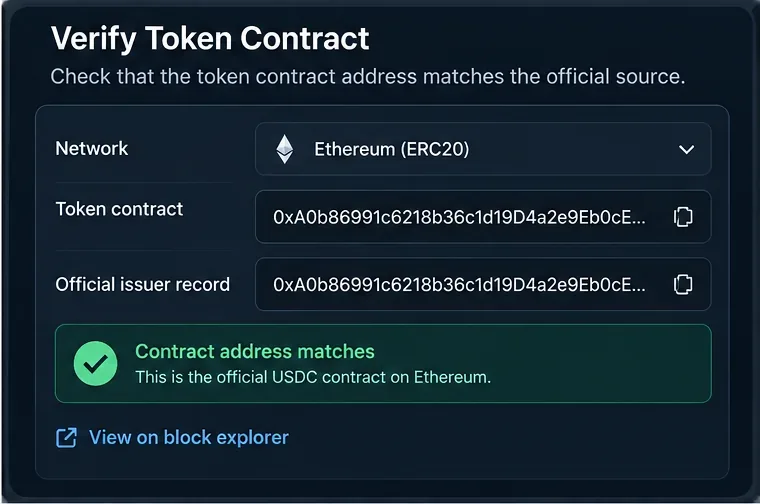
A critical distinction is that the token contract and the claim contract may be different addresses. A real token address does not prove that the contract your wallet is about to call is the official distributor. Compare the actual destination shown by your wallet with the address the project itself publishes.
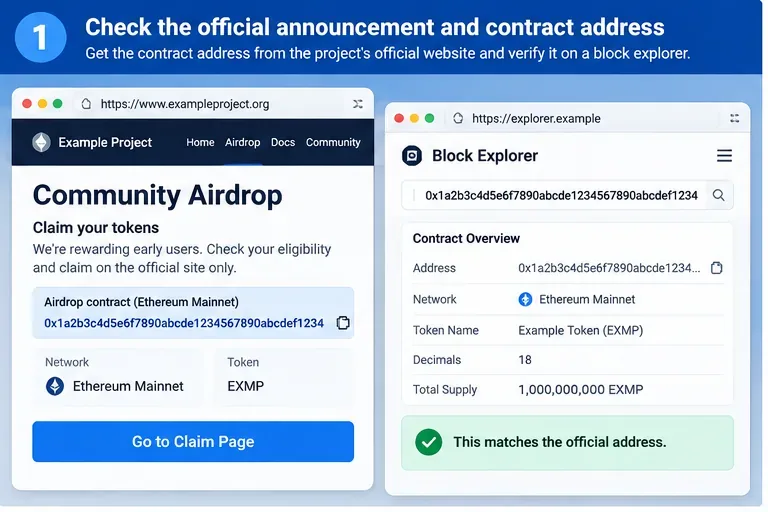
Caption: Before connecting a wallet, copy the claim address from the project’s first-party announcement and compare the complete address on the correct network.
MetaMask’s airdrop scam guidance specifically warns that unexpected airdropped assets can direct users toward fraudulent websites and recommends checking the issuing contract against the legitimate contract. It also stresses that a recovery phrase should never be entered into a claim site.
2. Verify the network and the complete address, not the first and last four characters
Addresses can look deceptively similar at a glance. Compare the full address using copy-and-paste, and verify the chain at the same time. An Ethereum address and an address on another EVM-compatible network may use the same hexadecimal format, yet refer to different deployments and different application state.
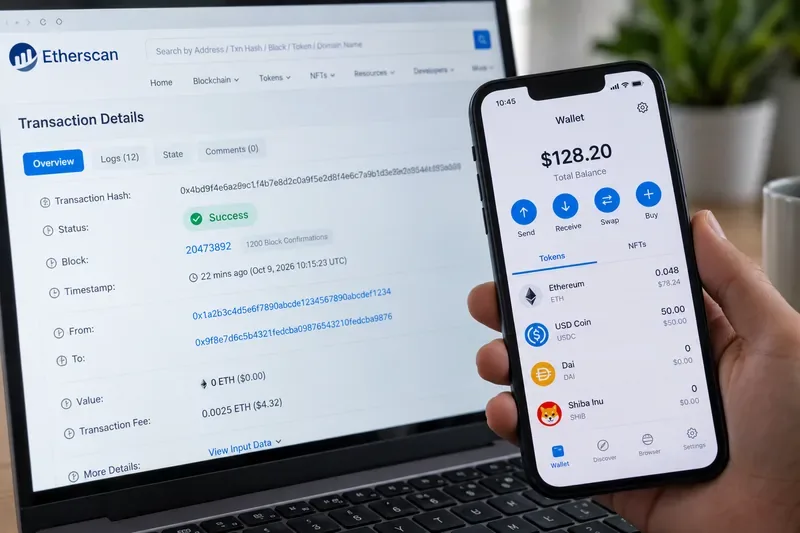
Use the block explorer linked by the project or the explorer native to the relevant chain. On Ethereum, Etherscan describes a contract page as showing the contract creator, transaction history, verified source code when available, and proxy information when detected. These are useful facts, but they are evidence to inspect rather than a security certificate.
3. Read the contract page with the right expectations
Source-code verification is valuable because it lets anyone compare human-readable source with deployed bytecode. According to Etherscan’s contract-code guide, an Exact Match means the published source corresponds to the deployed code. Etherscan separately cautions that source-code verification does not imply that a contract is safe to interact with.
Check at least these fields:
- Address: it must exactly match the project’s first-party documentation.
- Network: it must be the chain specified for the claim.
- Contract creator: useful supporting context, especially when the project publishes its deployer, but not proof on its own.
- Source verification: useful for transparency, not a guarantee of benign logic.
- Proxy status: if the contract is upgradeable, note whether the explorer identifies a proxy and implementation. The address users interact with may be the proxy, so do not replace the published claim address with an implementation address unless the project explicitly tells you to.
- Recent activity: unexpected method calls or a newly created look-alike contract are reasons to investigate further, not automatic proof of fraud.
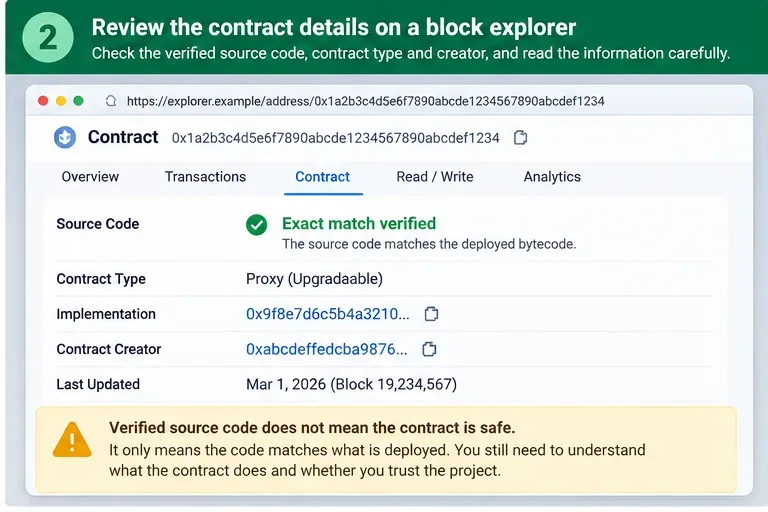
Caption: A verified contract page provides useful evidence about deployed code and proxy structure, but verification alone does not establish that an airdrop claim is legitimate.
4. Treat the wallet confirmation screen as the final security boundary
Even after the website and contract appear correct, read the wallet request itself. Ask a simple question: Does this permission make sense for receiving the advertised airdrop?
A straightforward claim often involves calling a claim or distribution function and paying network gas. Be suspicious when a claim unexpectedly asks to approve spending of assets you already own, particularly stablecoins, liquid tokens, or entire NFT collections. An unlimited ERC-20 allowance or setApprovalForAll is especially important to review because it can grant much broader authority than a one-time claim needs.
There are legitimate applications that use broad allowances for convenience. That fact does not make a broad allowance appropriate for an unrelated airdrop. If the permission is not clearly necessary and documented by the project, reject the request and investigate before proceeding.
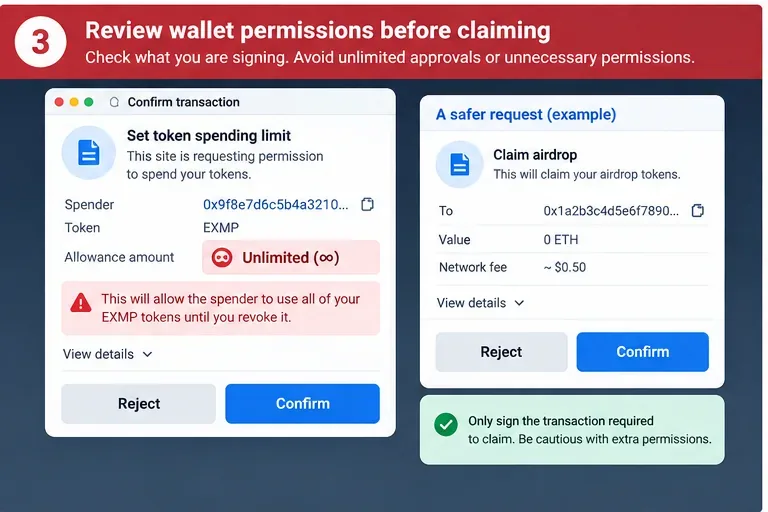
Caption: Compare the requested permission with the action you intended. A surprise unlimited spending allowance during a simple claim deserves an immediate stop and review.
MetaMask explains in its token-approval documentation that allowances can permit a dapp to move specified tokens and that unlimited approvals increase exposure if a contract or site is malicious. Its current wallet interface can also let users set spending caps for applicable approvals.
5. Do not confuse “Connect” with “Sign” or “Approve”
Connecting a wallet to a site normally lets the site learn which public account you selected and request interactions. That is different from signing an approval or transaction that changes on-chain permissions. Disconnecting a site later also does not revoke an on-chain token allowance that you already granted.
Pause whenever the flow changes from “Connect wallet” to “Sign,” “Approve,” “Permit,” “Set spending cap,” or “Confirm.” Read the displayed spender, contract, asset, amount, network, and requested operation. If the wallet cannot decode the request into something you can understand, that uncertainty is itself a reason not to rush.
Hardware-wallet users should also verify details on the trusted device screen rather than relying solely on the browser. Ledger describes Clear Signing as a way to translate encoded transaction data into human-readable intent. Availability depends on the wallet, signer, application, and protocol metadata, so a readable display is an additional control, not proof that the site is legitimate.
6. Use security warnings, but do not outsource the decision to them
Wallet threat detection can catch known phishing domains and malicious contracts. As of September 2026, MetaMask says its security alerts are enabled by default in Extension and Mobile, use on-chain and ecosystem threat signals, and can simulate transactions or signature requests. It also states that simulations do not guarantee detection of every threat.
That means the correct interpretation is asymmetric: a strong “Malicious” warning is a reason to stop; the absence of a warning is not a reason to skip verification. See MetaMask’s security alerts documentation for the current behavior and supported networks.
7. Never type a seed phrase or private key into an airdrop page
A legitimate claim application does not need your Secret Recovery Phrase, seed phrase, or private key. Those secrets control the wallet itself. A website asking for them is not performing a normal blockchain claim.
Do not enter them into a support form, “wallet synchronization” page, browser pop-up, verification page, or direct message. If a recovery phrase or private key has already been exposed, treat the wallet as compromised rather than merely disconnected from one website.
8. After the claim, review and remove permissions you no longer need
Claiming successfully does not automatically remove earlier approvals. Review token and NFT permissions after interacting with unfamiliar applications, especially if the flow included approvals you did not expect. Revocation is an on-chain action and therefore usually requires a network fee.
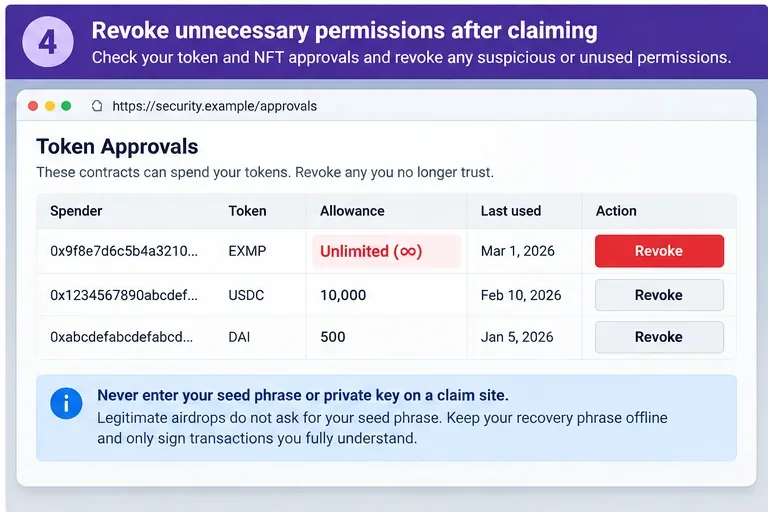
Caption: After a claim, review active token and NFT permissions and revoke suspicious or unnecessary access using a trusted wallet or explorer tool.
For Ethereum, ethereum.org’s scam help page points users to approval-checking and revocation options, including Etherscan’s Token Approval Checker. Prefer a revocation path reached from your wallet, the official explorer, or another source you have independently verified; a fake “revoke” page can itself be a phishing trap.
Fast decision table: official claim or possible drainer?
| What you see | What it means | What to do |
|---|
| Contract address exactly matches the project’s first-party announcement | Strong identity evidence, but not a complete safety guarantee | Continue to inspect the wallet request |
| Verified source code on a block explorer | Published source matches deployed bytecode under the explorer’s verification rules | Use it as transparency evidence, not a safety badge |
| Different contract address from the official claim page | You may be interacting with another deployment or an impersonator | Stop until the discrepancy is explained by a first-party source |
| Claim asks for unlimited access to an unrelated valuable token | Permission is broader than the stated purpose appears to require | Reject and investigate |
Claim asks for setApprovalForAll over an NFT collection | The operator could potentially move NFTs covered by that approval | Reject unless the exact need is clearly documented and understood |
| Wallet shows a malicious-site or malicious-address alert | Threat-detection systems found high-confidence risk signals | Do not connect or sign; leave the site |
| No wallet warning appears | No warning was triggered; it is not proof of safety | Complete the manual checks anyway |
| Website asks for a seed phrase/private key | This is not a normal airdrop-claim requirement | Close the site immediately |
Common mistakes that defeat otherwise good security habits
Searching the token symbol and trusting the first result. Token names and symbols are not unique security identifiers. Use the exact contract address from a first-party source.
Checking only the token contract. The wallet may actually be interacting with a distributor, router, proxy, spender, or permit system. Verify the contract involved in the request, not just the token you hope to receive.
Assuming a verified explorer page equals an audit. Verification makes code inspectable. It does not certify business logic, governance, upgrade keys, or the absence of malicious behavior.
Signing first and planning to revoke later. A malicious spender can act before you revoke. Revocation is damage limitation, not a substitute for checking the authorization before signing.
Using your highest-value wallet for experimental claims. Segregating assets can reduce the amount exposed to a mistaken approval. It does not make a malicious signature safe, but it can limit consequences if the wallet contains little else.
If you already signed something suspicious
First, stop interacting with the site. Record the URL, network, transaction hash, contract address, and what the wallet displayed. Then check active token and NFT approvals from a trusted wallet or official explorer path and revoke suspicious allowances where possible. Remember that disconnecting the site is not the same as revoking on-chain permission.
If you merely connected a public address and signed nothing, your risk is materially different from having granted an allowance or revealed wallet secrets. If you exposed a seed phrase or private key, assume the account credentials are compromised and move remaining assets to a newly created wallet whose recovery material was generated securely and never shared with the old environment.
If funds were stolen, preserve transaction hashes and addresses for reporting. Ethereum.org’s scam-support page lists reporting and approval-review resources. Blockchain transactions are generally irreversible, so documentation helps with reporting and investigation even when recovery cannot be guaranteed.
A 30-second check before you press Claim
- I reached the claim from a first-party project source, not an unsolicited link.
- I confirmed the correct network.
- I compared the complete claim contract address, not just the token symbol or shortened address.
- I checked the block explorer and understand what its verification label does and does not prove.
- I read the wallet’s destination/spender, asset, amount, and requested permission.
- The request does not unexpectedly grant broad access to my existing tokens or NFTs.
- I am not being asked for a seed phrase, private key, or recovery words.
- I will stop if the wallet shows a malicious warning or if the request is unreadable or unexplained.
The safest airdrop claim is not the one with the most badges. It is the one where the first-party announcement, network, contract address, and wallet authorization all tell the same coherent story. If one of those layers disagrees, the appropriate next action is verification—not another click.