หน้าแรก
» ความรู้
»
A Beginner's Guide to Using KuCoin's Peer-to-Peer (P2P) Marketplace
A Beginner's Guide to Using KuCoin's Peer-to-Peer (P2P) Marketplace
KuCoin’s peer-to-peer marketplace lets users buy and sell supported crypto directly with other users while the crypto side of an active P2P order is handled through KuCoin’s order flow. For a beginner, the difficult part is usually not finding the Buy or Sell button; it is knowing which details to verify before money leaves your bank account, when to mark an order as paid, and when it is safe to release crypto.
This practical guide was checked against KuCoin’s official support material on September 16, 2026. Interface labels, available fiat currencies, payment methods, and regional access can change, so treat the screen examples below as orientation aids and follow the live order instructions in your own KuCoin account. KuCoin’s current documentation for P2P is collected in its official P2P Market Help Center.
KuCoin P2P in one minute
Question
Beginner answer
What is P2P?
A marketplace where users trade crypto for fiat with counterparties using supported payment methods.
Do I send fiat through KuCoin?
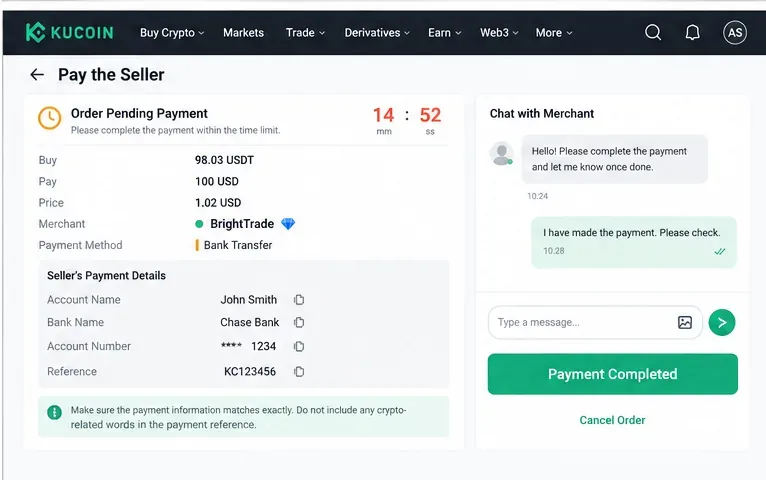
Usually no. For a P2P order, KuCoin shows the counterparty’s payment details, and you complete the fiat transfer through the specified bank or payment service.
What protects the crypto side?
KuCoin says the seller’s relevant assets are frozen for an active buy order until the order is completed or otherwise resolved.
Is P2P risk-free?
No. Fiat-payment fraud, fake payment evidence, chargebacks, third-party transfers, phishing, and disputes can still happen.
What is the safest beginner habit?
Keep communication inside the order, verify names and payment details carefully, and never rely on screenshots or messages as proof that money arrived.
KuCoin’s P2P FAQ describes the service as supporting fiat-to-crypto conversion and says the platform charges zero P2P transaction fees. That does not mean every payment is cost-free: your bank, wallet, payment provider, or currency conversion route may still charge its own fees. Always compare the final amount you will pay or receive rather than looking only at the advertised crypto price. See KuCoin’s P2P FAQ for its current description of the service.
Before your first trade: a short checklist
Use only the official KuCoin site or app and secure your account.
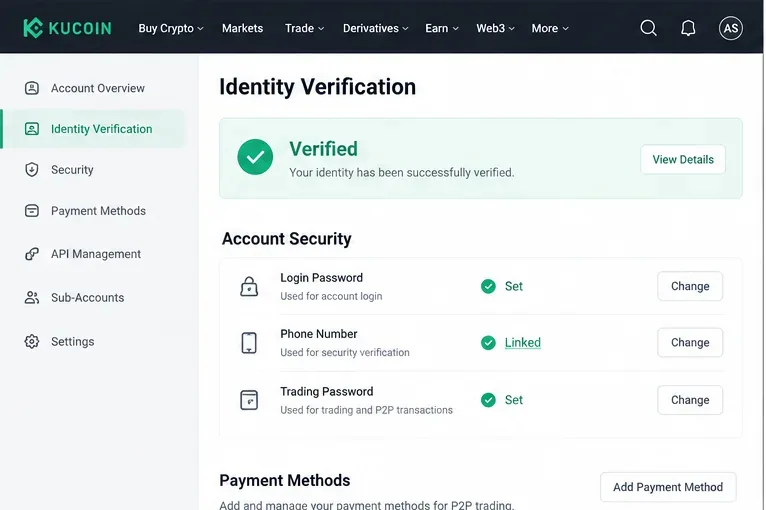
Complete Identity Verification if required for your account. KuCoin states that new users must complete Identity Verification to use its products and services.
Set up the security items KuCoin requests for P2P, including the trading password where applicable.
Add a payment method in your own name. KuCoin warns users not to add payment methods registered to someone else.
Check whether your chosen fiat currency and payment method are available in your region and account.
Start with an amount you can comfortably verify before trying a larger order.
Do the security work before you are staring at a countdown timer. Confirm that Identity Verification is complete, your account security settings are current, and the payment method you intend to use belongs to you. For sellers, this is especially important because the buyer will send fiat to the payment details connected to the order.
Before trading P2P, confirm identity verification and the account-security and payment settings required by your live KuCoin account.
Step 2: Open P2P and choose how you want to trade
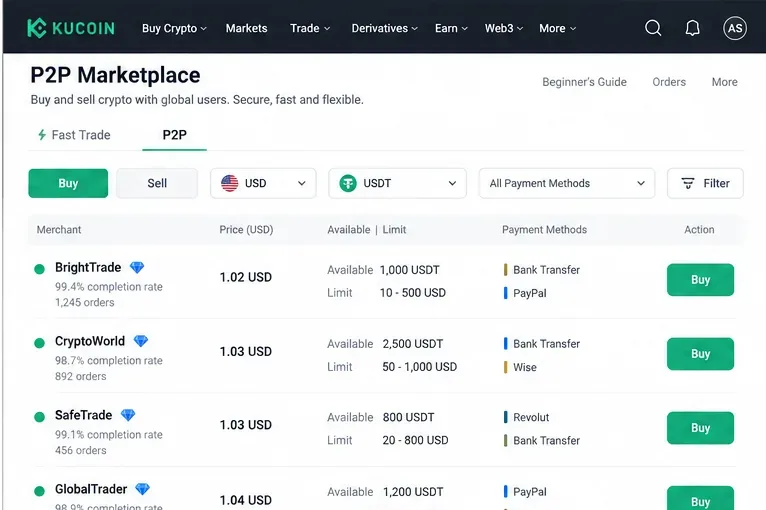
On the website, KuCoin’s official buy guide currently directs users to Buy Crypto → P2P. The marketplace offers a regular P2P area where you can choose an advertisement and a Fast Trade option that can automatically match a counterparty. On the app, navigation can differ by version, and KuCoin also maintains a Lite flow, so use the P2P entry shown in your current interface.
For a first transaction, the regular P2P list is useful because you can compare offers before placing an order. Select the fiat currency and crypto you actually intend to trade, then narrow the list by the payment method you can use.
Use the P2P marketplace filters to narrow offers by side, fiat currency, crypto, payment method, price, and order limits before choosing a counterparty.
Step 3: Evaluate an offer instead of picking the first price
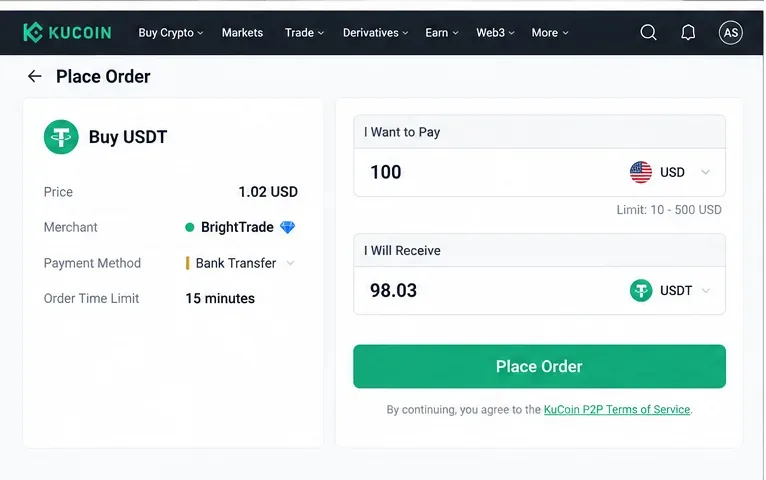
The cheapest-looking price is not the only thing that matters. Check the advertisement’s minimum and maximum order size, supported payment method, available quantity, and the counterparty information displayed by KuCoin. KuCoin’s P2P pages may also show merchant activity or completion information. Compare the total transaction conditions, not just a tiny difference in price.
A beginner should also avoid offers that require a payment method they do not already understand. If a counterparty asks you to abandon the KuCoin order, use a different bank account than the one displayed, communicate on Telegram or WhatsApp, or follow instructions that conflict with the order page, stop. KuCoin’s scam guidance specifically warns against moving P2P communication and transaction details outside the platform.
ทั้งสองวิธีนี้ไม่ได้ทำให้ไม่จำเป็นต้องตรวจสอบคำสั่งซื้อแบบเรียลไทม์ คู่มือการซื้อบนเว็บไซต์ของ KuCoin อธิบายทั้ง Fast Trade และ P2P zone โดยอธิบายว่า Fast Trade จะจับคู่กับคู่ค้าโดยอัตโนมัติ ในขณะที่ P2P zone ให้คุณเลือกข้อเสนอได้ ดูคู่มือการซื้ออย่างเป็นทางการได้ที่เว็บไซต์