Home
» Knowledge
»
Hot Wallets vs. Cold Wallets: Which is Best for Storing Your Crypto?
Hot Wallets vs. Cold Wallets: Which is Best for Storing Your Crypto?
There is no single wallet type that is best for everyone. A hot wallet is usually connected to the internet and is convenient for frequent transactions. A cold wallet keeps the signing keys offline and is generally better suited to assets you do not need to move often. The right choice depends on what you are doing, how much operational risk you can manage, and whether you can protect a recovery backup.
Current guidance from official wallet providers and manufacturers continues to support this basic distinction; it does not turn the choice into a risk-free “hot versus cold” winner. The important question is not only where the wallet is stored, but who controls the keys, how transactions are approved, how recovery is handled, and what happens if a device or backup is lost.
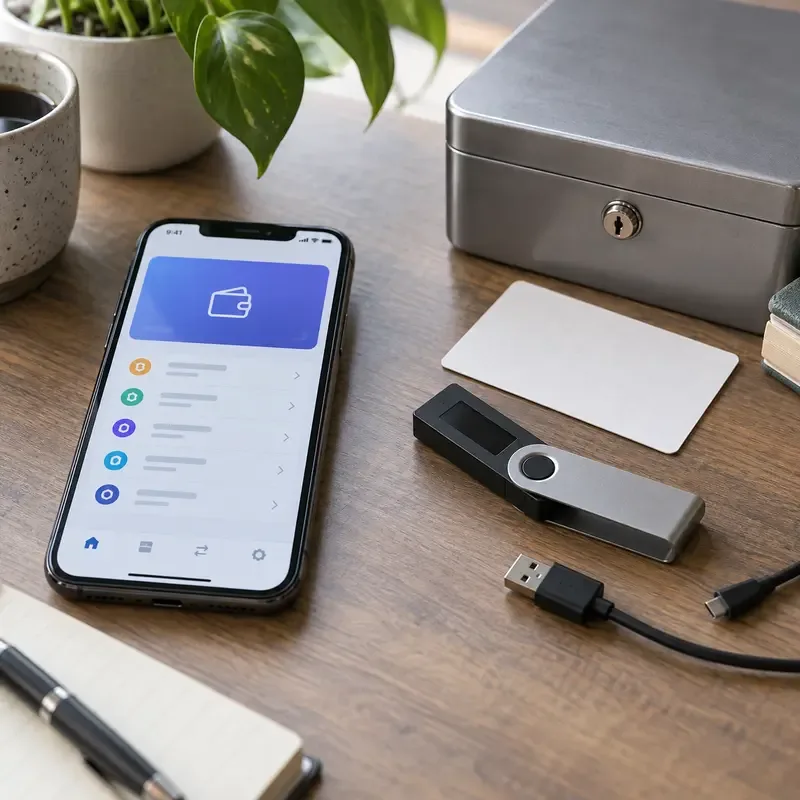
A connected mobile wallet and an offline hardware-wallet setup represent different tradeoffs between access and key isolation.
First, what does a crypto wallet actually store?
Cryptocurrency balances are recorded on blockchains. A self-custodial wallet manages the private keys or key material that can authorize transactions from the associated addresses. It does not contain coins in the same way a physical wallet contains cash. The recovery phrase, also called a seed phrase or Secret Recovery Phrase by some providers, can restore access to the wallet accounts it represents.
Verified: Coinbase explains that a hardware wallet stores private keys rather than the cryptocurrency itself, while MetaMask warns that anyone with a Secret Recovery Phrase or private key can control and move the associated assets. Depends on context: an exchange account may be custodial, meaning the exchange controls the keys on the customer’s behalf; that is different from using a self-custodial hot or cold wallet. Not known from the wallet label alone: whether a particular provider will reimburse a loss, recover a forgotten phrase, or reverse an unauthorized blockchain transaction.
Action: Before comparing devices, write down whether your funds are on a custodial exchange account or in a self-custodial wallet. Then identify where the recovery method is documented. Never paste a seed phrase into this article, a support chat, a website form, cloud notes, or a screenshot.
What is a hot wallet?
A hot wallet is a wallet interface whose key management operates in an internet-connected environment. Common examples include browser extensions, mobile apps, desktop software, and some web-based wallets. Its main advantage is speed: you can connect to decentralized applications, receive funds, swap tokens, sign messages, and send transactions without retrieving a separate offline device each time.
That convenience also creates a larger exposure surface. Malware, malicious browser extensions, phishing pages, fake wallet downloads, unsafe smart-contract approvals, and an unlocked or compromised device can all affect the user’s security. A hot wallet is not automatically unsafe, but it requires continuous attention to the device, websites, permissions, and transaction details.
Verified: MetaMask’s security guidance says users should never share their Secret Recovery Phrase or private keys, should store the recovery phrase offline, and should verify websites and support channels. Depends on context: a hot wallet can be reasonable for a small spending balance, active DeFi use, testing, or assets that must remain immediately accessible. Not known in advance: whether every browser extension, mobile app, dApp, or third-party integration you encounter is genuine and safe.
Action: Keep only the amount you are prepared to expose to your normal online activity in a hot wallet. Use the official download route, update the device, lock the wallet when not in use, and review every transaction and token approval before signing.
What is a cold wallet?
Cold storage means keeping the private keys offline or otherwise isolated from an internet-connected signing environment. A hardware wallet is one common form, but “hardware wallet” and “cold wallet” are not perfect synonyms. A hardware device can be connected to software and used for different activities; the security outcome depends on how the keys are generated, protected, and used.
Cold storage reduces some remote attack paths because the signing key is not normally exposed to the online computer. It does not remove all risks. A person can lose the device, misplace the backup, buy a tampered product, approve a malicious transaction on the device, enter the recovery phrase into a fake app, or leave a copy of the backup where someone else can find it.
Verified: Trezor describes its wallet backup as a list of words that can restore access if a device is lost or damaged, and MetaMask explains that a hardware wallet’s recovery phrase should not be connected to the internet. Depends on context: cold storage is usually more suitable for long-term holdings or funds that do not need frequent access, but it can be inconvenient for active trading and decentralized applications. Not known from the product category alone: whether a specific device’s firmware, supply chain, supported networks, transaction display, and recovery process meet your needs.
Action: If you use cold storage, buy from a manufacturer or authorized channel, initialize it yourself, verify the backup process on the device, and keep the recovery backup offline in a controlled location. Do not photograph or type the phrase into a computer “just to keep a second copy.”
Hot wallet vs. cold wallet: the practical comparison
Factor
Hot wallet
Cold wallet
Internet exposure
Keys are used in an online environment
Keys are intended to remain offline or isolated
Convenience
Fast access for frequent payments and dApps
More deliberate setup and signing steps
Typical fit
Small active balance, spending, testing, DeFi
Long-term holdings and larger amounts not needed daily
Main operational risk
Phishing, malware, fake apps, and unsafe approvals
Lost or exposed backup, device mistakes, and supply-chain concerns
Recovery responsibility
Usually the user in a self-custodial wallet
Usually the user through the recovery backup
This table describes common patterns, not a guarantee. A well-managed hot wallet may be safer for a small, frequently used balance than a cold wallet whose recovery phrase is stored in a cloud account. Conversely, an expensive hardware wallet does not protect funds if the owner approves a malicious transaction or gives the phrase to a fake support agent.
Misconception: “Cold wallets cannot be hacked.”
What is verified: keeping private keys offline can reduce exposure to remote malware and online key theft. That is the core security benefit of cold storage. What depends on circumstances: the user still decides what transaction to approve, where the recovery backup is stored, and which computer or application is used to prepare the transaction. What remains unknown: no article can prove that a particular device, firmware version, seller, or user setup will remain secure forever.
Action: Treat the recovery phrase as the most sensitive asset in the setup. Verify the destination address and transaction details on the hardware device’s own screen, keep firmware and companion software current according to the manufacturer’s instructions, and stop if a website or support person asks for the phrase.
Misconception: “Hot wallets are only for beginners.”
What is verified: hot wallets are useful because they make frequent transactions and application connections easier. Professional users also use online wallets for operational liquidity, testing, and application access. What depends on circumstances: the acceptable balance depends on transaction frequency, personal security practices, the device environment, and the consequences of a loss. What remains unknown: whether the next dApp or token approval a user encounters is trustworthy.
Action: Use separate wallets for separate jobs. Keep a limited “active” wallet for dApps and routine transactions, and keep a different wallet for funds that should not be exposed to experimental contracts. If a hot wallet interacts with a suspicious site, stop using it until you have investigated approvals and exposure.
Misconception: “A hardware wallet is automatically cold storage.”
What is verified: a hardware wallet is a physical key-management device, while cold storage describes how keys are kept offline and how the account is used. Ledger explicitly notes that the terms are not identical and that a hardware wallet may not function as a strictly cold account when it interacts with smart contracts. What depends on circumstances: the actual risk depends on the account, signing workflow, connected software, and contracts used. What remains unknown: a product label alone does not reveal whether a particular setup is isolated enough for your intended use.
Action: Create one account for long-term storage and avoid connecting it to dApps. Use a separate account, even on the same device if the wallet supports it, for active applications. Check that you understand which account is being used before approving a transaction.
Misconception: “The recovery phrase is just a backup password.”
What is verified: the phrase can restore access to the wallet accounts derived from it, and anyone who obtains it may be able to control the associated funds. It is not a customer-service password that a company can safely reset for you. What depends on circumstances: the exact backup format, word count, passphrase option, and supported accounts vary by wallet. What remains unknown: whether a damaged, incomplete, or incorrectly recorded backup can be recovered after the device is gone.
Action: Write the backup exactly as instructed by the wallet, store it offline, protect it from fire, water, theft, and unauthorized access, and test recovery with a small amount before relying on it for significant funds. Do not store the words in a password manager, email, cloud drive, or phone photo unless the specific security model has been carefully evaluated.
Which wallet is best for different use cases?
For frequent spending or active trading
A hot wallet is usually more convenient because transactions are immediately accessible. The tradeoff is that the wallet is exposed to the online environment more often. Consider keeping only a working balance and moving longer-term funds elsewhere.
Action: Set a personal balance limit, enable device security, verify addresses, and keep a written record of which wallet is used for active funds.
For long-term holdings
A cold wallet is often the stronger fit when the primary goal is reducing online exposure and transactions are infrequent. The tradeoff is more responsibility: you must secure the device, recovery backup, PIN, inheritance or access plan, and recovery procedure.
Action: Buy the device through a trusted channel, create the wallet privately, verify the backup, and document a recovery plan without documenting the secret itself.
For DeFi, NFTs, or frequent dApp connections
A hot wallet offers the smoothest interaction, but it should not be treated as a vault. A hardware wallet can add protection for key use, but connecting a high-value account to many contracts can still create approval and transaction risks.
Action: Separate an active dApp account from a storage account, review approvals regularly, and revoke or move assets when an integration is no longer needed.
For a custodial exchange account
An exchange account is a third-party custody arrangement rather than a self-custodial hot or cold wallet. It may be convenient, but you rely on the platform’s security, account controls, withdrawal policies, and continued availability.
Action: Use a unique password, strong account security, withdrawal controls where available, and a plan for moving assets that you intend to hold independently.
A balanced setup is often more realistic than one “best” wallet
For many users, a layered arrangement is easier to manage: a small hot wallet for active use, a separate cold wallet for long-term storage, and only limited funds on a custodial exchange when trading requires it. This does not eliminate risk; it limits the amount exposed to any one mistake and makes each wallet’s purpose clearer.
Verified: official guidance consistently emphasizes protecting private keys and recovery phrases rather than relying only on a device label. Depends on circumstances: the number of wallets, amount held, and level of separation should match your experience and ability to maintain backups. Not known in advance: the safest arrangement cannot be selected from a balance figure alone because the user’s behavior, threat model, jurisdiction, supported networks, and recovery needs also matter.
Action: Make a one-page inventory without secrets: wallet purpose, network, account type, backup location category, and emergency contact or inheritance instructions. Review it after major software, device, or life changes.
Final decision checklist
Choose a hot wallet when immediate access and frequent application use matter more than maximum isolation, and keep the balance limited.
Choose cold storage when long-term key isolation matters more than convenience, and you can protect and recover the backup.
Use separate accounts for long-term storage and dApp activity.
Never share a private key or recovery phrase with support staff, friends, websites, or anyone sending an unsolicited message.
Remember that a wallet cannot protect you from approving a transaction you did not understand.
Check official documentation for supported networks, recovery standards, firmware, and security procedures before transferring funds.
Wallet features, supported networks, firmware, recovery standards, and security recommendations can change. This comparison is educational, not personalized financial or security advice. Before moving funds, read the current documentation for the exact wallet, network, exchange, and application you plan to use.