Home
» Knowledge
»
Insufficient Margin Error in Crypto Futures: What It Means and How to Resolve It
Insufficient Margin Error in Crypto Futures: What It Means and How to Resolve It
An “Insufficient Margin” error means the trading platform cannot reserve enough eligible collateral to support the futures order you are trying to place. For a beginner, the confusing part is that your wallet may still show money in it. The issue is usually not your total wallet balance; it is the amount of available margin that remains after existing positions, open orders, unrealized profit and loss, fees, collateral rules, and the contract’s current margin requirements are taken into account.
This guide explains the terms first, then walks through a practical diagnostic sequence. The exact labels and calculations differ across exchanges and contracts, so always compare this process with the live margin data on your platform. The exchange documentation cited below was checked on September 16, 2026.
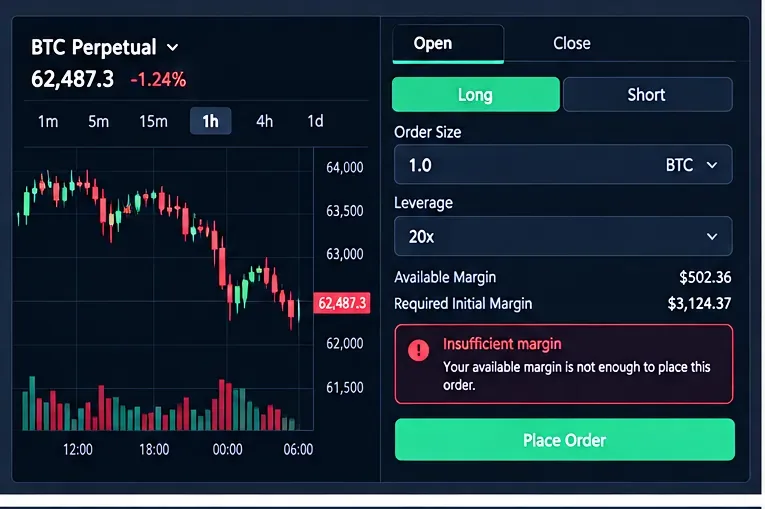
A typical margin rejection: the order requires more initial margin than the account currently has available. The interface is a generic teaching example, not a screenshot from a specific exchange.
What “Insufficient Margin” Means
Margin is collateral set aside to support a leveraged derivatives position. Leverage lets you control a position whose notional value is larger than the collateral committed to it. Leverage magnifies both gains and losses; the U.S. Commodity Futures Trading Commission notes that leveraged futures exposure can amplify market moves and may require traders to add funds or close positions when the market moves against them. See the CFTC advisory on virtual-currency trading risks.
Two margin terms matter immediately:
Initial margin (IM) is the amount required to open or increase a position. Bybit’s current USDT perpetual documentation, for example, defines initial margin as the minimum margin required to open a position and shows a simplified relationship of position value divided by leverage. See Bybit’s initial margin documentation.
Maintenance margin (MM) is the minimum margin needed to keep a position open. If account or position equity falls too close to or below the maintenance requirement, liquidation risk increases. Coinbase similarly defines maintenance margin as the minimum balance needed to keep a futures position open in its derivatives risk-management documentation.
An insufficient-margin message normally appears before a new order is accepted because the platform determines that the remaining eligible margin is below what the new exposure requires. Binance’s futures documentation also distinguishes margin used for existing positions from margin needed for open orders and new orders; its current explanation is available in Binance’s margin-requirement guide.
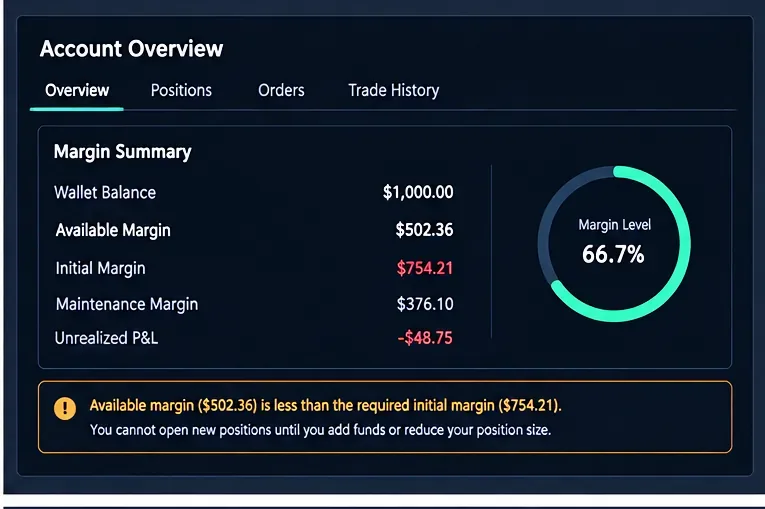
The number to compare with a new order is usually available margin, not simply the headline wallet balance. Unrealized losses and existing commitments can reduce what remains usable.
Before You Change Anything: Check These Four Numbers
When you see the error, do not immediately deposit more money or raise leverage. First identify which variable is causing the shortage.
Available margin: the amount still usable for new exposure.
Required initial margin: the collateral the proposed order would consume under the contract’s current rules.
Open-order margin or funds on hold: collateral reserved by limit, stop, take-profit, or other active orders. Coinbase International Derivatives explicitly notes that funds reserved for open orders are on hold and are not available for other trades; see Coinbase’s perpetual-futures order documentation.
Unrealized P&L and margin ratio: losses can reduce account equity and therefore the buffer available to support additional positions.
How to Resolve the Error, Step by Step
1. Re-check the order size and notional value
Notional value is the economic size of the position before leverage. A very small quantity input error can create a much larger position than intended. Confirm the contract, side, quantity, price, and contract multiplier before changing account settings.
For many linear crypto futures products, required initial margin grows with position value. If the order is larger than you intended, reducing quantity is the cleanest fix because it reduces exposure and margin demand at the same time.
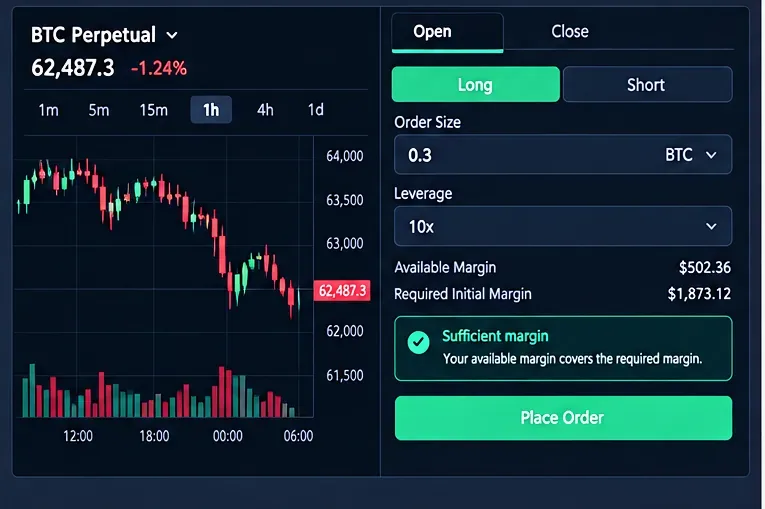
Reducing position size can bring the required initial margin below the available balance. The leverage value shown is illustrative; the key change here is the smaller order size.
2. Cancel stale open orders that are locking margin
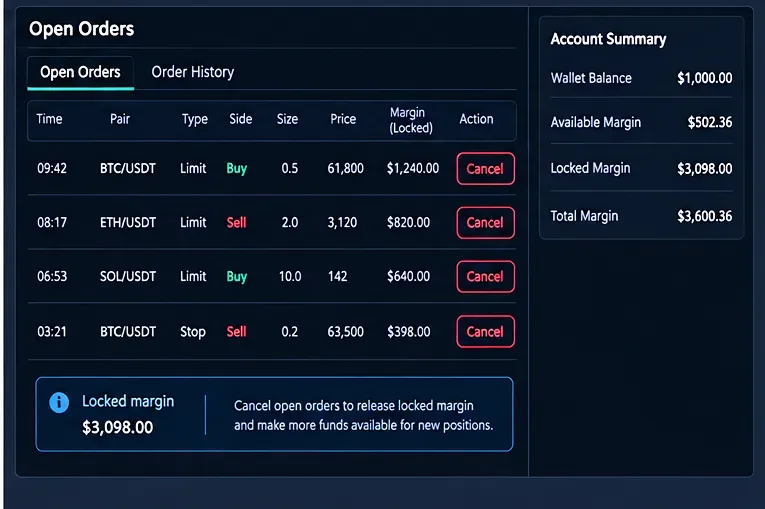
A common beginner surprise is that an order that has not executed can still reserve collateral. Check every open order, including orders on other futures markets in the same collateral pool. Cancel only orders you no longer want. Once released, the platform may make that margin available for new orders.
Open orders can reserve collateral even before they fill. Review stale or duplicate orders and cancel only those you no longer need.
3. Confirm the funds are in the correct derivatives wallet or collateral pool
Some platforms separate spot balances from derivatives balances, while others use unified portfolios with eligibility or collateral-haircut rules. A healthy spot-wallet balance therefore does not always mean the same amount is available to a futures order. Transfer funds only if your exchange requires a separate derivatives balance or if the asset is eligible collateral under the account mode you use.
For example, Coinbase’s U.S. futures documentation explains that its system checks buying power against the initial margin requirement before an order and may hold funds for futures margin. See Coinbase’s cash-balance and futures-margin documentation.
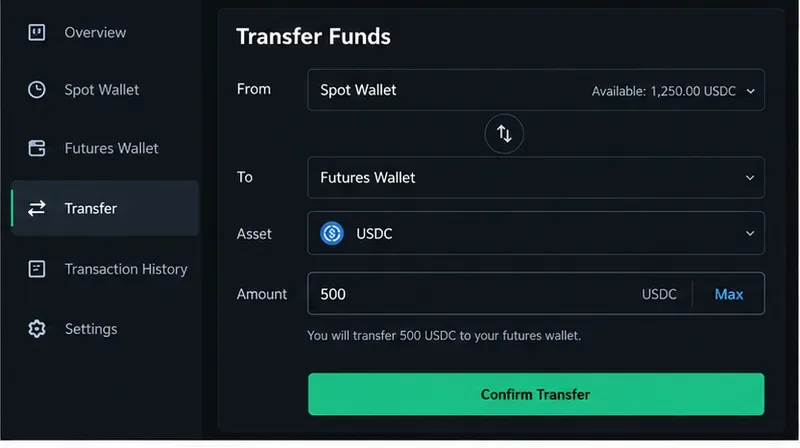
If your platform uses separate balances, transfer eligible collateral to the futures account before retrying. Menu names and supported assets vary by exchange.
4. If you already have an isolated-margin position, consider whether adding margin is appropriate
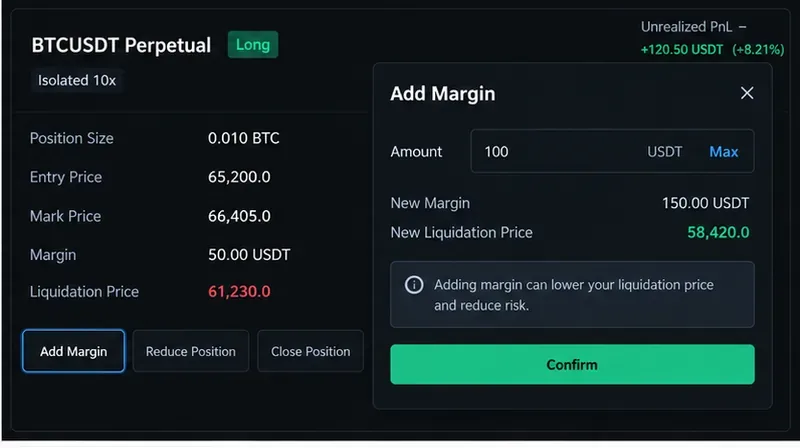
Isolated margin assigns collateral to a specific position rather than sharing one collateral pool across all positions. If the problem is an existing isolated position that is near its maintenance requirement, adding margin can widen its liquidation buffer. However, this is different from fixing a new-order rejection: adding margin to one isolated position may not increase the free balance available elsewhere.
Coinbase International Derivatives describes cross and isolated margin separately, and its margin-management documentation provides a workflow for adding margin to a position. See Coinbase’s margin-types guide and margin-management guide.
Adding margin to an isolated position can increase that position’s buffer, but it is not automatically the same as increasing free margin for a separate new order.
5. Check the contract’s current risk tier and margin schedule
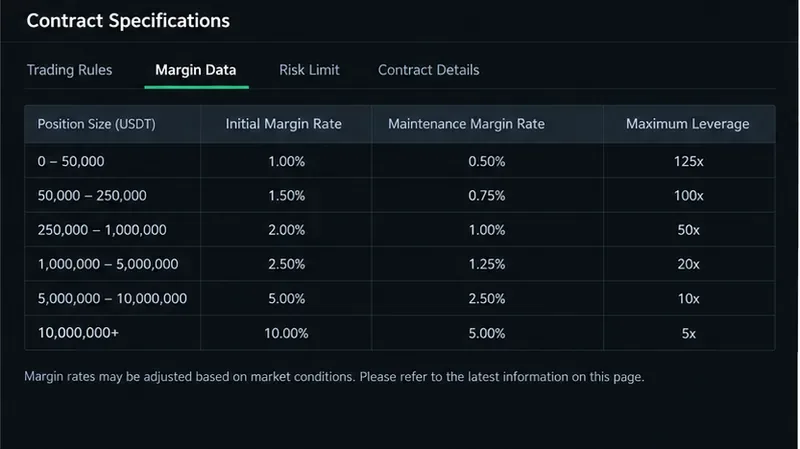
Margin requirements are not always fixed. Larger position values may move into higher risk tiers with higher initial or maintenance requirements. Exchanges can also adjust margin parameters as volatility or market conditions change. Bybit states that larger contract values can reduce maximum allowable leverage and increase margin requirements through its risk-limit system. See Bybit’s risk-limit documentation.
Regulated futures venues may also apply different intraday and overnight requirements. Kraken Derivatives US, for example, says contract specifications display intraday and initial margin levels and that risk teams may adjust intraday margins when market conditions require it. See Kraken’s U.S. futures margin guide.
Risk-tier tables are contract-specific and can change. This generic illustration shows what to look for; use the live margin data published by your own exchange rather than the sample percentages shown here.
6. Understand what changing leverage actually does
This is where many beginners make the wrong move. On products where initial margin is approximately position value divided by leverage, higher leverage can reduce the initial margin required for the same notional position. That can make an order pass the initial-margin check, but it also means less collateral supports the same market exposure and the position is generally more sensitive to adverse moves.
So “increase leverage until the error disappears” is not a safe default troubleshooting rule. If the intended position is too large for the capital you want to risk, reducing position size is usually the more direct way to solve the mismatch. Coinbase’s leverage documentation emphasizes that leverage magnifies both profits and losses and that margin requirements can change by contract or trading session; see Coinbase’s futures leverage and margin guide.
7. Account for fees, funding, unrealized losses, and collateral haircuts
Your manual calculation may say the order should fit while the platform still rejects it. The difference can come from exchange-specific buffers and adjustments. Depending on the venue and product, relevant items can include estimated closing fees, unrealized losses, funding debits, collateral conversion values, or haircuts applied to non-cash collateral.
Bybit, for example, notes that the initial margin displayed for certain USDT perpetual and expiry positions can include an estimated taker fee for closing the position. This is one reason you should use the exchange’s live “required margin” value rather than relying only on a simple calculator.
8. Retry only after the margin buffer is clearly positive
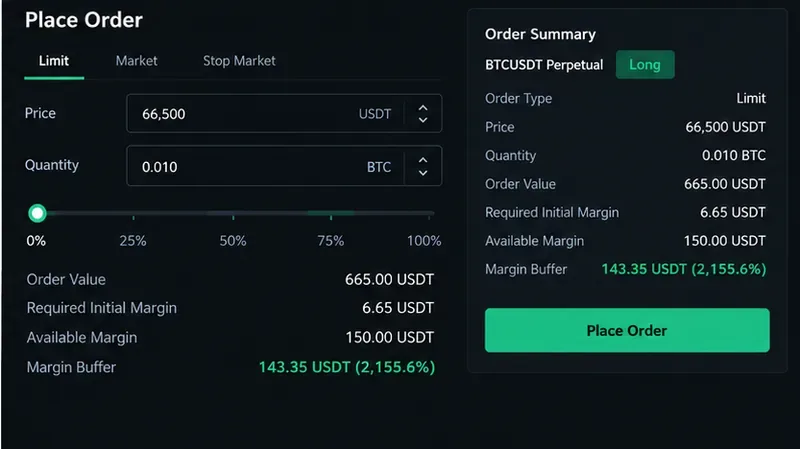
After making the necessary change, re-check the order preview. Confirm that available margin comfortably exceeds the required initial margin and that placing the order will not leave the account immediately close to its maintenance threshold. A trade that barely passes an initial-margin check can still have poor resilience to fees, mark-price movement, or a margin-rule change.
Before submitting again, confirm the order preview shows a meaningful positive margin buffer, not merely a barely passing balance.
Quick Diagnostic Table
What you see
Likely cause
First thing to check
Wallet has funds, but order is rejected
Funds are not available margin
Open positions, open orders, collateral eligibility, wallet/account mode
Error appears only when quantity is increased
Initial margin rises with position size or risk tier
Fees, tiering, mark price, haircuts, or platform buffers
Live order preview and contract documentation
Mistakes to Avoid
Using total wallet balance instead of available margin
Total equity can include funds already committed to positions or orders. Always use the platform’s available-margin or buying-power figure for the new order.
Raising leverage without reducing risk
Higher leverage may reduce the initial collateral required for the same notional exposure, but it does not make the underlying position smaller. The loss on a given market move is tied to the exposure, not to the fact that less margin was posted.
Adding funds without finding the real cause
If stale orders are locking margin or the quantity was entered incorrectly, adding collateral treats the symptom rather than the error. Diagnose first.
Ignoring maintenance margin because the order passed
Initial margin gets you into the position; maintenance margin determines how much buffer remains before liquidation pressure. A successful order submission is not evidence that the position is conservatively funded.
Assuming margin rules never change
Exchanges may update risk tiers, maximum leverage, or margin requirements. Check the current contract specification rather than relying on an old screenshot, calculator, or remembered percentage.
A Simple Example
Suppose you want a futures position with a notional value of $10,000. If the applicable initial margin rate is effectively 10%, the position requires about $1,000 of initial margin before exchange-specific fees or buffers. If your account shows $1,500 in total equity but $700 is already committed to open positions and orders, only about $800 may remain available. The platform can reject the new trade even though the headline account value is greater than $1,000.
You could resolve the mismatch by reducing the order’s notional size, freeing collateral from unwanted orders, or adding eligible collateral. Changing leverage may also alter the initial-margin calculation on some products, but that should be treated as a risk decision, not merely as an error-clearing trick.
How to Know You Actually Fixed the Problem
Before you submit the order again, confirm all of the following:
The symbol, side, quantity, and contract type are correct.
The exchange’s displayed required initial margin is below your available margin.
You understand which open orders and positions are consuming collateral.
The remaining buffer is large enough for normal price movement, fees, and any known session-based margin changes.
Your liquidation or margin-ratio indicator is not already close to the platform’s danger threshold.
You have checked the current contract specifications rather than relying on a static rule from another exchange.
If those checks pass and the platform still shows “Insufficient Margin,” consult the exchange’s current support documentation or support team with the exact contract, account mode, order type, required margin, and available margin values. Margin engines differ, and without those details it is not possible to diagnose every rejection from the error message alone.
Bottom Line
“Insufficient Margin” is best read as a balance-sheet constraint, not simply as “you do not have enough crypto.” The platform is telling you that the collateral it considers available cannot support the new futures exposure under the contract’s current rules. Start by checking order size, available margin, locked funds, current positions, and the live margin schedule. Reduce unwanted exposure or free collateral before considering more aggressive leverage. That approach fixes the immediate order problem while keeping the more important issue—liquidation risk—in view.
Risk note: Crypto futures and perpetual contracts are high-risk leveraged products. Rules, product availability, margin models, and investor protections vary by jurisdiction and venue. This article is educational and does not provide individualized investment advice.