Updated September 14, 2026. Revoking old smart contract permissions is one of the simplest ways to reduce unnecessary wallet exposure, but a good result is more specific than “I disconnected some dapps.” When you finish this process, you should know which contracts can still spend your tokens, which permissions you intentionally kept, and which approvals have been reduced to zero or otherwise invalidated on the correct blockchain.
This guide focuses on that outcome. It covers ERC-20 token allowances, NFT operator approvals, Permit2 permissions, the tools that can help you inspect them, and the situations where revoking is not enough. It does not promise that revocation makes a wallet fully secure: key compromise, malicious signatures, protocol exploits, and already-confirmed transfers require different responses.
What Success Looks Like
| Goal | Good Evidence | When to Change Approach |
|---|
| Remove an ERC-20 allowance | The revocation transaction is confirmed and the allowance reads 0. | If the approval reappears, confirm the chain, spender address, token contract, and whether another permission system such as Permit2 is involved. |
| Remove an NFT operator approval | The operator is no longer approved for all NFTs in that collection, or the specific token approval is cleared. | If the approval checker cannot detect a non-standard NFT contract, inspect the collection contract directly or use its official interface. |
| Reduce future exposure | Unused and unlimited allowances are removed or limited; active permissions are intentional. | If a workflow repeatedly requires broad permissions, consider a separate activity wallet or a dapp that supports narrower limits. |
| Respond to a compromised wallet | Assets and future activity are moved to a new wallet whose keys are not compromised. | Do not rely on revocation alone if the seed phrase or private key is exposed. |
First, Understand What You Are Revoking
Under the ERC-20 standard, the approve function lets a token holder authorize a spender to withdraw up to a specified amount, while transferFrom allows an authorized spender to move tokens. The official standard is available in ERC-20: Token Standard.
NFT permissions can be broader. ERC-721 defines setApprovalForAll, which can authorize an operator to manage all of an owner’s NFTs for that collection. See ERC-721: Non-Fungible Token Standard.
Important distinction: connecting a wallet to a website is not the same as granting an on-chain token allowance. MetaMask explicitly states that disconnecting a dapp does not revoke token approvals that already exist. Hiding a token in a wallet interface also does not change its allowances.
Target result: identify on-chain spending authority, not merely connected websites. If your only action was “Disconnect,” continue with an approval checker.
Reference: MetaMask: How to revoke smart contract allowances/token approvals.
Step 1: Inventory Permissions Before You Revoke Anything
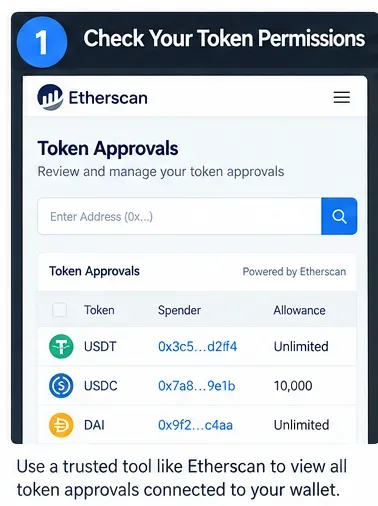
Caption: Start with an inventory of token, spender, and allowance. An “Unlimited” entry deserves review, but it is not automatically malicious.
Use an approval checker to see which spenders currently have authority over your assets. Three useful options are:
- Etherscan Token Approval Checker: useful for Ethereum addresses and separates ERC-20, ERC-721, and ERC-1155 approvals. Etherscan says you can inspect an address without connecting a wallet, then connect only when you want to submit a revocation. See Etherscan Token Approvals.
- MetaMask Portfolio: its spending-cap management feature supports Ethereum Mainnet, Polygon, BNB Chain, Optimism, and Base as documented when this article was updated. See MetaMask Portfolio spending caps.
- Revoke.cash: provides a multi-network approval checker and educational material covering regular approvals, permit signatures, and Permit2. See Revoke.cash approval documentation.
How to judge the result: your inventory should show the token or NFT collection, spender/operator address, network, and current permission. Save unfamiliar spender addresses for investigation before signing anything.
When to switch tools: if one checker does not support your network or a non-standard token does not appear, use that chain’s trusted block explorer or inspect the token contract directly. No single indexer can guarantee complete visibility for every non-standard contract.
Step 2: Decide What Should Stay and What Should Go
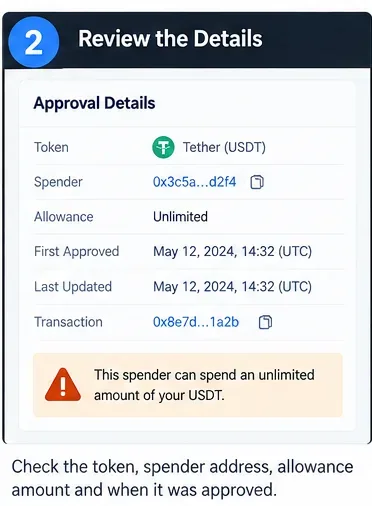
Caption: Review each approval in context: the asset, spender, amount, network, and whether you still use the underlying application.
Do not revoke mechanically. An approval is a capability, and some active dapp functions depend on it. Revoke.cash notes, for example, that revoking an approval does not remove already deposited or staked tokens, but you may need to approve again before adding more. Some marketplace listings also depend on active NFT approvals.
A practical priority order is:
- Unknown or suspicious spenders.
- Approvals connected to phishing incidents or abandoned dapps.
- Unlimited allowances you no longer need.
- Old approvals for protocols you stopped using.
- Broad NFT operator approvals with no active purpose.
Quality signal: every permission you keep should have a reason. “I recognize the protocol and still need this spender for an active position” is a reason. “I probably approved it sometime” is not.
When not to revoke immediately: if a permission supports an active listing, automation, subscription-like workflow, or smart-account policy, first understand the operational effect. Security improves when you remove unnecessary authority, not when you break needed workflows without understanding them.
Step 3: Use a Trusted Revocation Path
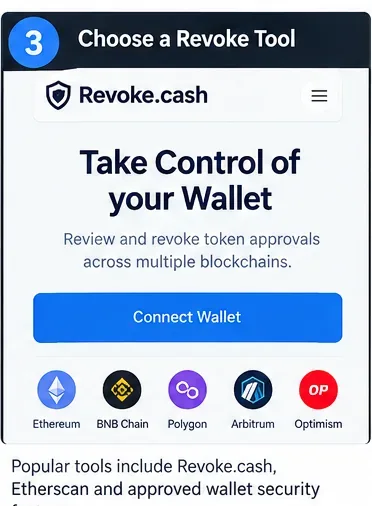
Caption: Use an official wallet feature, a reputable approval checker, or the network’s established explorer; verify the domain before connecting.
Revocation is normally an on-chain state change. MetaMask states that revoking an allowance requires an on-chain transaction, so network gas is generally required. Etherscan likewise provides a “Revoke” action for listed approvals.
For most users, the lowest-friction choices are the wallet’s own approval-management feature, the chain’s established explorer, or a specialized service such as Revoke.cash. None should require your seed phrase or private key.
Target result: the transaction you are about to sign should reduce or remove an existing permission—not grant a new spender unexpected authority.
Stop condition: if a website asks for your seed phrase, private key, remote-control access, or an unrelated transfer to “activate” revocation, stop. Navigate to the tool from an independently verified official source instead of a search advertisement or unsolicited message.
Step 4: Connect Only the Account and Network You Need
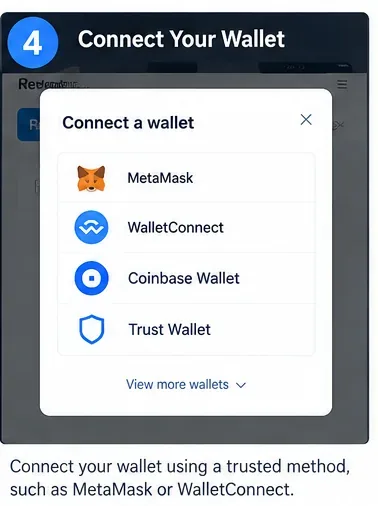
Caption: Connecting is only the interface step. The actual revocation takes effect when the appropriate on-chain transaction is confirmed.
Wallet connection lets the site request account information and propose actions, but connecting by itself is not the revocation. Etherscan’s current wallet guidance says connecting does not automatically sign anything; signatures and transactions still require wallet approval.
Target result: confirm that the selected wallet address and blockchain match the approval you intend to remove.
When to change approach: if the tool switches you to an unexpected chain or displays a different address, cancel before signing. An approval is network-specific; revoking something on one chain does not revoke a separate approval on another chain.
Reference: Etherscan: Connecting Your Wallet.
Step 5: Revoke or Reduce the Permission You No Longer Need
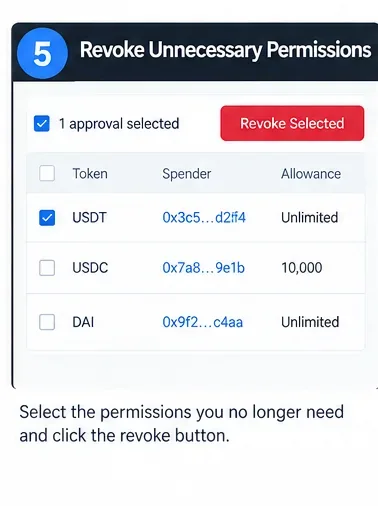
Caption: Remove the minimum set of permissions needed to reach your security goal; you do not have to revoke every legitimate allowance at once.
For a standard ERC-20 allowance, revocation generally means setting the spender’s allowance to zero. For ERC-721 operator access, revocation generally changes the operator approval to false. Revoke.cash explains that the same approval functions are commonly used for granting and revoking; the value changes to zero or false.
Quality signal: the transaction preview identifies the token contract and the permission being changed. If your wallet provides decoded transaction information, read it rather than approving from habit.
Limit: a revocation does not reverse transfers that already happened. It also does not recover stolen funds. Revoke.cash describes its service as preventative rather than a recovery tool.
Reference: Revoke.cash FAQ.
Step 6: Review the Wallet Confirmation Before Signing
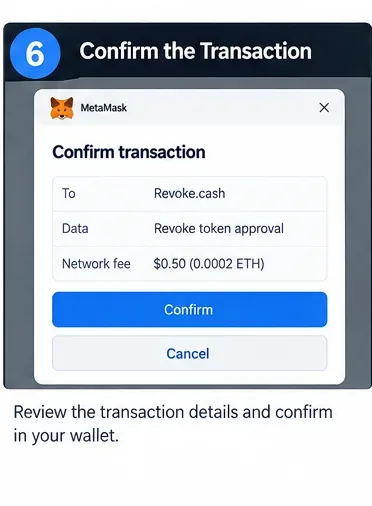
Caption: Before confirming, verify the account, network, contract interaction, and expected gas fee.
The final wallet confirmation is your opportunity to catch an incorrect chain, account, spender, or transaction type. Gas varies by network conditions, so a fixed dollar fee should not be expected.
Target result: the pending transaction corresponds to the intended permission change and is sent from the correct wallet.
When to stop: cancel if the transaction unexpectedly transfers assets, approves a different spender, calls an unrelated contract, or contains details you cannot reconcile with the action you chose. A safe workflow favors verification over speed.
Step 7: Verify On-Chain—Do Not Stop at “Transaction Submitted”
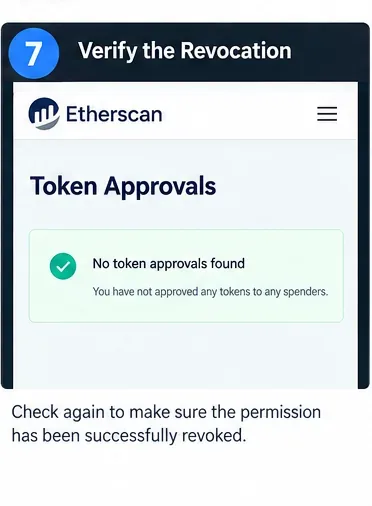
Caption: Re-open the approval checker after confirmation and verify that the allowance is zero, expired, false, or otherwise no longer active.
A submitted transaction can fail, remain pending, or be replaced. The security outcome is reached only when the relevant permission state has actually changed.
Success indicators:
- For ERC-20, the spender allowance is 0 or the intentionally reduced amount.
- For ERC-721 operator access,
isApprovedForAll is false for the operator you removed.
- The revocation transaction has confirmed on the intended chain.
- The approval checker refreshes to show the new state.
When to investigate further: if a permission still appears after a confirmed transaction, compare the spender address and token contract carefully. You may have revoked one allowance while another spender, proxy, operator, or Permit2 permission remains active.
Step 8: Review Permit2, Permit Signatures, and Your Ongoing Permission Policy
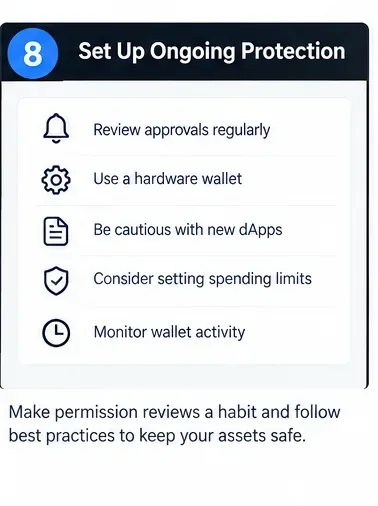
Caption: Ongoing wallet hygiene means reviewing permissions periodically and granting narrower authority when the application supports it.
Regular ERC-20 approvals are not the whole picture. Uniswap’s Permit2 system allows users to approve the Permit2 contract at the token level and then grant spender permissions through Permit2. Its official interface includes allowance amount, expiration, nonce invalidation, and a lockdown function that can set selected allowances back to zero. See the official Uniswap Permit2 repository.
Permit signatures add another complication: some permissions are authorized through signed messages rather than immediately recorded as ordinary token allowances. Revoke.cash notes that off-chain permit signatures cannot simply be enumerated from the chain in the same way as standard approvals; invalidating relevant nonces or token-specific permit state may be necessary when you know you signed a malicious permit.
Target result: after reviewing normal allowances, also ask whether you have used Permit2 or signed a permit-style message on an untrusted site.
When to change approach: if you suspect a malicious signature but cannot identify its exact form, stop interacting from the affected wallet until you understand the permission model. Blindly paying gas to cancel every possible permit can be wasteful and may not address the actual threat.
Essential Tools: Which One Fits the Job?
| Tool | Best Use | Important Limit |
|---|
| MetaMask Portfolio | Managing supported-network spending caps from the MetaMask ecosystem. | Network coverage is finite and can change; check current support before relying on it as your only inventory. |
| Etherscan Token Approval Checker | Reviewing and revoking Ethereum token/NFT approvals with explorer context. | It is Ethereum-focused; use the relevant trusted explorer or another tool for other networks. |
| Revoke.cash | Multi-network approval review, revocation, and education about Permit/Permit2. | No approval checker can recover stolen assets or repair compromised private keys. |
| Direct contract / verified explorer interface | Checking a known token’s allowance, NFT operator state, or non-standard behavior when indexers are incomplete. | Requires more technical care; verify the contract address and function before writing on-chain. |
When Revoking Permissions Is Not Enough
Your Seed Phrase or Private Key Is Compromised
If an attacker has the key, they do not need an allowance to authorize transactions as you. Revoke.cash specifically warns that a wallet being swept of incoming gas is a sign that the seed phrase may be compromised and that revoking approvals will not restore wallet security.
Better outcome: create a new wallet from a clean environment and migrate assets using a carefully planned recovery process. Do not continue treating the compromised address as a long-term safe wallet.
You Already Signed a Malicious Transfer or Transaction
Revoking later cannot undo a finalized blockchain transfer. If an asset is already gone, focus on preventing further loss, documenting transaction hashes, contacting relevant service providers when applicable, and moving unaffected assets if keys may be compromised.
The Risk Is in the Protocol, Not the Approval
Revoking an allowance removes future spending authority from that spender. It does not remove smart-contract risk from assets already deposited into a protocol, bridge, vault, or staking contract.
Better outcome: evaluate whether you need to withdraw the position itself. Permission hygiene and protocol-risk management solve different problems.
You Use Smart-Account or Advanced Permissions
MetaMask documents newer advanced permissions based on ERC-7715 that can include amount limits, recurring access, and expiration dates. These are different from classic token allowances and are managed through the relevant smart-account permission interface.
Better outcome: review both traditional token approvals and account-level permissions. A clean ERC-20 allowance list does not necessarily describe every capability granted by a smart account.
Reference: MetaMask: Understanding advanced permissions.
A Better Long-Term Permission Policy
- Prefer bounded amounts when practical. MetaMask recommends checking what a dapp requests and reducing the amount when appropriate rather than approving unlimited access automatically.
- Review old approvals periodically. The right cadence depends on how actively you use DeFi, but a review after a period of heavy dapp experimentation is more useful than waiting for an incident.
- Separate high-value storage from experimental activity. A dedicated activity wallet can reduce the assets exposed to new dapps, although it does not make malicious approvals safe.
- Verify domains and spender addresses. A legitimate-looking interface can still direct you to a malicious contract.
- Remember the hardware-wallet limitation. A hardware wallet helps protect private keys, but an approval you intentionally sign is still valid on-chain. Revoke.cash explicitly notes that hardware wallets do not by themselves protect against approval exploits.
- Keep enough native gas for maintenance. Revocation transactions need network fees. Do not wait until an emergency to discover that the wallet cannot submit the required transaction.
Final Verification Checklist
Before declaring the cleanup complete, verify all of the following:
- The correct address was checked on every network you actually use.
- Unknown and unnecessary ERC-20 allowances were removed or reduced.
- Unused NFT operator approvals were reviewed.
- Permit2 permissions were considered if you have interacted with Permit2-enabled apps.
- Revocation transactions are confirmed, not merely submitted.
- The approval checker shows the expected post-revocation state.
- Any permissions intentionally retained have a clear current purpose.
- If keys may be compromised, you are migrating to a new wallet rather than relying on revocation alone.
The strongest outcome is not an empty approval list at any cost. It is a wallet whose remaining permissions are understood, intentionally limited, and appropriate for how you actually use it. Revoking smart contract permissions is a valuable maintenance tool, but it works best as one layer in a broader security process that includes careful signing, contract verification, key protection, and realistic separation of risk.
Primary Sources
This article is educational and not financial, legal, or security advice. Smart-contract permissions and wallet features change over time; verify current network support and transaction details before signing.