Home
» News
»
Sim-Swap Attacks and 2FA Security: How to Better Protect Your Crypto Accounts
Sim-Swap Attacks and 2FA Security: How to Better Protect Your Crypto Accounts
For a crypto account, SMS should not be your primary second factor. A SIM-swap attack can give a criminal control of the phone number that receives your texts and calls. If that number is also your exchange-login or password-reset channel, a texted verification code may no longer prove that you are signing in. The practical upgrade is to move important accounts to a phishing-resistant method—typically a passkey or a hardware security key where supported—and to harden the recovery paths around it.
This does not make an account invulnerable. Malware, a compromised email inbox, social engineering, unsafe recovery procedures, and an already-unlocked device can still defeat good habits. But removing SMS from the most sensitive path closes a specific and consequential weakness.
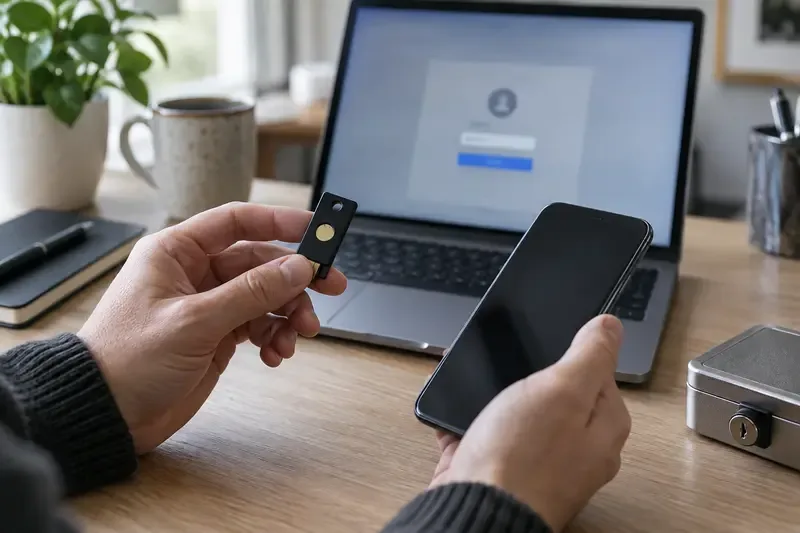
A separate hardware security key can reduce dependence on a phone number for account sign-in when a service supports that option.
What is a SIM-swap attack, and why does crypto make it urgent?
A SIM swap, also called a port-out scam, occurs when someone fraudulently transfers your phone number to a SIM or eSIM they control. The U.S. Federal Trade Commission says the immediate step if this happens is to contact your carrier to regain control of the number. The FCC also identifies SIM swapping and port-out scams as forms of cell-phone fraud.
The attacker does not need to break the encryption of SMS. Their aim is to take over the endpoint: your number. Once successful, they may receive one-time codes, password-reset messages, account alerts, and calls intended for you. That can be especially damaging for a crypto exchange because an attacker may try to reset a password, approve a new device, change withdrawal settings, or bypass a weak recovery process.
A sudden loss of cellular service can be a warning sign, but it is not proof by itself; outages, device problems, and account issues can have ordinary causes. Treat unexpected loss of calls, texts, and mobile data as urgent when it coincides with unfamiliar password-reset messages, login alerts, or account changes.
Is SMS 2FA better than no 2FA?
Usually, yes. SMS-based two-factor authentication is still an additional barrier compared with a password alone. It can stop some opportunistic account takeovers. The mistake is treating it as the final level of protection for assets that matter.
SMS is exposed to risks that do not apply in the same way to an authenticator app or a security key: SIM swaps, carrier-account compromise, number-porting fraud, and interception or redirection in telecommunications systems. NIST’s digital identity guidance classifies out-of-band authentication over the public switched telephone network as a restricted authenticator, reflecting those limitations. CISA recommends phishing-resistant MFA and says number matching is a better fallback than ordinary push prompts or SMS-based attacks when stronger MFA cannot be used.
Method
What it protects against
Main limitation for crypto accounts
SMS code
Some password-only attacks
Can fail if the phone number is taken over.
Authenticator-app code (TOTP)
SIM swaps because the code is not delivered by SMS
Can still be phished or copied into a fake site; recovery and device loss need planning.
Passkey
SIM swaps and many credential-phishing attempts
Availability, device access, and backup options vary by service and ecosystem.
Hardware security key
SIM swaps and phishing-resistant sign-in when implemented with FIDO/WebAuthn
You need a compatible service, a safe backup key, and a documented recovery plan.
The table is a decision aid, not a claim that one factor alone is enough for every person. For a sizeable exchange balance, use the strongest method the exchange actually supports, then protect email and recovery channels to a comparable standard.
Which upgrade should you choose first?
Start with the account that can unlock everything else: your primary email inbox. If your exchange password-reset link goes to that inbox, a strong exchange login does little if the email account is easy to reset by SMS. Enable a passkey or hardware-key-based method for email where available, use a unique password, and review recovery email addresses, recovery phone numbers, and active sessions.
Next, open the official security settings of each exchange by typing the known address yourself or using a trusted bookmark—never by following a link in a text, direct message, or search ad. Look for wording such as “passkey,” “security key,” “hardware key,” “FIDO,” or “WebAuthn.” For example, Coinbase’s current help documentation lists a passkey plus a security key as a combination that offers a backup if the phone is lost. That is an example of one provider’s options, not a statement that every exchange has the same settings.
How do you set up stronger 2FA without locking yourself out?
Register two independent authenticators when the service permits it
Keep one primary passkey or security key and one backup method that is not stored in the same place. A second hardware key kept in a secure location is often simpler than relying on the same phone for every backup. Do not register a backup device you cannot later identify or control.
Save recovery codes deliberately
Recovery codes can be valuable, but they are effectively account keys. Store them offline or in a well-protected password manager, not in a cloud note, email draft, or screenshot gallery. Confirm that the codes are complete and current; some services invalidate older codes when you generate a new set.
Remove SMS only after a tested alternative exists
Do not delete an SMS factor first and assume the new method works. Register the stronger method, sign out in a controlled way, and verify that you can sign back in from a normal device. Verify the backup too, if the service allows it. Then reduce or remove SMS for sign-in and recovery where the service offers that choice. Some services require a phone number for regulatory, notification, or recovery functions; in that case, minimize how much authority SMS has and rely on the service’s strongest available sign-in method.
Should you still protect the mobile-carrier account?
Absolutely. Upgrading 2FA reduces the value of a stolen number, but your phone number still receives calls, personal messages, and possibly alerts. Ask the carrier what protection it supports for SIM changes and number ports, such as an account PIN, a port-out lock, or additional verification. Use a unique carrier-account password. Do not rely on easily guessed biographical answers to account-verification questions.
Also limit public exposure of the details an attacker may use to impersonate you. Avoid posting your full birth date, address, or mobile number publicly. Be cautious with unexpected carrier calls or messages that request account codes; contact the carrier through a verified number or its official app instead.
What else protects crypto after login?
Authentication secures entry; it does not automatically protect every action afterward. Turn on withdrawal-address allowlists, withdrawal delays, new-device alerts, and transaction confirmations when your provider supports them. Review API keys and revoke ones you no longer use. Keep only an amount you need for trading on an exchange; custody choices involve their own risks and should be made deliberately.
Use a unique, long password for every exchange and email account. A password manager helps avoid reuse and can make it easier to notice look-alike domains. Before approving a prompt, read the device and location information. Never give a verification code, recovery code, seed phrase, or private key to a caller, chat agent, or direct-message contact.
What should you do if your phone suddenly loses service?
Use another device or phone to contact the carrier through a verified official channel and report a suspected SIM swap or port-out.
From a device you trust, secure your primary email first: change its password if needed, revoke unfamiliar sessions, and check recovery methods.
Secure exchange accounts next. Use the exchange’s official account-lock or support process if you see unauthorized activity.
Change passwords that may have been exposed and remove the compromised phone number as an authentication or recovery factor where possible.
Document times, carrier messages, login alerts, and transactions. Report identity theft or fraud through the relevant official channels in your country.
Do not rush to follow inbound “support” messages during an incident. Attackers often exploit urgency. Navigate to the provider directly and use contact details from its official site.
How can you tell your setup is meaningfully stronger?
Your crypto account protection has improved when a stolen phone number alone cannot reset your email or exchange account; you have at least one tested, independent backup; recovery codes are protected; and you can explain what you would do if the primary phone is lost. Recheck these assumptions whenever you change phones, change carriers, replace a security key, or an exchange changes its security settings.