Home
» Knowledge
»
A Beginners Guide to Using KuCoins Peer-to-Peer (P2P) Marketplace
A Beginners Guide to Using KuCoins Peer-to-Peer (P2P) Marketplace
KuCoin’s peer-to-peer marketplace lets users buy and sell supported crypto directly with other users while the crypto side of an active P2P order is handled through KuCoin’s order flow. For a beginner, the difficult part is usually not finding the Buy or Sell button; it is knowing which details to verify before money leaves your bank account, when to mark an order as paid, and when it is safe to release crypto.
This practical guide was checked against KuCoin’s official support material on September 16, 2026. Interface labels, available fiat currencies, payment methods, and regional access can change, so treat the screen examples below as orientation aids and follow the live order instructions in your own KuCoin account. KuCoin’s current documentation for P2P is collected in its official P2P Market Help Center.
KuCoin P2P in one minute
Question
Beginner answer
What is P2P?
A marketplace where users trade crypto for fiat with counterparties using supported payment methods.
Do I send fiat through KuCoin?
Usually no. For a P2P order, KuCoin shows the counterparty’s payment details, and you complete the fiat transfer through the specified bank or payment service.
What protects the crypto side?
KuCoin says the seller’s relevant assets are frozen for an active buy order until the order is completed or otherwise resolved.
Is P2P risk-free?
No. Fiat-payment fraud, fake payment evidence, chargebacks, third-party transfers, phishing, and disputes can still happen.
What is the safest beginner habit?
Keep communication inside the order, verify names and payment details carefully, and never rely on screenshots or messages as proof that money arrived.
KuCoin’s P2P FAQ describes the service as supporting fiat-to-crypto conversion and says the platform charges zero P2P transaction fees. That does not mean every payment is cost-free: your bank, wallet, payment provider, or currency conversion route may still charge its own fees. Always compare the final amount you will pay or receive rather than looking only at the advertised crypto price. See KuCoin’s P2P FAQ for its current description of the service.
Before your first trade: a short checklist
Use only the official KuCoin site or app and secure your account.
Complete Identity Verification if required for your account. KuCoin states that new users must complete Identity Verification to use its products and services.
Set up the security items KuCoin requests for P2P, including the trading password where applicable.
Add a payment method in your own name. KuCoin warns users not to add payment methods registered to someone else.
Check whether your chosen fiat currency and payment method are available in your region and account.
Start with an amount you can comfortably verify before trying a larger order.
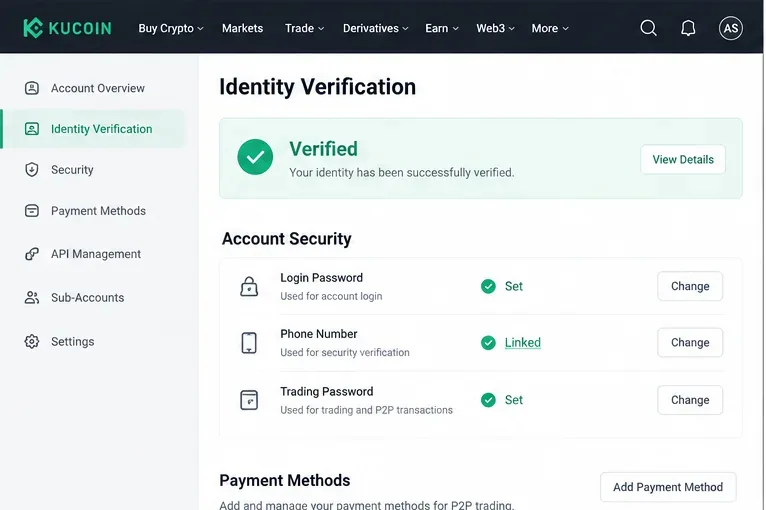
Do the security work before you are staring at a countdown timer. Confirm that Identity Verification is complete, your account security settings are current, and the payment method you intend to use belongs to you. For sellers, this is especially important because the buyer will send fiat to the payment details connected to the order.
Before trading P2P, confirm identity verification and the account-security and payment settings required by your live KuCoin account.
Step 2: Open P2P and choose how you want to trade
On the website, KuCoin’s official buy guide currently directs users to Buy Crypto → P2P. The marketplace offers a regular P2P area where you can choose an advertisement and a Fast Trade option that can automatically match a counterparty. On the app, navigation can differ by version, and KuCoin also maintains a Lite flow, so use the P2P entry shown in your current interface.
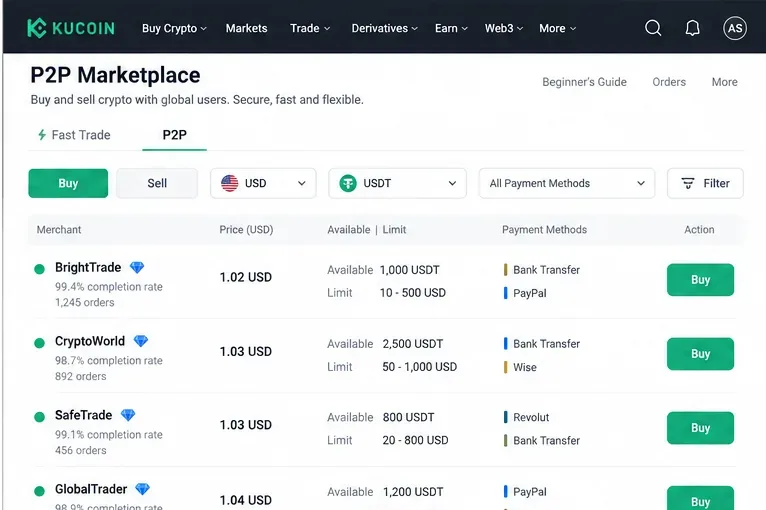
For a first transaction, the regular P2P list is useful because you can compare offers before placing an order. Select the fiat currency and crypto you actually intend to trade, then narrow the list by the payment method you can use.
Use the P2P marketplace filters to narrow offers by side, fiat currency, crypto, payment method, price, and order limits before choosing a counterparty.
Step 3: Evaluate an offer instead of picking the first price
The cheapest-looking price is not the only thing that matters. Check the advertisement’s minimum and maximum order size, supported payment method, available quantity, and the counterparty information displayed by KuCoin. KuCoin’s P2P pages may also show merchant activity or completion information. Compare the total transaction conditions, not just a tiny difference in price.
A beginner should also avoid offers that require a payment method they do not already understand. If a counterparty asks you to abandon the KuCoin order, use a different bank account than the one displayed, communicate on Telegram or WhatsApp, or follow instructions that conflict with the order page, stop. KuCoin’s scam guidance specifically warns against moving P2P communication and transaction details outside the platform.
Step 4: Review the order before you place it
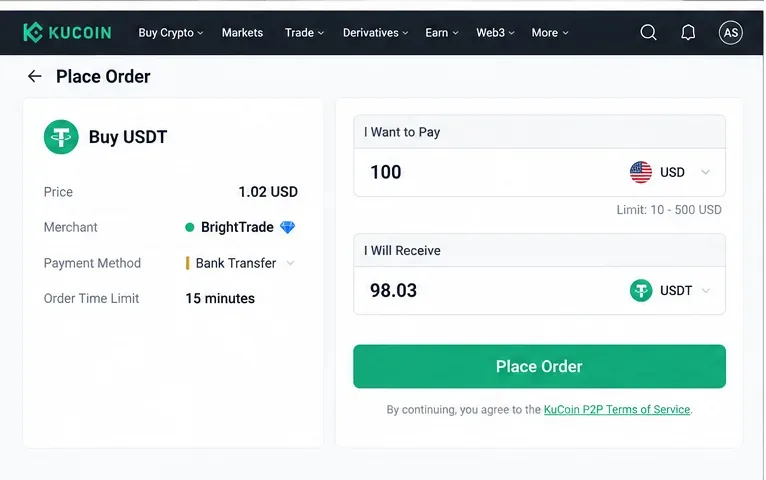
Enter the fiat amount you want to spend or the crypto amount you want to buy, then inspect the calculated amount, price, order limit, merchant, and payment method. Do this before you click Place Order. Once an order is created, the payment window is time-sensitive.
Review the fiat amount, crypto amount, price, payment method, counterparty, and time limit before placing the P2P order.
Step 5: Pay the exact counterparty shown in the live order
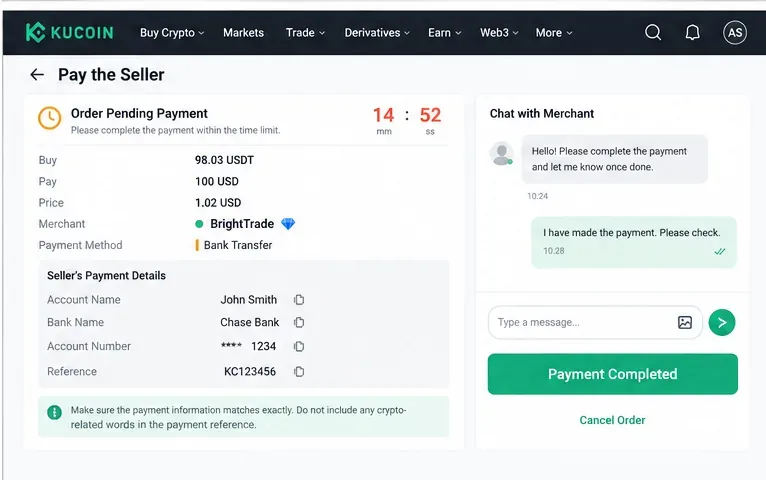
After the order is created, KuCoin shows the seller’s payment details. Use the specified payment method and carefully match the recipient information shown on the order page. KuCoin’s rules say buyers should complete payment within the seller’s stipulated time and then confirm payment in the order.
Do not press the paid or payment-completed button before you have actually sent the fiat. KuCoin’s appeal FAQ warns that marking an order as paid without completing payment can be treated as malicious behavior and may lead to account restrictions. Keep the in-order chat available if you need to contact the seller.
Transfer fiat only to the payment details shown in the active order, complete the transfer within the timer, then mark the order as paid only after the transfer is actually sent.
What should you put in the transfer note?
Follow the order instructions and your payment provider’s requirements. KuCoin’s P2P appeal FAQ specifically says users should avoid putting crypto-related terms such as BTC, USDT, KCS, an order number, or requests such as “release coins” in the transfer information. Do not invent a reference or alter the recipient data unless the live order instructs you to do so.
Step 6: Wait for the seller to release the crypto
Once you have paid and correctly marked the order as paid, wait for the seller to verify the fiat receipt and release the crypto. KuCoin says the relevant seller assets are frozen for a buy order, and if the seller does not release after payment is confirmed, the buyer can use the order chat and the platform’s help or appeal process.
Do not cancel an order after you have already transferred money unless KuCoin support or the documented order flow tells you how to proceed. A completed purchase should end with the crypto credited according to the order status, not with an off-platform promise.
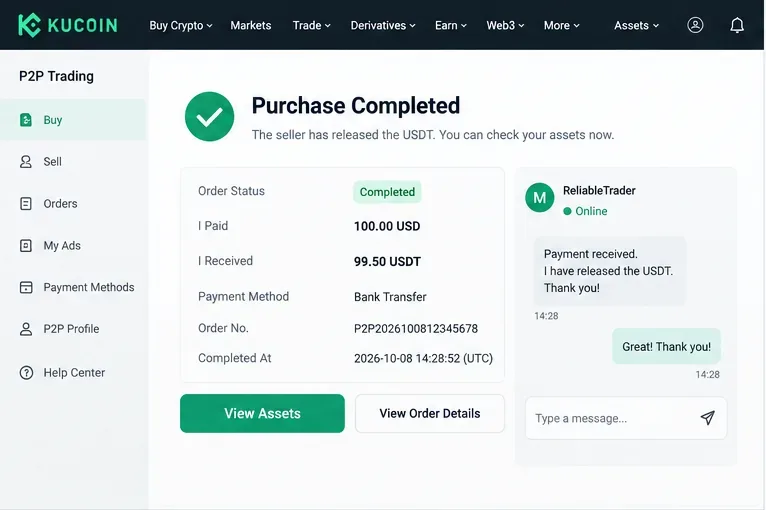
A completed buy order should show a completed status and the released crypto in your KuCoin assets; keep the order details until you have verified the result.
Step 7: If you sell crypto, verify the money yourself before release
The sell flow reverses the direction of risk. You choose a buy advertisement or matching route, specify how much crypto to sell, and wait for the buyer’s fiat payment. KuCoin’s website sell guide is explicit: do not release crypto if you have not received the buyer’s payment.
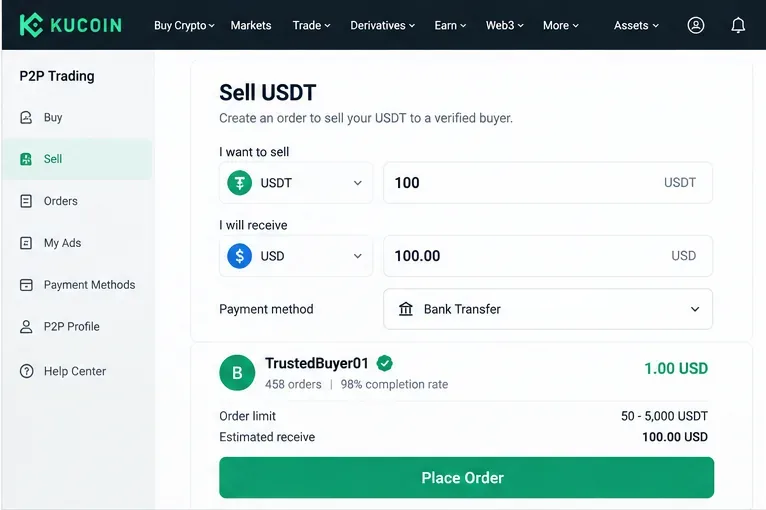
For a sell order, check the crypto amount, expected fiat amount, payment method, buyer details, and order limit before proceeding.
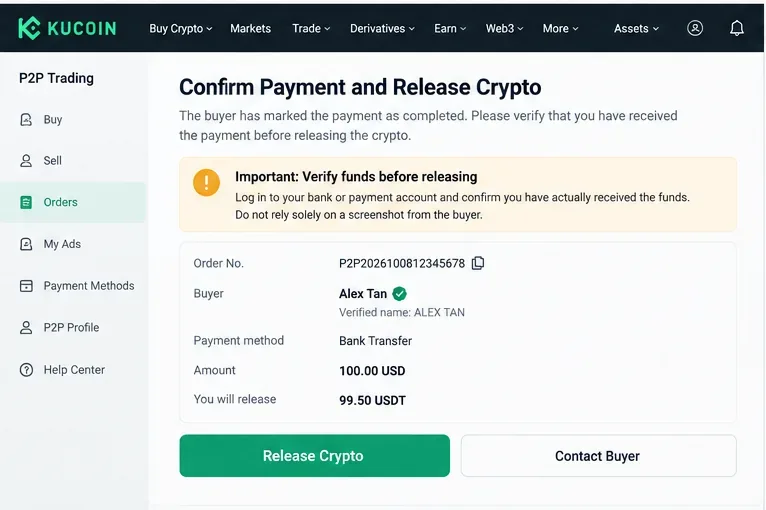
When the buyer marks payment as complete, open your bank or payment account directly and confirm that the funds are actually available. Do not rely on a screenshot, SMS, email, or the buyer’s message. KuCoin’s anti-scam guidance warns that payment screenshots and SMS notifications can be faked. It also flags third-party payments and chargeback risks.
For sellers, the critical checkpoint is independent verification in the bank or payment account. Release crypto only after the expected funds are genuinely received.
Step 8: Use the appeal process when the order cannot be resolved normally
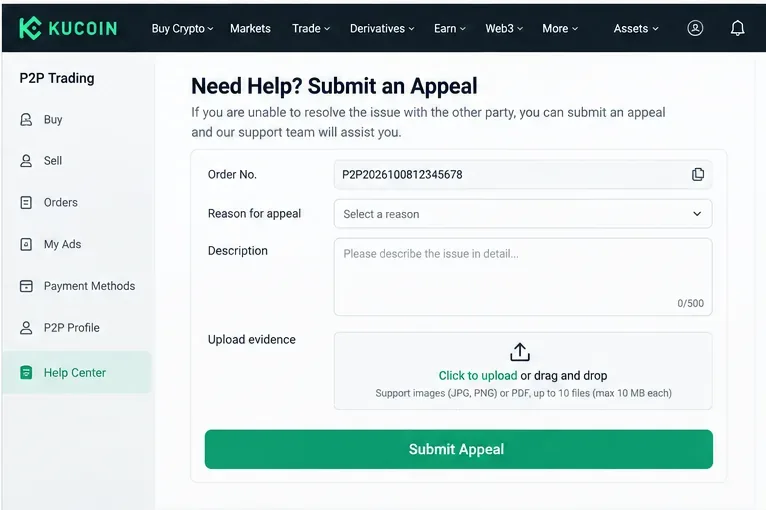
If payment has been made but the order is stuck, the counterparty disputes what happened, or you suspect fraud, do not try to solve the problem by moving the trade off-platform. KuCoin’s documented appeal process allows users to choose an appeal reason, describe the issue, and submit supporting material such as bank statements, screenshots, vouchers, or other evidence requested by support.
If an order cannot be resolved through the normal P2P flow, use the official appeal process and provide clear transaction evidence tied to the order.
KuCoin says appeals are evaluated using the platform’s trading rules and transaction evidence. Its current process is described in the P2P Order Appeal Process. Keep your order number and payment records until the dispute is fully resolved.
Beginner safety rules worth memorizing
Never release crypto because of a screenshot. Check your bank or wallet directly.
Never mark an order paid before paying. The platform status should reflect what actually happened.
Never accept a last-minute bank-account swap through outside chat. Use the details in the active KuCoin order.
Avoid third-party payments. KuCoin warns that the payer name should match the verified counterparty and that third-party payments can increase chargeback and fraud risk.
Keep communication in KuCoin P2P chat. Off-platform conversations weaken the transaction record and are a common path used in man-in-the-middle scams.
Do not be rushed into releasing assets. Urgency is not proof of payment.
KuCoin’s official guide to common P2P scams covers fake proof of payment, SMS scams, chargebacks, man-in-the-middle schemes, triangle scams, and KuCoin impersonation. Read it before your first sell order, because sellers are the party who must decide whether fiat receipt is genuine before crypto is released.
Fast Trade or choosing an ad: which is better for a beginner?
Approach
Useful when
Main trade-off
Fast Trade
You want the platform to match you quickly.
You do less manual comparison before matching.
P2P marketplace
You want to compare counterparties, prices, limits, and payment methods.
You need to evaluate the offer yourself.
Neither route removes the need to check the live order. KuCoin’s web buy guide documents both Fast Trade and the P2P zone and explains that Fast Trade automatically matches a counterparty while the P2P zone lets you choose an offer. See the official website buy guide.
What to do after your first successful trade
Save the order record until you have reconciled both sides: the fiat debit or credit in your payment account and the crypto movement in KuCoin. If you plan to trade again, review whether the payment method, order size, and counterparty selection worked as expected. Beginners are better served by a repeatable verification routine than by trying to optimize every fraction of a percent on the first trade.
Finally, remember that platform access, supported payment rails, and legal requirements can depend on where you live. KuCoin’s services are governed by its current Terms of Use. P2P is a transaction method, not a guarantee against losses, payment reversals, account freezes, scams, or changes in crypto value. Use only payment methods you understand, verify every transfer independently, and escalate uncertain orders through the official process rather than improvising outside it.