Home
» Knowledge
»
How to Use Crypto Exchange Convert Features for Zero-Fee Swaps Without Missing the Hidden Costs
How to Use Crypto Exchange Convert Features for Zero-Fee Swaps Without Missing the Hidden Costs
Crypto exchanges increasingly offer a Convert feature: a simplified way to exchange one asset directly for another without placing an order on a traditional order book. For beginners, the appeal is obvious. You choose what you have, choose what you want, review a quote, and confirm.
The phrase “zero-fee swap”, however, needs careful interpretation. A conversion can have no separate trading fee and still produce a less favorable rate than the visible spot market because the quote may include a spread. A spread is the difference between a market reference price and the price you actually receive. As of September 2026, official exchange documentation shows that fee treatment varies materially by platform, pair, region, product, and account type.
For example, Binance says its Convert quotes for simple conversions have no additional fees, but the quoted price can differ from Binance Spot. Kraken states that certain USD-to-USDC or USDG conversions are available at a 1:1 rate with no spread or conversion fee, while its broader instant buy, sell, and convert services can include fees and spreads. Coinbase explicitly says cryptocurrency conversions can include both fees and a spread. The practical lesson is simple: “zero fee” should be verified on the preview screen, not assumed from the feature name.
What a crypto exchange Convert feature actually does
A Convert tool replaces the mechanics of order-book trading with a direct quote. Instead of choosing a market pair, deciding between a market or limit order, and interpreting bid and ask prices, you request a rate for exchanging Asset A into Asset B. If you accept the quote before it expires, the exchange executes the conversion and credits the destination asset to your account.
This can be useful when speed and simplicity matter more than precise order execution. It can also be useful for small portfolio adjustments, moving from a volatile asset into a stablecoin, or converting an asset that does not have an obvious direct spot pair. It is not automatically the cheapest way to trade. For larger transactions, volatile assets, or thinly traded pairs, comparing the Convert quote with the spot market can be worth the extra minute.
Binance's official guide, updated September 2, 2026, describes its Convert service as an instant quotation system and says simple conversions have no additional fees. It also notes that quoted prices can vary. See the official Binance Convert guide. Coinbase, by contrast, states that conversions may include Coinbase fees and that a spread is included in the crypto-to-crypto exchange rate; see the Coinbase pricing and fees disclosure.
What to prepare before you convert
Before opening the Convert screen, make sure three things are clear. First, confirm the asset is in the correct exchange wallet or account balance. Some platforms let Convert draw from more than one internal wallet, while others require the funds to be in a specific trading balance. Second, know roughly how much of the destination asset you expect to receive by checking a current market reference price. Third, decide the maximum effective cost you are willing to accept.
That last point matters because “$0 trading fee” does not necessarily mean “$0 economic cost.” If the market value of what you give up is $1,000 and the quote gives you destination assets worth about $992 at the same reference prices, the effective difference is roughly $8 even if the fee line says $0. That difference can come from spread, market movement, liquidity, or the exchange's quotation methodology.
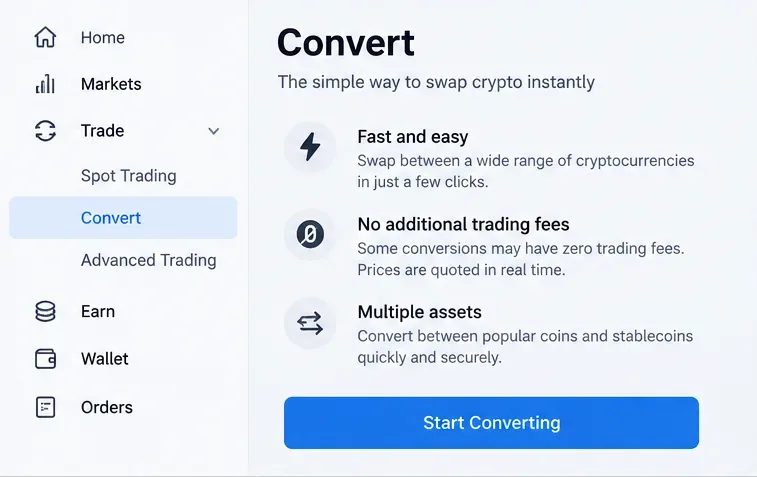
Step 1: Open the exchange's Convert tool rather than the order-book trading screen. This example interface highlights that zero trading fees can apply to some conversions, not necessarily every asset or platform.
Step 1: Open Convert and confirm that you are using the right product
Sign in through the exchange's official website or app, then find Convert, Swap, or an equivalent direct-conversion option. Do not assume that Buy/Sell, Spot, Advanced Trade, and Convert have the same fee schedule. They are often separate products.
Navigation can also change. Binance announced a revised Convert entry point in March 2026, while keeping the underlying Convert functionality; see the official Binance navigation update. That is why it is better to follow the platform's current support page than an old screenshot or third-party tutorial. If a menu label looks different from what you remember, verify it through the exchange's official help center before proceeding.
Step 2: Select the asset you are giving up and the asset you want
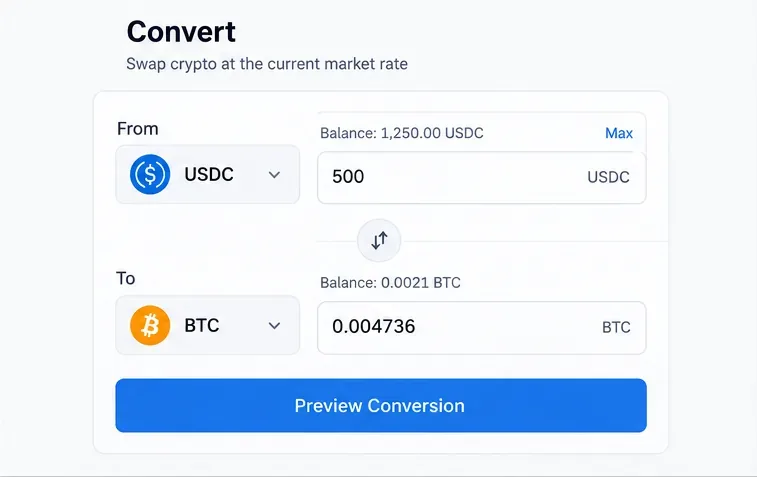
The From asset is what you currently own. The To asset is what you want to receive. Enter the amount you want to convert, then make sure the direction is correct before requesting a quote. A surprisingly common mistake is reversing the pair and converting in the wrong direction.
Also check whether the pair is actually eligible for the advertised zero-fee treatment. A platform may waive a trading fee only for selected stablecoin pairs, promotional pairs, subscription tiers, or specific Convert modes. For instance, Kraken's official documentation says eligible USD conversions with USDC and USDG can be performed at 1:1 with no spread or conversion fee. That is a much stronger statement than merely saying the trading fee is zero. See Kraken's official free stablecoin conversion documentation.
Step 2: Choose the source and destination assets carefully, enter the amount, and use the preview rather than confirming immediately.
Step 3: Preview the quote and measure the real cost
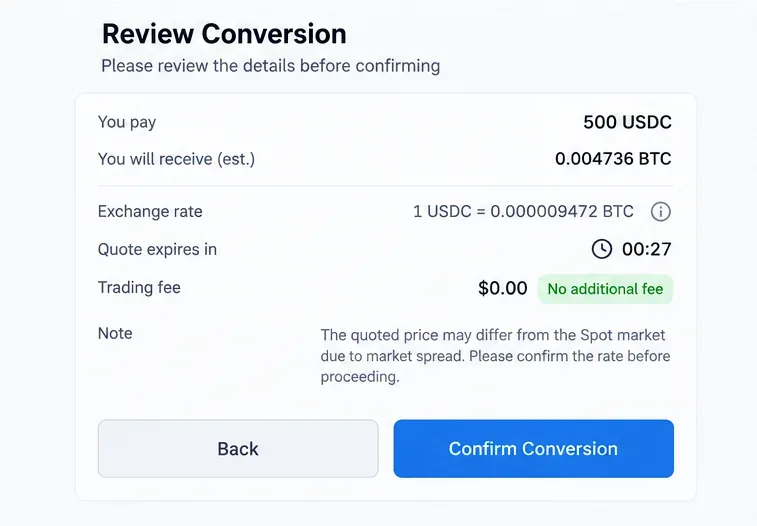
This is the most important step. The preview should show the amount you will spend, the amount you will receive, the quoted exchange rate, and any explicit fee. Some exchanges also show a quote expiration timer because the rate is locked only briefly.
Do not stop at the fee line. Compare the quoted rate with a current spot reference for the same assets. You do not need advanced mathematics. A simple comparison is enough:
Reference value: what the destination amount would be worth at the current spot rate.
Quoted value: what the Convert tool says you will actually receive.
Effective conversion cost: the percentage difference between those two values, plus any separate fee shown.
Suppose the spot market implies that 1,000 units of your source asset should buy 0.0100 BTC, but the Convert quote offers 0.0099 BTC with a $0 trading fee. The explicit fee is zero, but the quote is still about 1% below that simplified reference. In fast markets, some difference may reflect changing prices rather than a fixed spread, so treat this as a comparison tool rather than a forensic fee calculation.
Coinbase's official help pages make this distinction clear: its conversion exchange rate can include a spread, and fees can also apply. Coinbase says the preview screen displays the transaction details before confirmation. See the official Coinbase Convert FAQ and its pricing disclosure linked above.
Step 3: Review the receive amount, exchange rate, quote timer, explicit fee, and any note about spread before you confirm the swap.
Step 4: Confirm, then save the transaction record
If the quote meets your criteria, confirm before it expires. If the rate changes, request a fresh quote instead of rushing. Once the conversion completes, verify the destination balance and open the transaction or Convert history.
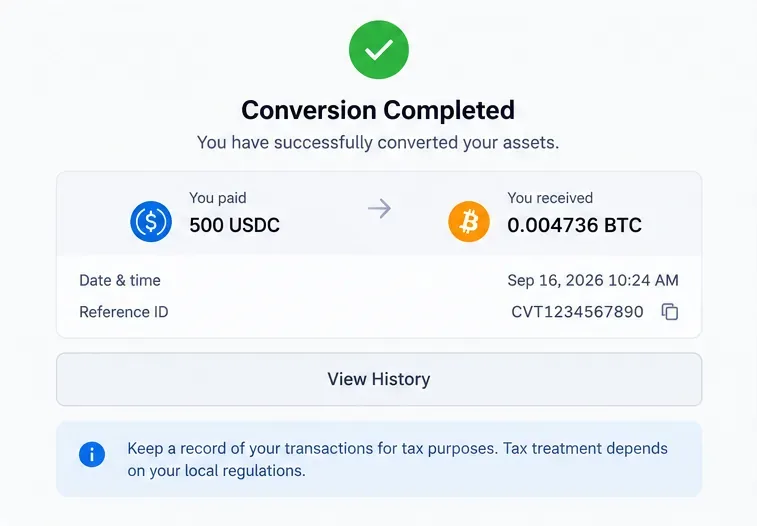
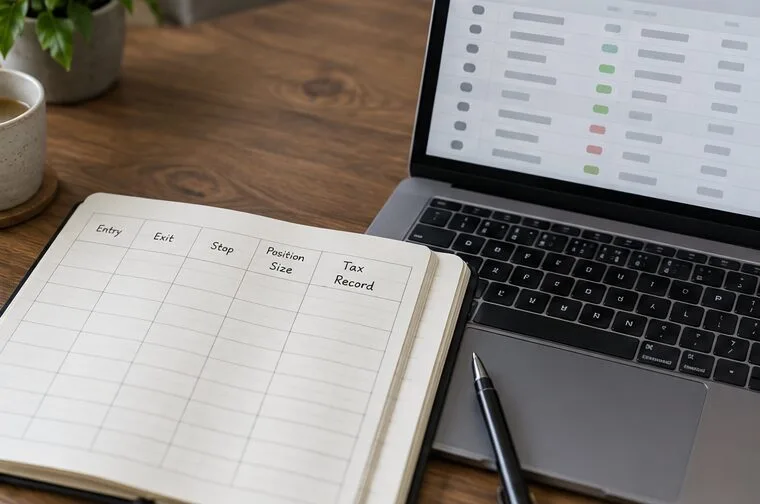
Save enough information to reconstruct the trade later: date and time, source asset and amount, destination asset and amount, quoted rate, fee, and transaction or reference ID. This is useful for portfolio accounting even if you never need it for taxes.
For U.S. taxpayers, a crypto-to-crypto conversion can be a taxable disposition. The IRS treats digital assets as property and states that exchanging a digital asset for another materially different digital asset generally requires recognizing gain or loss. See the IRS digital assets guidance. Tax treatment differs by jurisdiction, so users outside the United States should check local rules rather than applying U.S. guidance automatically.
Step 4: After the conversion, verify what you spent and received, then keep the timestamp and reference ID with your transaction records.
When is a zero-fee Convert swap actually a good deal?
Situation
What to check
Why it matters
Stablecoin-to-fiat conversion advertised at 1:1
Confirm there is no spread and no conversion fee
A true 1:1 conversion can be genuinely cost-free at the conversion stage
Crypto-to-crypto Convert quote with $0 fee
Compare the quote with the spot market
The economic cost may be embedded in the rate
Large conversion
Compare Convert with a spot or advanced-trading order
A small percentage difference becomes meaningful on a large amount
Highly volatile market
Check the quote timer and refresh if needed
Prices can change materially during the decision window
Thinly traded asset
Check liquidity and the receive amount
Wider spreads can make convenience expensive
Common mistakes beginners should avoid
Assuming “zero fee” means the exchange earns nothing
A zero explicit fee does not prove the quoted rate matches the mid-market or spot price. Always evaluate the amount you receive.
Comparing two platforms only by the fee label
Platform A may show a $0 fee with a wider quote, while Platform B may show a small fee with a tighter rate. The better comparison is the final amount of destination asset you receive for the same source amount.
Ignoring product-specific rules
Kraken's fee overview notes that some zero-fee benefits, such as Kraken+ trading benefits, can still leave spreads or payment-processing fees in place. The official Kraken fee overview is a useful example of why the words “zero-fee” must be read alongside the detailed conditions.
Using an old tutorial instead of the current interface
Exchange navigation and product terms change. Check the current official support page when a button, wallet source, supported pair, or fee disclosure does not match an older guide.
Forgetting that a conversion can have tax consequences
Moving from one crypto asset into another may be economically similar to “swapping,” but tax systems may treat it as disposing of one property and acquiring another. Keep records at the time of the transaction instead of trying to reconstruct them months later.
A simple decision rule before every Convert transaction
Before confirming, answer four questions: Is the pair eligible for the claimed zero-fee treatment? Is there a spread or a quote that differs meaningfully from spot? Is the final receive amount acceptable compared with the alternatives? Have you saved enough information to document the transaction afterward?
If all four answers are satisfactory, Convert can be an efficient way to swap assets without navigating an order book. If the quote looks expensive, the asset is illiquid, or the amount is large, compare the direct quote with the platform's spot or advanced-trading market before proceeding. The goal is not to avoid every visible fee at any cost. It is to understand the total economic cost of the swap and choose the execution method that fits the transaction.