Home
» Knowledge
»
How to Use Etherscan and BscScan to Track Suspicious Crypto Activity
How to Use Etherscan and BscScan to Track Suspicious Crypto Activity
When a crypto transfer looks unfamiliar, a block explorer can help you reconstruct what happened without connecting your wallet or giving anyone your private key. Etherscan is a blockchain explorer for Ethereum, while BscScan serves BNB Smart Chain. A blockchain explorer is a searchable interface for public on-chain data: wallet addresses, transactions, blocks, token transfers, smart contracts, and related metadata.
This guide is designed for a beginner investigating activity that seems unusual: an unexpected token movement, a transfer to an unknown address, a transaction you do not remember, or a wallet that appears to be moving funds through several contracts. The goal is not to declare an address “guilty.” Public blockchain data can show what moved where and when, but it often cannot prove who controls an address or why a transfer occurred.
What you need before you start
You usually need only one reliable identifier:
Wallet address: the public account identifier you want to examine.
Transaction hash (tx hash): the unique identifier assigned to a blockchain transaction.
Token contract address: the smart-contract address for a specific token, useful when similarly named or fake tokens exist.
Use the explorer that matches the network. Ethereum activity belongs on Etherscan; BNB Smart Chain activity belongs on BscScan. Searching the wrong chain can make a real transaction appear to be missing.
You do not need to enter a seed phrase or private key to look up public activity. Etherscan's documentation states that connecting a wallet is optional and is used for features that require proving control or interacting with the chain; ordinary lookup does not require it. See Etherscan's wallet connection guidance.
Step 1: Search the exact address or transaction hash
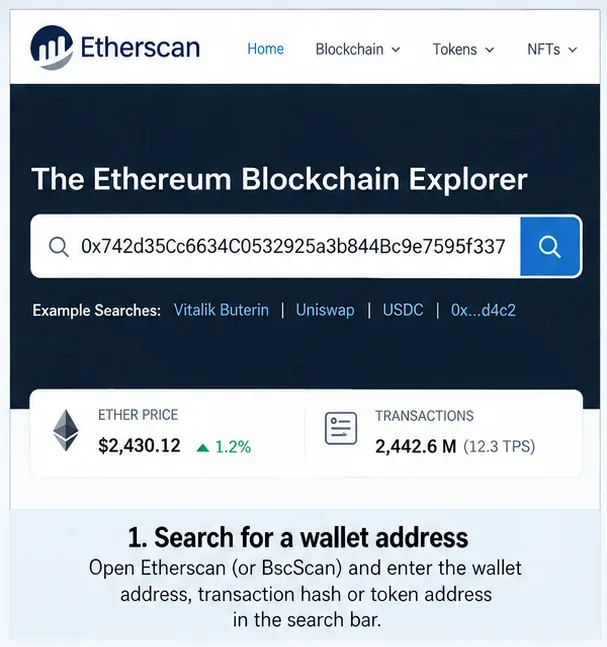
Copy the identifier from a source you trust and paste it into the explorer's search field. Etherscan's official navigation guide confirms that the search bar accepts addresses and transaction hashes, as well as block numbers, token names, and domain names. When investigating suspicious activity, an exact address or tx hash is safer than relying on a token name alone because names can be duplicated.
Start with the exact wallet address or transaction hash. The values shown here are examples; verify the live record on the explorer you are using.
Before doing any analysis, compare the full beginning and end of the address with your original record. Crypto addresses are long, and visually similar addresses can cause mistakes. Also verify the domain in your browser before using any interactive feature. For simple viewing, stay on the public explorer page and avoid unsolicited links that claim you must “verify” or “unlock” a wallet.
Step 2: Build a timeline from the address page
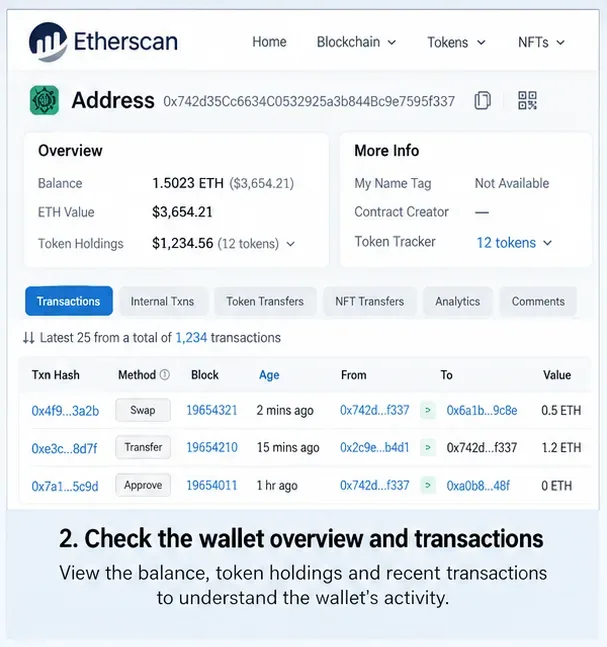
An address page is your starting map. On Etherscan, the documented activity area includes regular Transactions, Internal Transactions, Token Transfers, NFT transfers, analytics, and other views. A regular transaction is initiated by an externally owned account, often called a wallet. An internal transaction is a value movement triggered through smart-contract execution rather than a separate user-signed transaction. Token transfers track movements of assets such as ERC-20 tokens independently from native ETH transfers.
The address page brings balances and activity tabs together so you can establish a timeline before judging individual transfers.
Start with the newest entries and work backward. Write down the timestamps, destination addresses, assets, and approximate amounts that matter to your case. You are looking for a sequence rather than a single dramatic event. For example, an unfamiliar outgoing transaction followed by several token transfers can be more informative than either item viewed alone.
Etherscan documents the address-page tabs and the distinction between regular, internal, and token activity in its EOA address guide and transaction explainer.
Patterns worth investigating further
A first-time destination receiving a large portion of the wallet's assets.
Several transfers occurring within minutes when you expected no activity.
Tokens leaving through a contract interaction even though no simple native-coin transfer is visible.
Funds splitting across multiple addresses or repeatedly converging into one address.
Interaction with an address carrying a public warning, name tag, or label that is relevant to your investigation.
None of those patterns proves fraud. Exchange deposits, decentralized exchange trades, bridges, automated strategies, multisignature wallets, and ordinary smart-contract operations can produce complicated paths. Treat patterns as leads to verify, not verdicts.
Step 3: Open the transaction and read it field by field
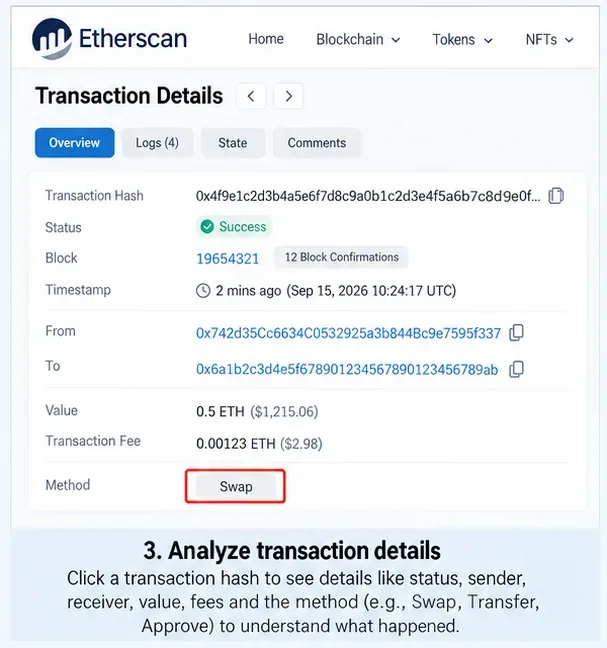
Click the transaction hash for an entry you want to understand. Etherscan and BscScan transaction pages expose the core facts of the record. On BscScan, official documentation lists the transaction hash, status, block, timestamp, From, To, value, transaction fee, gas information, input data, and additional fields for contract interactions.
Opening a transaction hash lets you verify the sender, recipient, status, value, fee, and contract-interaction context.
Read the page in this order:
Status: confirm whether the transaction succeeded, failed, or is still pending. A failed transaction normally does not produce the intended state change, although a fee may still have been spent.
From: identify the address that submitted the transaction.
To or Interacted With: determine whether the destination is another wallet or a smart contract.
Value: check the amount of native coin transferred directly.
Token transfers: for contract interactions, inspect the token movements generated by the transaction rather than assuming the native-coin value tells the whole story.
Input data or method: use the decoded method, when available, as context for what the contract call attempted to do.
A common beginner mistake is to see “Value: 0 ETH” or “0 BNB” and conclude that nothing moved. A transaction can call a token contract or decentralized application and move tokens while transferring no native coin directly. That is why you should inspect token-transfer events and, when relevant, internal transactions.
For the documented fields on BNB Smart Chain, see BscScan's official transaction-details guide. Etherscan also explains that a tx hash acts as the reference used to look up transaction status and details in its transaction viewing guide.
Step 4: Follow token transfers and counterparties
If the suspicious event involves USDT, USDC, another fungible token, or an NFT, do not stop at the main Transactions tab. Open the relevant token-transfer view and follow the recipient address. Then open that recipient in a new tab and repeat the process.
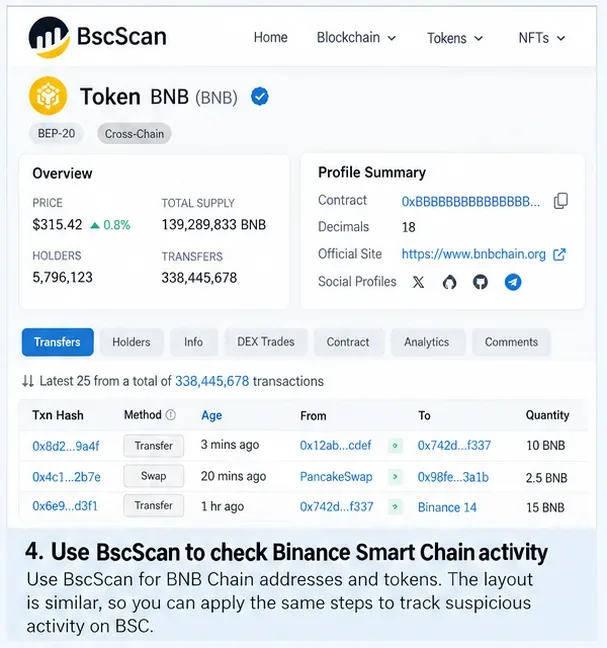
BscScan uses a similar explorer workflow for BNB Smart Chain. Example figures in this image are not live market or chain data.
BscScan uses the same general investigation pattern on BNB Smart Chain: search an address or tx hash, inspect its activity, open individual transactions, and follow counterparties. BscScan's transaction documentation also separates contract interactions, internal calls, and token transfers, which is useful when a transaction routes assets through a smart contract.
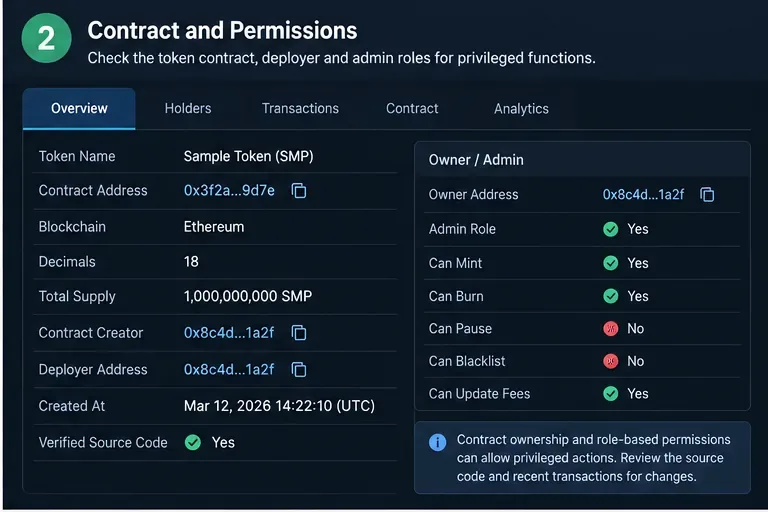
When you encounter a token you do not recognize, verify its contract address, not just its name or ticker. Etherscan's official token-page documentation shows that a token page can include its contract address, transfer history, holders, contract interface, labels, and other context. See Etherscan's token-page guide.
How to use labels without overtrusting them
Explorers may display public name tags, labels, or notes. These can help identify publicly known exchanges, protocols, deployers, or addresses associated with reported incidents. Etherscan explains that name tags and labels add context from public information, while BscScan notes that it labels and tags addresses to make ownership or project associations easier to understand.
Use a label as a clue, not as proof of intent or ownership in every context. Labels can be updated, disputed, incomplete, or absent. Follow the underlying transactions and, where provided, review the supporting public context. Etherscan describes its system in Public Name Tags, Labels & Public Notes.
Step 5: Check token approvals if your own wallet is involved
A token approval is permission granted to a smart contract or spender address to transfer a token from your wallet up to an allowed amount. An unfamiliar approval does not by itself mean tokens were stolen, but an unwanted or unlimited allowance can remain relevant after the original transaction.
Etherscan's address tools include a Token Approvals feature, and BscScan lists Token Approvals among its explorer services. If you are investigating your own wallet, review which contracts currently have allowances. If you choose to revoke one, remember that revocation is an on-chain transaction and normally requires network gas. Only connect your wallet when you intentionally need to perform that action; simply investigating public history does not require a connection.
Explains activity hidden behind a simple “To” field
Are there relevant labels?
Name tags, labels, public notes
Adds context, but should not replace transaction evidence
Are approvals still active?
Spender, token, allowance
Identifies permissions that may still matter
Common mistakes that can derail an investigation
Using the wrong network. The same hexadecimal-style address can appear on multiple EVM-compatible networks. Confirm whether the activity happened on Ethereum, BNB Smart Chain, or another chain before drawing conclusions.
Looking only at native coin. A wallet can lose or move ERC-20/BEP-20 tokens through a contract interaction even when the direct ETH or BNB value is zero.
Assuming an address equals a person. A blockchain address is a public identifier, not automatically a verified real-world identity. Exchange deposit infrastructure and smart contracts can also complicate attribution.
Calling every complex route a mixer or laundering pattern. Bridges, aggregators, decentralized exchanges, routers, and automated contracts can create multi-hop flows. Describe the observable flow first; apply stronger labels only when reliable evidence supports them.
Trusting token names. Scam or spam tokens can imitate familiar names. Verify the contract address against a trusted primary source.
Connecting a wallet just to investigate. Public lookup does not require it. Connecting and signing introduce unnecessary risk when your only goal is reading chain data.
What a block explorer can—and cannot—tell you
Etherscan and BscScan are excellent for reconstructing public on-chain events. They can show that a specific address submitted a transaction, that tokens moved to another address, that a contract emitted transfer events, and that funds later traveled elsewhere. They can also provide public labels and contract information that make those records easier to interpret.
They cannot, by themselves, reliably establish a person's identity, prove criminal intent, explain an off-chain agreement, or guarantee that a labeled address is the final destination of funds. Centralized exchanges may pool deposits, bridges move value between networks, and smart contracts can represent many users at once.
If you are documenting a potentially serious incident, preserve the exact tx hashes, addresses, timestamps, screenshots or exports, and the network name. Keep the facts separate from your interpretation. For your own compromised wallet, consider moving unaffected assets using a trusted wallet setup and seeking assistance from the relevant wallet, exchange, or security provider; do not share your seed phrase with anyone claiming they can “recover” funds by requiring it.
Beginner's final checklist
Confirm the correct blockchain explorer and domain.
Search an exact wallet address or transaction hash.
Review regular transactions, internal transactions, and token transfers.
Open suspicious tx hashes and verify status, From, To, value, fees, and token movements.
Follow recipient addresses to build a timeline of subsequent transfers.
Use public labels as context, not proof.
Verify unfamiliar tokens by contract address.
If your own wallet is involved, inspect token approvals and revoke only when you understand the on-chain action you are taking.
Never enter a seed phrase or private key into a block explorer.
With that workflow, a block explorer becomes less like a wall of hashes and more like a transaction ledger you can read systematically. Start with one verified identifier, build the timeline, inspect the transaction mechanics, follow the assets, and keep conclusions proportional to what the public chain actually proves.